Exploiting Vulnerabilities Part 2
You can access the slides 🖼️ for this lecture.
Here we discuss the concept of trust boundaries in programs.
Distrusting Command Line Parameters
In most of the examples of attacks we covered previously, the payload was coming from the command line. As a reminder, the payload is the malformed piece of program input that the attacker uses to trigger a vulnerability and perform an exploit. Not trusting the validity of the number and the values of command line parameters is a well-known security practice when developing systems software.
In fact, now that we are talking about distrusting some forms of input to the program, we can try to reason about what our trust model was for all these attack examples we saw. From the victim’s program protection point of view, we trust the privileged layers like the OS, as well as the hardware, to work correctly. What we did not trust was other programs that could inject command line arguments into our victim program. If the program is invoked by the attacker on the command line, as we have seen in our examples, this untrusted other program could be the invoking shell. Our trust model can be illustrated as follows:
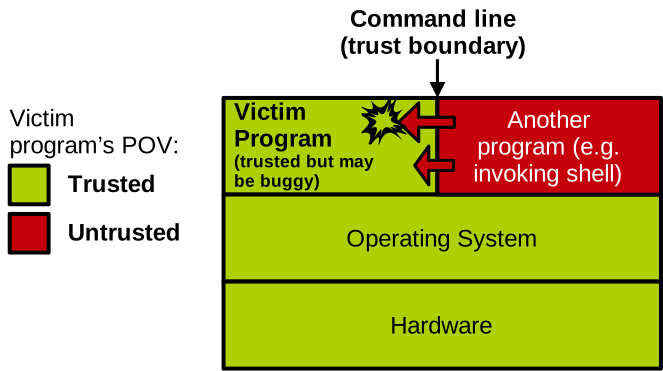
It is well known that a programmer should never assume that any data flowing into the program through command line arguments is well-formed. To trigger vulnerabilities, an attacker can try to invoke the program with the wrong number of command line parameters, a bad combination of parameters, or invalid types, sizes, or ranges for certain parameters. As the developer of an application, it is important to reason about how the program reacts when something malformed is passed through the command line. Will the program crash or misbehave? If so, that is not good, and we are probably looking at security issues as we have seen in the previous examples. The proper way to deal with these malformed program inputs is to handle them gracefully, for example by printing an error message and exiting the program.
Please also note that this is not just about a well-intentioned user invoking the program and setting by mistake the wrong number of arguments or the wrong value for an argument. The programmer needs to reason about the target trust model, and assume that untrusted actors will actively try absolutely anything possible to trigger bugs in the program to subvert it.
Trust Boundaries in Programs
The command line in our scenario is an interface between a trusted (program) and an untrusted component (external environment, e.g., invoking shell): it’s a trust boundary. That makes this interface a vector of attack: protection is required to ensure that all the data flowing through this interface is valid before it can be used by the trusted component. This protection needs to be implemented by the programmer and consists of a series of sanity checks. Examples of such sanity checks are:
- Do we have the right amount of parameters?
- Do parameters make sense together (proper combinations)?
- Do parameters have proper values in terms of types, ranges, format, etc.?
Beyond the command line parameters, there are several other common sources of untrusted input in modern systems software
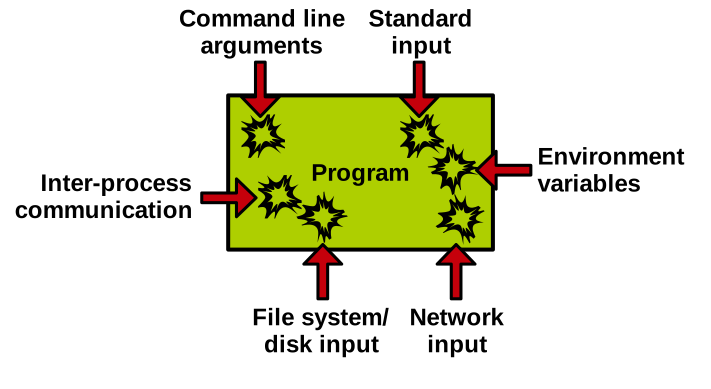
- The standard input can be used by an attacker to feed bad data to your program.
- Environment variables can be manipulated.
- All the data flowing into the program through disk or network I/O could be invalid: malformed file formats, corrupted network packet data/metadata, etc.
- Finally, if the application we aim to secure is communicating with another program that is not trusted through inter-process communication, that is also a vector of attack.
Which of these attack vectors to consider in order to secure an application depends on the target threat model, but almost every production-ready program using these interfaces will need to perform sanity checks on the data flowing through them.
Example: Command Line Arguments
We have already seen plenty of examples of programs that can be subverted through malformed command line arguments. Here we have a vulnerable program with two buffers that can be overflown:
#include <stdio.h>
#include <string.h>

// usage: ./cmdline <username> <password>
int main(int argc, char **argv) {
    char username[32];
    char password[32];

    strcpy(username, argv[1]);
    strcpy(password, argv[2]);

    // ...
}
A protected version of that program is as follows:
#define USERNAME_MAX_LEN    32
#define PASSWORD_MAX_LEN    32

int main(int argc, char **argv) {
  char username[USERNAME_MAX_LEN];
  char password[PASSWORD_MAX_LEN];

  // check the number of parameters
  if(argc != 3) {
      printf("usage: %s <uname> <passwd>\n",
        argv[0]);
      return 0;
  }

  // don't copy past the buffer size
  strncpy(username, argv[1], USERNAME_MAX_LEN);
  strncpy(password, argv[2], PASSWORD_MAX_LEN);

  // make sure strings are properly terminated
  username[sizeof(username) - 1] = '\0';
  password[sizeof(password) - 1] = '\0';
  // ...
}
As we can see, we first validate that we have the right number of command line arguments.
Then, with strncpy, we make sure not to copy more bytes than the size of the receiving buffers.
And finally we make sure that the strings are properly terminated, because the attacker could pass them in such a way that they are not.
Example: Environment Variables
Here is another example of bad data injection, this time through an environment variable:
#include <stdio.h>
#include <stdlib.h>

// usage: USER_INPUT=pierre ./environment-variable
int main(int argc, char *argv[]) {
    char *user = getenv("USER_INPUT");
    if (!user) {
        fprintf(stderr, "Please set the USER_INPUT environment variable.\n");
        return 1;
    }

    char buffer[100];

    // Vulnerable: format string comes from environment variable
    snprintf(buffer, 100, user);

    printf("Hello, ");
    puts(buffer);

    return 0;
}
We first get a pointer to the value of this environment variable named USER_INPUT with the getenv libc function.
Then we use snprintf to copy the value of the environment variable into buffer.
There is no possibility of overflow here, because we know that snprintf won’t write more than 100 bytes which is the size of the receiving buffer.
However, snprintf takes as its third parameter a format string, and optionally as fourth and subsequent parameters a list of variables whose values should be substituted for tokens in the format string, exactly like printf.
So if we pass through the environment variable something that looks like a format string with tokens, we can leak part of the program’s memory on the command line when the format string is printed:
$ gcc environment-variables.c -o environment-variables
$ USER_INPUT="%p %p %p %p %p %p" ./environment-variables
Hello, 0xa 0xffffffff (nil) 0x7ffc34723608 0x100000040 0x2000000
Some of these look like pointers, and leaking pointers is an important step in many attacks as we will see next in this unit.
The fix to get rid of the vulnerability is simple: have the format string be simply %s, and have that token be replaced by snprintf with a single variable which is the value of the environment variable:
#include <stdio.h>
#include <stdlib.h>

// usage: USER_INPUT=pierre ./environment-variable
int main(int argc, char *argv[]) {
    char *user = getenv("USER_INPUT");
    if (!user) {
        fprintf(stderr, "Please set the USER_INPUT environment variable.\n");
        return 1;
    }

    char buffer[100];

    snprintf(buffer, sizeof(buffer), "%s", user);

    printf("Hello, ");
    puts(buffer);

    return 0;
}
If we try the attack it does not succeed:
$ gcc environment-variables-fixed.c -o environment-variables-fixed
$ USER_INPUT="%p %p %p %p %p %p" ./environment-variables-fixed
Hello, %p %p %p %p %p %p
Even simpler: for copying a string just use strncpy.
Example: HeartBleed
Let’s have a look at one last example, this time taken from the real world. You may have heard about the HeartBleed vulnerability (CVE-2014-0160) in the OpenSSL library that is used to encrypt most of the HTTPS traffic of the internet. It’s a very severe issue that caused a big commotion in 2014.
With HeartBleed the attacker’s payload comes through the network. The attacker here controls a remote client and aims to leak sensitive data from the server. The client regularly sends a heartbeat request to the server to keep the connection alive. The client indicates within the request the size of the response the server should send back, and sets that number to a larger value than the actual response the server will write. This triggers a read overflow on the heap of the server, and the memory read this way is sent back to the client. It could contain anything, including crypto keys that are commonly manipulated by that library.
An excellent illustration of the HeartBleed bug is presented in this xkcd comic.
Under normal operation the client asks the server to respond with POTATO and also gives the server the size it should use to respond, which is 6 letters: the server then answers POTATO in 6 letters and all is well.
The client repeats the process, this time with BIRD in 4 letters, and things work as expected.
The exploit consists in the client asking the server for a relatively small reply but with a very large reply size: here the reply should be BIRD, but rather than specifying a size of 4, the client requests 500 letters.
This leads to a read overflow in the server’s memory, of a bit less than 500 bytes past the buffer holding BIRD.
This memory is sent back to the client, and it may contain very sensitive data due to the security-critical nature of the OpenSSL library.
Here is a simplified implementation of the HeartBleed bug in the code of the server:
int main() {
    char secret[64] = "SECRET: This is private data that shouldn't leak!\n";
    int server = socket(AF_INET, SOCK_STREAM, 0);
    int opt = 1;
    setsockopt(server, SOL_SOCKET, SO_REUSEADDR, &opt, sizeof(opt));

    struct sockaddr_in addr = { .sin_family = AF_INET, .sin_port = htons(12345),
        .sin_addr.s_addr = INADDR_ANY
    };

    bind(server, (struct sockaddr*)&addr, sizeof(addr));
    listen(server, 1);

    int client = accept(server, NULL, NULL);

    unsigned char buf[32] = {0};
    recv(client, buf, sizeof(buf), 0);

    // Heartbleed-style vulnerability:
    // client sends: [type][len][data] -> respond with `len` bytes
    int len = buf[1];  // vulnerable: no bounds check
    send(client, buf + 2, len, 0);

    close(client); close(server);
}
You can see that the server receives data from the client in a 32-byte buffer, according to a particular format. The first byte indicates the request type, used to indicate a heartbeat request. The second byte indicates the size the server response should have, and the next 30 bytes contain the data that should be present in the server’s response.
We can reproduce the exploit by compiling and launching the server in a terminal:
$ gcc heartbleed.c -o heartbleed
$ ./heartbleed
And sending the payload to the server from another terminal with Netcat:
$ printf '\x01\x90hi' | nc localhost 12345
hiSECRET: This is private data that shouldn't leak!
P%��(�
7�nh%��N|�a���a����U%%
What matters here is the second byte of the payload (0x90, which is 144 in base 10) followed by a message whose size is much smaller than 144 bytes: hi.
So the vulnerable server overflows buf on the stack and sends to the client the overflowed content, which happens to include the secret.
The fix is simple: put a cap on the size that can be indicated by the client. Here we make sure it cannot be longer than the 30 bytes we have to hold it:
int client = accept(server, NULL, NULL);

unsigned char buf[32] = {0};

// zero out buf:
memset(buf, 0x0, 32);

recv(client, buf, sizeof(buf), 0);

int len = buf[1];

// sanity check len:
if(len > (32-2))
    len = (32-2);

send(client, buf + 2, len, 0);
Handling Trust Boundaries
So, as we saw, it’s very important that, as a developer, you secure the trust boundaries in your program. For that, you need to reason about your trust model. Here is an example of a trust model for a server:
| Source | Example Use | Trust Level | Reasoning / Risk |
|---|---|---|---|
| Command-line arguments | ./server --config=config.txt | ❌ Untrusted | User-controlled; could point to malicious files or overflow buffer sizes |
| Environment variables | export PORT=8080 | ❌ Untrusted | Inherited from shell; attacker can manipulate via scripts or misconfigurations |
| Standard Input | Admin enters reload via terminal | ❌ Untrusted | Human error or input injection if stdin is redirected |
| Configuration file | Parses config.txt for allowed IPs or auth keys | ⚠️ Partially trusted | Could be modified by external actors; needs file integrity checks and format validation |
| Network input | Receives GET /index.html requests via TCP socket | ❌ Totally untrusted | Malicious clients can send malformed, oversized, or malicious payloads |
| Internal constants | Default port = 80, buffer sizes | ✅ Trusted | Controlled by developer; no user influence |
We do not trust the command line arguments or environment variables. If there is somehow an interactive command line, we do not trust whatever comes through the standard input either. We do not trust network input either; requests could be malformed, as we just saw. The server’s configuration files on the filesystem are partially trusted: it may be possible for an attacker to alter them if the filesystem permissions are not set up correctly, so a bit of sanity checking on the configuration coming from these files is probably a good idea. Finally, internal constants in the program’s binary are assumed to be trusted.
Based on a defined trust model, it is the developer’s responsibility to identify interfaces between untrusted and trusted components, and to sanity check all the data and control flow going through these interfaces. That means validating, before use, data types, sizes, ranges, but also the consistency of pieces of data together. It also allows avoiding leaking data and references to untrusted components by zeroing out data that is not initialised.
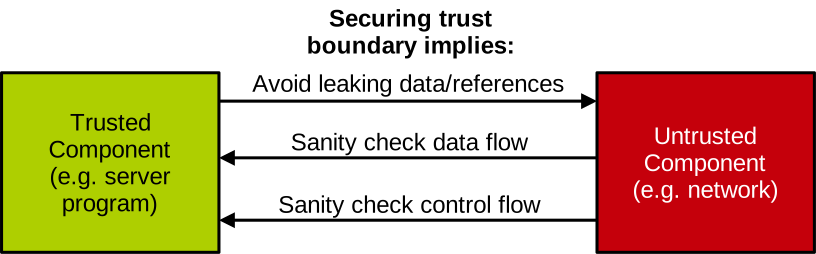
But it is not only about data: the control flow should be validated too. An example here is enforcing ordering: if a networked application defines a communication protocol with another untrusted program, and the protocol requires that requests of type A should always be sent before requests of type B, what are the implications of the untrusted program sending B before A?
Securing such interfaces becomes very hard when the program and its trust boundaries are large and complex. This is why we have entire classes of software that are quite prone to suffer from vulnerabilities, because it is impossible to guarantee that their trust boundaries have been 100% sanitised:
- Parsers, that handle feature-rich and complex (e.g. XML) formats;
- Web browsers, handling large amount of untrusted inputs (e.g. HTML, CSS, JS, etc.);
- Image/document processors, processing complex file formats, sometimes embedding code;
- Shell/command line parsers that may support many features;
- Network protocol stacks, that can be complex and support many features/types of requests;
- Etc.
All of these are complex pieces of software handling complex data formats, often exposing interfaces that are themselves proportionally complex.