Memory Management
You can access the slides 🖼️ for this lecture.
Here we cover another key responsibility of operating systems, memory management. It corresponds to the set of features implemented by the operating system to manage memory allocation, protection, and accesses. Features that fall under memory management are:
- Memory allocation/deallocation for applications and for the kernel.
- Setting up and maintaining address spaces for processes and for the kernel.
- Enforcing memory protection (isolation) between processes and the kernel, and in between processes.
- Swapping (saving memory content to disk).
- Etc.
Virtual Memory
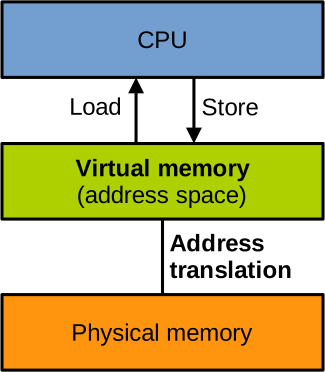
As you know, the CPU accesses memory with load and store instructions. In the vast majority of modern systems, the CPU enables virtual memory early during the boot process. From that moment, all the addresses targeted by loads and stores will be virtual, and the CPU will no longer be able to address physical memory directly. The translation between the virtual addresses the CPU requests to access and the actual physical memory they correspond to is done transparently by the MMU:
Segmentation
An old implementation of virtual memory is segmentation. An application will get access to a relatively small virtual address space, a segment, whose size is a subset of the total RAM size. That address space is then mapped to physical memory contiguously. In effect, the address translation just consists in adding an offset to a virtual address to obtain the corresponding physical one.
Below you can see an illustration of a CPU accessing memory with segmentation when an application App. 1 runs (left) and when another application App. 2 runs (right):
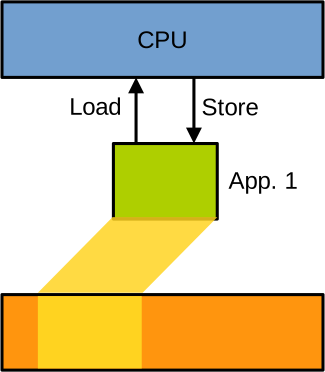
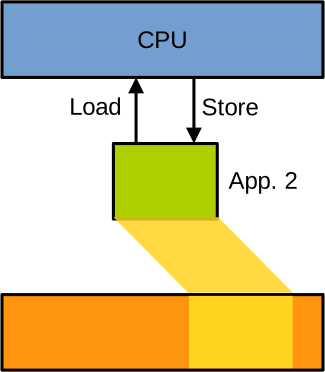
Each application has its own address space defined by a segment base address in physical memory, and a size. To ensure that the applications are isolated, the OS makes sure that the physical memory accessible through such address spaces is non-overlapping. The translation is realised simply by adding the base address as an offset to each virtual address to obtain the corresponding physical address. Overall segmentation was not very flexible. In particular, the requirement to have each address space map to a contiguous area of physical memory brought fragmentation issues.
Paging
Rather than segmentation, the vast majority of modern systems use paging to implement virtual memory. With paging, almost the entire space addressable given the width of the memory address bus is accessible to make up each process address space. For example, on most Intel 64-bit CPUs virtual addresses are 48 bits wide, which gives a virtual address space of 256 TB for each process. Of course, most of that address space is not mapped to physical memory. With paging, the mapping is achieved at the granularity of 4 KB pages. A data structure called the page table defines what virtual pages are mapped to physical memory, and where to:
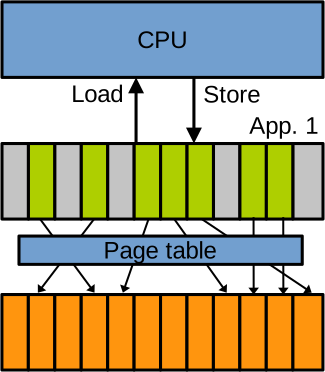
Each process has a different page table, and without establishing shared memory processes do not share physical pages. This way they are fully isolated from each other. Concretely, the way a page table handling the address space of a process works is as follows:
- The OS sets up the page table when the process is created. The OS also maintains the page table when new mappings need to be added/removed, for example when the process loads a shared library or allocates memory.
- A page table installed is walked transparently by the MMU to achieve the translation when the CPU runs the process in question and accesses memory.
The Page Table
The page table itself is implemented as a tree living in physical memory. Using a linear array with one entry per virtual page would be highly inefficient, as modern 64-bit address spaces are very large, there are many pages, but most of them are not mapped. The tree is made of pointers linking together special pages in physical memory used for address translation. Using a tree means that the system can avoid storing a lot of translation information corresponding to the large areas of the address space that are not mapped to physical memory. On modern CPUs the page table generally has 4 levels of pointers, although we are starting to see some CPUs with 5. The address of the root of the tree is held in a specific control register, so to change address space during context switch the hardware simply switches that register to the root of the page table for the process being scheduled in.
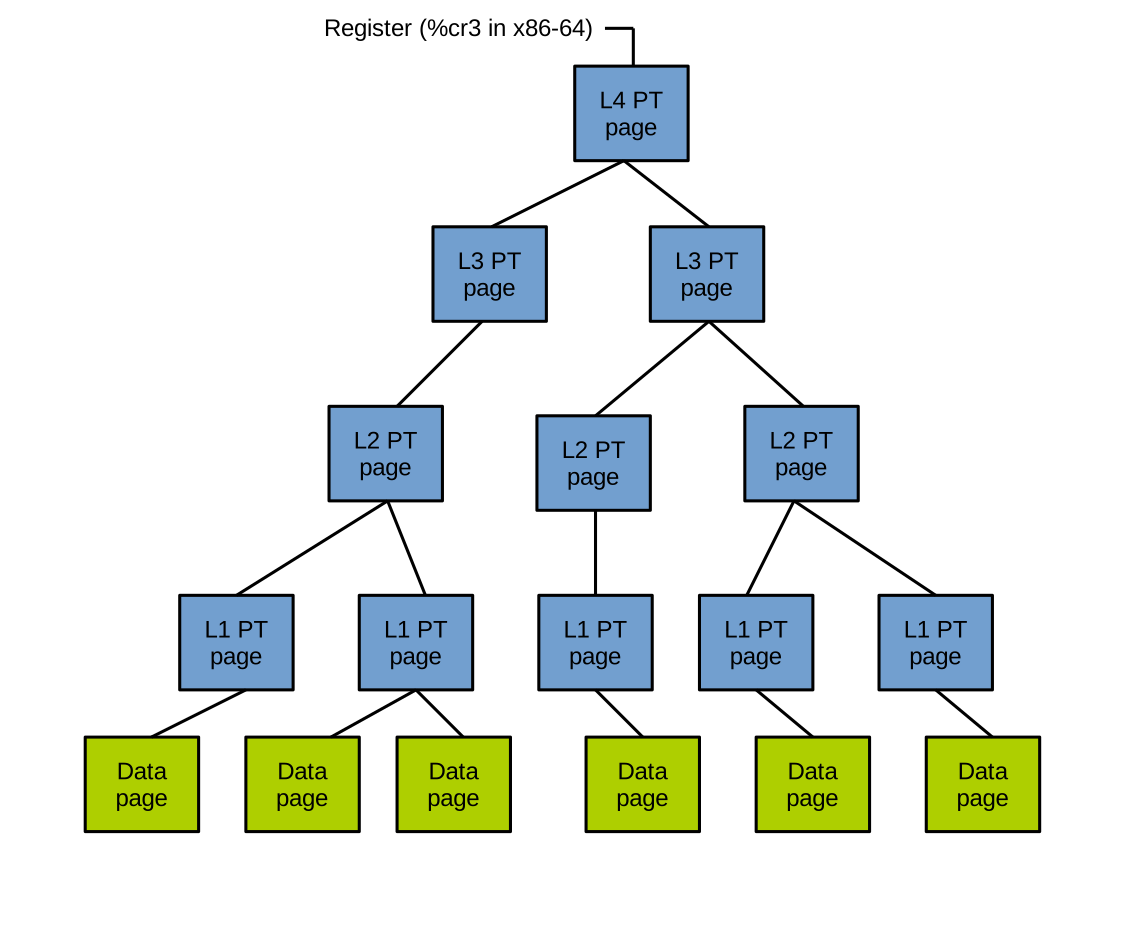
The diagram above illustrates a typical 4-level page table.
The address of the root page is held in a control register on the CPU; for Intel x86-64 this is %cr3.
The root node represents the 4th level of the page table, and the entries it contains reference pages of the 3rd level.
Entries at the 3rd level reference pages of the 2nd level, and their entries reference pages of the 1st level.
Finally, entries at the 1st level reference the physical pages holding the data accessed by the CPU.
As I mentioned, each translation page contains pointers to the next level. The size of a page is 4 KB, so there is enough space for 512 pointers:
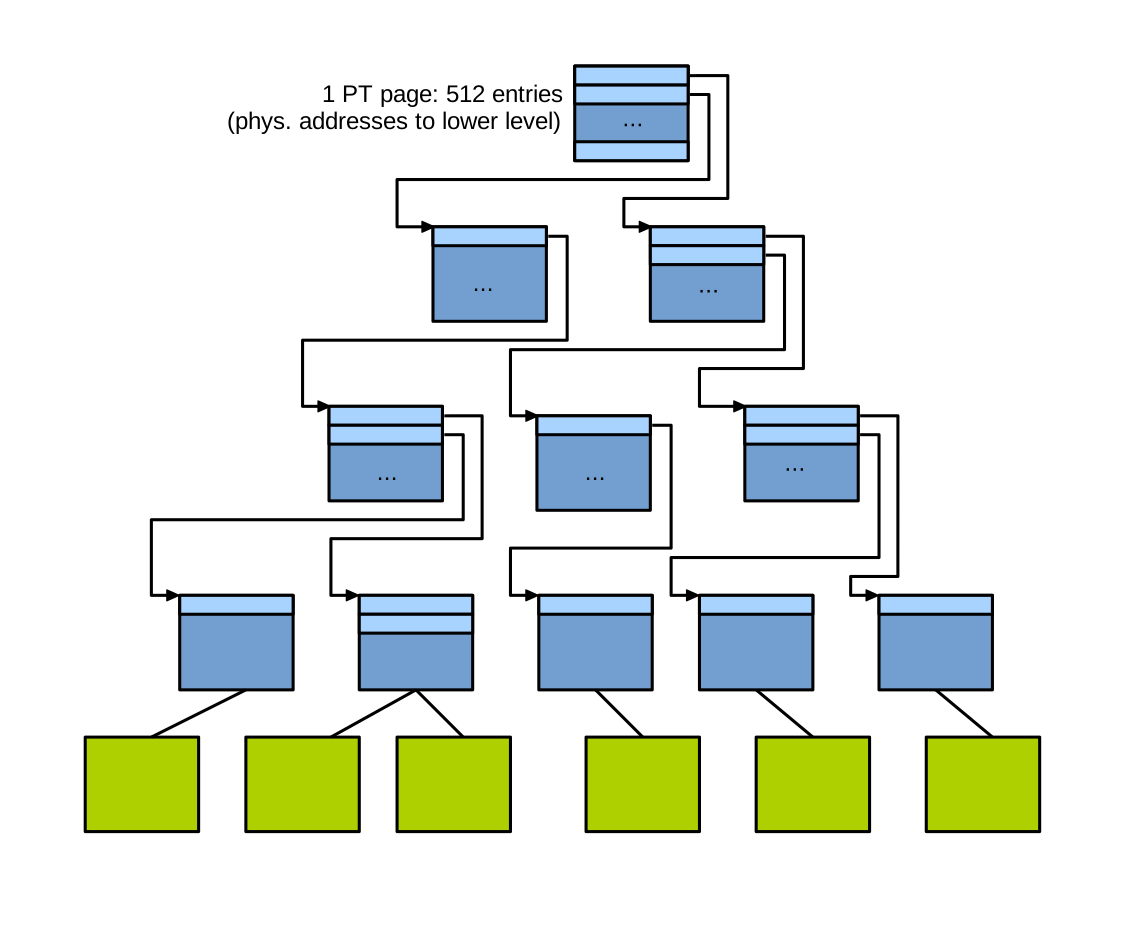
Each pointer may be either present, meaning it corresponds to a range of virtual address space that is mapped, and its value refers to a page at the lower level. Or absent, meaning it corresponds to a range of the virtual address space that is not mapped. Note that all pointers in translation pages refer to physical addresses.
Page Table Walk
When a page table is installed and the CPU issues loads and stores, the page table is walked transparently by the MMU to perform the translation.
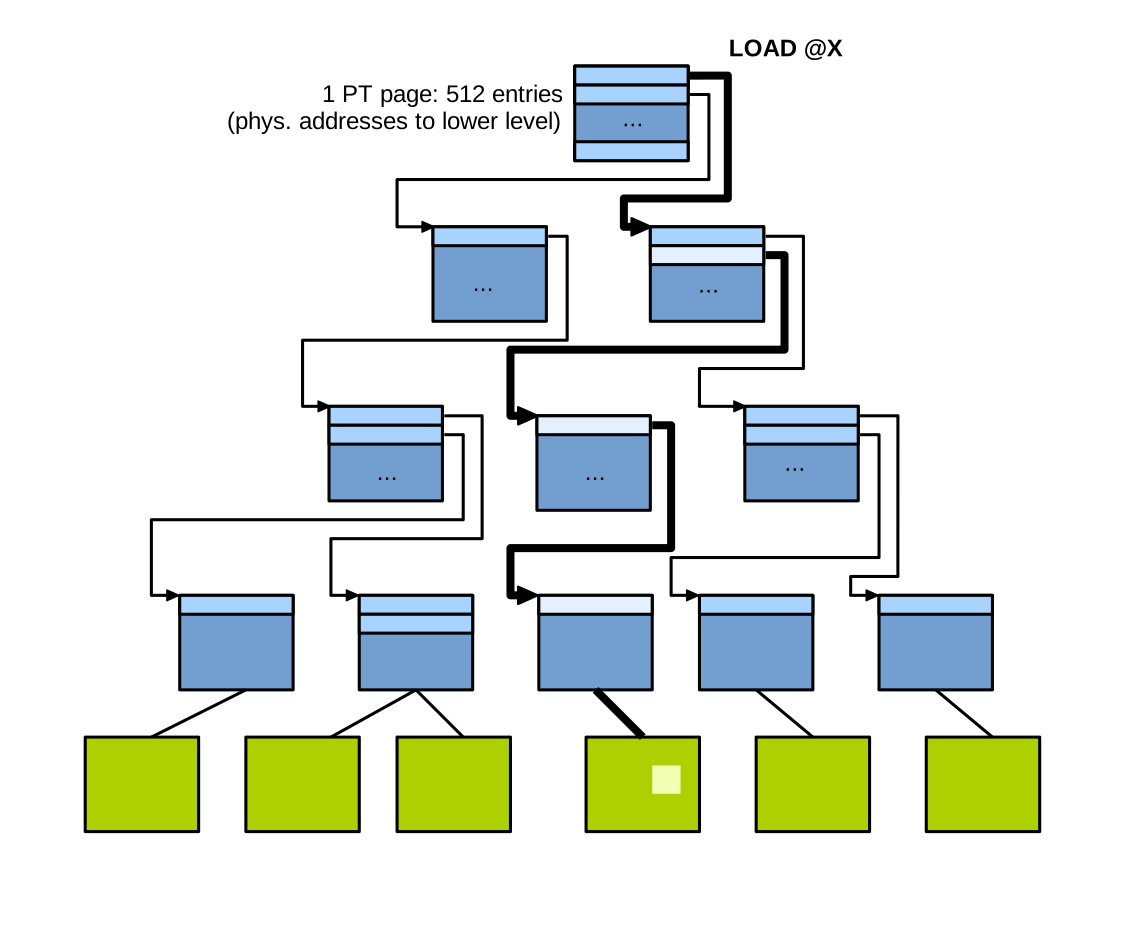
For example, if the CPU issues a load at address x, the MMU follows the path of pointers indexed by x, and the data read by this load operation will be the byte hit in the data page at the end of the walk.
To see how the entries in the page table are indexed during a page table walk, consider the following 64-bit virtual address, depicted in binary on the slide. A page table walk is performed transparently by the MMU, as follows:
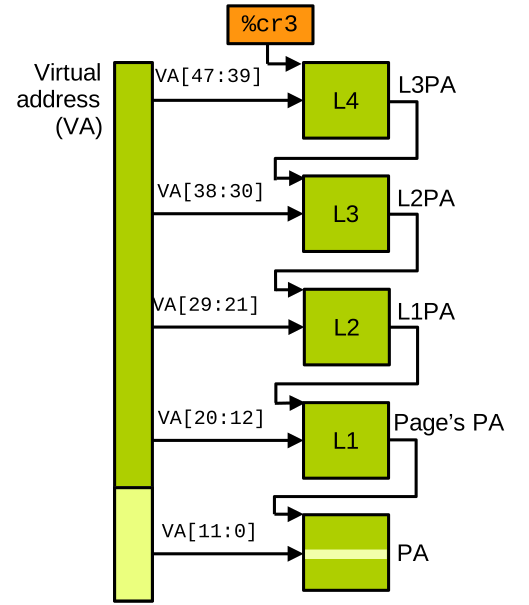
On x86-64, the %cr3 control register holds the address of the root of the page table, which is the 4th level.
The bits 39 to 47 of the target virtual address are used to index an entry in the root page, which gives us the pointer to the 3rd level translation page.
Then the bits 30 to 38 of the target virtual address index an entry in the 3rd level translation page, which gives us the pointer to the 2nd level page.
The bits 21 to 29 of the virtual address index an entry in the 2nd level translation page, giving the pointer to the 1st level page.
The bits 12 to 20 of the virtual address index an entry in the 1st level translation page, giving the pointer to the physical page the CPU wants to access.
And finally the last bits of the virtual address, bits 0 to 11, index a byte within that physical page.
Page Table Entries (x86-64)
As previously mentioned, each page composing the page table contains 512 entries, each of size 64 bits. The entirety of the 64 bits of an entry are not needed to index the lower levels. First, on most 64-bit processors the virtual address space is rather indexed on 48 bits. Second, the pointers in the translation page do not refer exactly to physical addresses, but rather to physical page indexes. Obviously there are fewer physical pages than there are physical addresses, so we need fewer bits to index them. Overall, we only need 36 bits for each entry, and we can use the additional bits to hold metadata about the range of the virtual address space referenced by each entry in translation pages:

This metadata is used to indicate whether the range of address space concerned is actually mapped, whether it is accessible in read and/or write mode, and whether it is accessible in user mode or only in supervisor mode. This allows to control memory accesses: if the address in the virtual address space is not present, or if the access in question is denied — for example because the page is read-only and the access is a write — the CPU will trigger a page fault exception. This is crucial to the security of the system, and it is used to implement memory protection, but also things like swap and the on-demand duplication of the address space upon fork.
The OS and the Address Space
Because the page table entries carry a bit that can mark part of the address space as accessible in supervisor mode only, the kernel can actually live in the same address space as processes. On Linux, the kernel is mapped in the top part of the address space of each process:
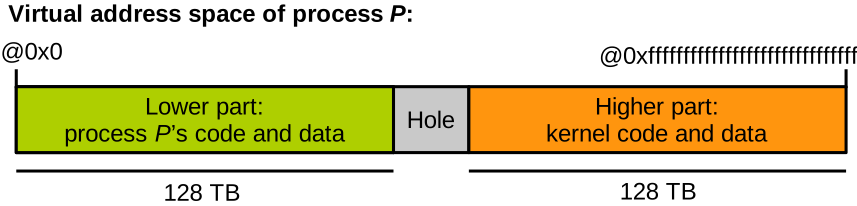
Every page table is configured so that this area is accessible in supervisor mode only, i.e. by the kernel only. This has an important advantage: there is no need to switch page tables upon system calls. Switching page tables is very costly in terms of performance, because it involves a flush of the translation cache, the translation lookaside buffer (TLB).
To sum up, the mechanisms enforcing the main memory security invariants in the system are twofold:
- Processes are isolated from each other by having different page tables defining different, non-overlapping address spaces.
- The kernel is isolated from processes through the supervisor-only access bit in each page table.
The Kernel Address Space
If we zoom in on the part of the address space reserved for the kernel, it is made of many different areas:

We cannot go over each area here, but here are the main ones:
- The dirmap is a direct linear mapping of all physical memory. It is useful when the kernel wants to access physical memory directly, for example when setting up page tables, or when allocating memory that needs to be contiguous in physical memory.
- The vmalloc area is basically the kernel heap, containing memory allocated dynamically.
- As with a standard program, the kernel also has a static memory part with its code and static data; these were mapped from the kernel’s binary at boot time.
- Finally, Linux supports the dynamic loading and unloading of kernel code at runtime, in the form of kernel modules. These are loaded in a specific area of the kernel part of the address space.
Memory Allocation in the Kernel
When the kernel needs to allocate memory for itself or for an application, the following steps are required. The kernel first reserves some physical memory, enough space to satisfy the allocation request. It also needs to find a free range of virtual memory, either within its own area of the address space if the allocation request originates from the kernel, or within the process-accessible part of the address space if it is a process requesting memory. The kernel then creates the page table entries corresponding to the newly created virtual pages, and these page table entries are set up to point to the physical pages that were previously reserved. In many cases, this mapping is not performed at allocation time, but rather later, when the CPU accesses the virtual pages for the first time. This is achieved by leaving the present bit unset in the page table entries: the first access will trigger a page fault, and at that time the kernel can perform the mapping and restart the memory access. The memory allocation request finally returns a pointer to the newly allocated virtual area that the kernel or application can use to access the memory in question:
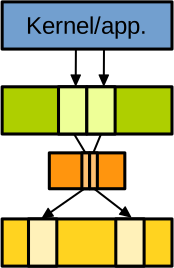
On the top of the diagram above we have the kernel or an application accessing an area of virtual memory (2 pages in green for that example). These pages are mapped to physical pages (in yellow) through the page table (in orange), which contains one page table entry per virtual page to map.
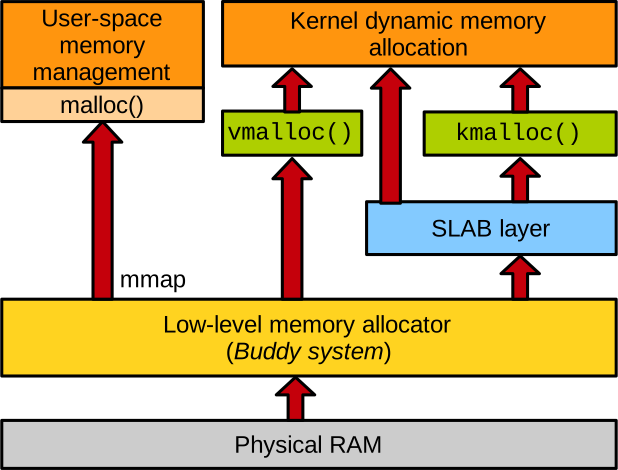
All requests for memory allocations in the system are served by the kernel.
If they come from user space (such as malloc on the diagram above), they are made through the mmap system call.
Note that malloc is implemented in user space by the libc, which in turn calls mmap under the hood to obtain a large area of virtual memory.
The malloc implementation in the libc then manages that area by splitting it into smaller buffers to serve allocation requests.
kmalloc and vmalloc
The kernel often needs to dynamically allocate memory for itself. To that end it provides two main interfaces, illustrated in green in the diagram above:
kmalloc, used for fast, small-sized allocations. It is usable in contexts where kernel code cannot sleep, for example when handling an interrupt. It also returns memory that is already mapped and always physically contiguous, which is important in particular scenarios such as allocating memory that is supposed to be accessed by devices.vmalloc, used for larger allocations at page granularity. It is slower as it requires updating the page table, and does not necessarily allocate memory that is physically contiguous.
SLAB Allocator
kmalloc relies on the SLAB layer which is a system of caches trying to reuse same-size allocations as much as possible.
This is good for speed, but also it reduces fragmentation.
It is useful when many data structures of the same type are allocated frequently.
Kernel code can also directly create its own SLAB caches without going through kmalloc.
Physical Page Allocator
To reserve physical memory, all allocation methods rely on the buddy system, also called the frame allocator. Here a frame means a physical page. This is the granularity at which the buddy system allocates physical memory. The buddy system maintains lists of blocks of same-size sets of contiguous free physical pages, with the goal of limiting fragmentation. Large blocks can be split and merged as needed. This can be illustrated as follows:
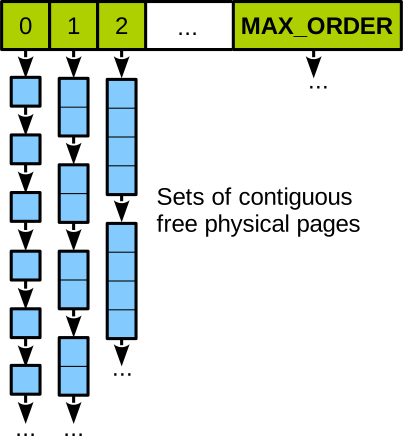
You can see the way the buddy system works here, with lists linking blocks of 1, 2, 4, 8, etc. contiguous physical pages.