Storage and Network: Brief Introduction
You can access the slides 🖼️ for this lecture.
Here we talk about the last two important features of operating systems we cover in this unit: storage and networking.
Computer Input/Output
A computer consists of a CPU, some memory, as well as I/O devices. The two I/O devices you’ll find in almost every computer are a secondary storage device, and a network card. There are some types of computers, such as servers, that don’t really have any other I/O apart from networking and storage. Same for many embedded devices: there is no mouse, no keyboard, no screen; however, they still need storage for persistence, and some form of access to the network for communication with the rest of the world.
Here we will see a brief introduction to how storage and networking work with Linux. We cannot go into too many details for time reasons, but there is much to say about storage and networking: these are very deep and complex topics, and there are entire books focusing on each.
The Linux Storage Stack
This is a simplified overview of the Linux storage stack:
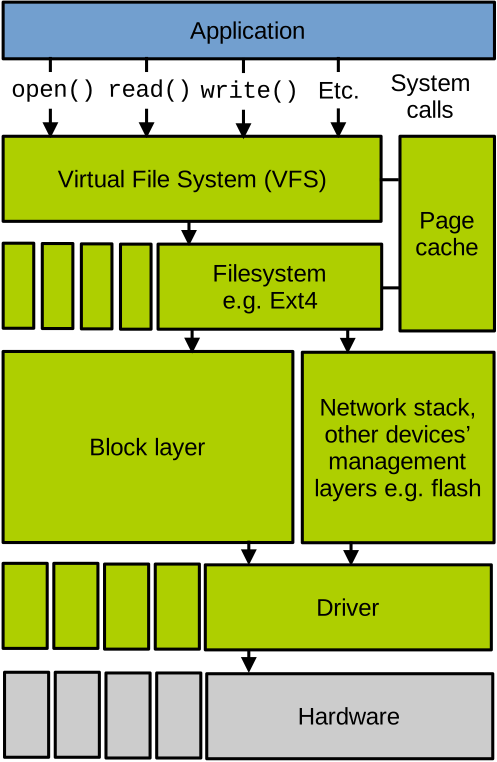
We have the application on top, and each layer of the operating system involved in storage management, down to the hardware. You may have heard of the fundamental theorem of software engineering, which states that “we can solve any problem by introducing an extra level of indirection”. The storage stack is a good illustration of this. Let’s go over these layers one by one.
System Calls and VFS Layer.
Like every other operating system service, applications access storage using system calls.
You know the filesystem-related ones: open, read, write, lseek, etc.
These system calls are received by the topmost layer of the storage stack in the OS: the Virtual File System (VFS). Its goal is to abstract all filesystems supported by Linux under a common interface, which is the set of system calls we just mentioned. These system calls are translated by VFS into concrete filesystem operations. VFS allows mounting multiple filesystems in a single directory tree. The benefits to having a unified interface to access files sitting on different filesystems are quite obvious: applications can be written independently of the filesystem used to store the files they access. Finally, VFS factorises a lot of storage management code that does not need to be implemented on a per-filesystem basis. This is particularly true for data and metadata caching code.
File System Layer.
Below VFS we have the concrete filesystems.
The filesystem’s implementation defines concretely how file data and metadata are stored and retrieved from the storage device.
Linux supports tens of filesystems.
Many target traditional storage devices such as hard disks and SSDs, but we also have RAM-based filesystems, pseudo filesystems that do not store any data (for example /proc and /sys), network filesystems (e.g., NFS), as well as filesystems for other media such as optical disks, embedded flash chips, etc.
Page Cache. Connected to the virtual and concrete filesystem layers, the page cache is the main file data cache on Linux. File data that is read is cached in RAM in case it needs to be read again in the future. File data that is written is cached in RAM for a bit of time to buffer short-term bursts of write requests before flushing them to disk. Linux’s policy on how much RAM to use for caching file data is simple: all the RAM that is not used by running programs and the kernel can be used to cache file data. The goal is to maximise the usage of your RAM.
We can check how much of your RAM is used to cache file data with this command:
$ free -h
               total        used        free      shared  buff/cache   available
Mem:            15Gi       5,2Gi       2,8Gi       179Mi       8,4Gi        10Gi
Swap:           15Gi          0B        15Gi
The amount of main memory used for the page cache is indicated by buff/cache: it is common to see gigabytes of RAM used for that purpose.
Block Layer. Below the filesystem we have the block layer. It is another indirection layer that abstracts block devices, i.e., storage devices accessed at relatively large granularities. For example, most hard disks are accessed at the granularity of a sector, which is 512 bytes. In addition to providing a common interface for all block devices, the block layer implements block I/O request schedulers that will queue, reorder, merge, or split requests to maximise performance. For example, one of the main goals of hard disk I/O schedulers is to avoid moving the magnetic head of the disk, which is a very costly operation.
Device Mapper. The block layer also allows creating virtual block devices on top of physical ones, to implement in software some features not always supported by the hardware, such as encryption, virtual partitions, compression, caching, aggregation of multiple disks for performance and fault tolerance reasons, etc. This is achieved through a layer called the device mapper.
Non-Block Storage. There are also quite a lot of filesystems and other storage layers that do not target block devices. For example, NFS will fetch the filesystem and propagate modifications through the network. Another example concerns the management of the embedded flash chips that can be found on early smartphones, which is realised by a dedicated subsystem named Memory Technology Device.
Drivers & Low-Level Layers. Between the block layer and the driver there may be more abstraction and protocol layers, such as USB, SCSI, SATA or NVMe. The lowest level of software in the storage stack corresponds to the device drivers. Drivers are in charge of sending to the device the I/O requests submitted by the higher layers. Generally, there is one driver per model of device, and Linux supports a very high number of devices. In fact, more than two-thirds of the 20 million lines of code that make up the kernel correspond to device driver code.
VFS Data Structures
We can zoom in a little on the VFS layer, which is the filesystem abstraction layer that handles system calls from user space directly. It uses a series of data structures to handle filesystem operations. Some are created when a disk partition hosting a particular filesystem is mounted. Others are created on demand when filesystem objects are accessed, for example when a file is opened. These data structures are used by VFS, and they are generally created by the concrete filesystem itself because only the filesystem knows how file data and metadata are stored on the storage device; VFS is just an abstraction layer.
These data structures can be represented as follows:
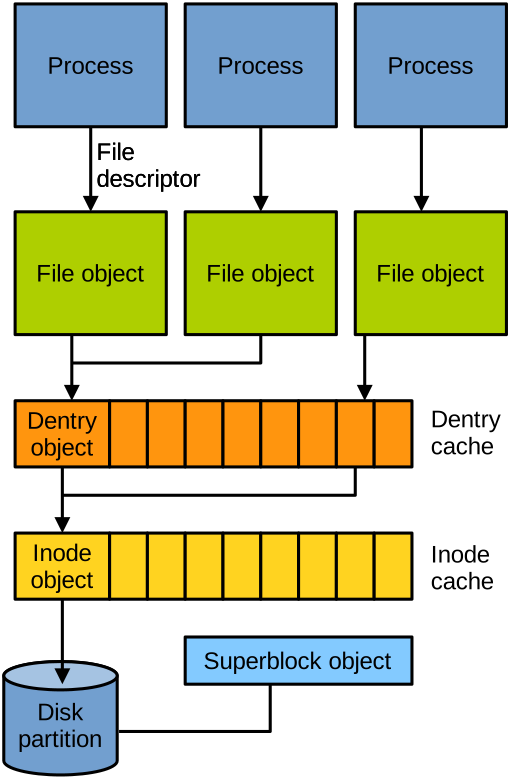
Superblock. A first interesting object is the superblock. There is one instance of this object per mounted filesystem; here, by filesystem, we mean a partition. The superblock contains general information about the partition, such as the filesystem type, mount flags, etc. It exposes a series of methods to execute partition-level operations such as flushing caches or unmounting the partition.
Inodes. A key data structure for filesystems is the inode. There is one inode object per file or directory on the filesystem. It contains metadata about the file, such as its size, owner, and permissions. Inode objects are created by the concrete filesystem and buffered in RAM in what is called the inode cache. They expose methods to perform file-level operations: creating, deleting, resizing, moving files, etc.
Directory Entries. A file’s name and location in the directory tree are not contained in the inode, but instead in a dedicated data structure which is called a directory entry (dentry). Dentries are used for operations on the directory tree, such as pathname lookup or listing the content of a directory, and they expose methods to accomplish these operations. Dentries are buffered in RAM in what is called the dentry cache. There is at least one dentry per file or directory in the filesystem, and there can be more than one in case you create hard links.
File Objects. Finally, the file object represents an instance of a file opened by a process. Each file descriptor used by the program corresponds to a file object in the kernel, so you can have several file objects for the same file if that file is opened multiple times by the program. The file object holds metadata about the opened file, for example, the file offset or the flags it was opened with. The file object exposes methods to access the file: reading it, writing it, etc.
Networking
Brief Overview
Let us now very briefly talk about the network stack. An ultra-simplified diagram depicting it is below:
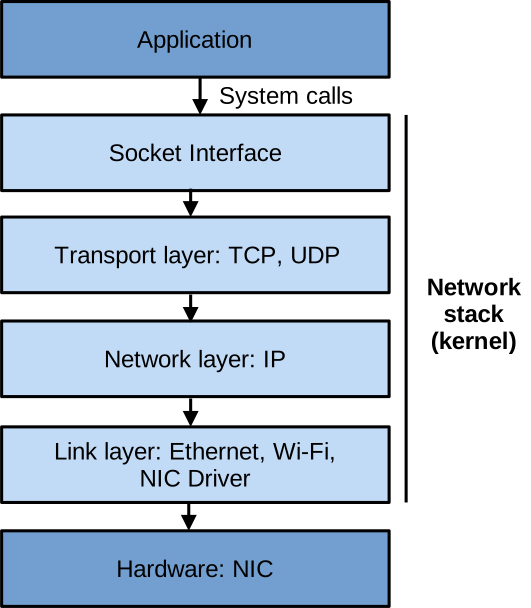
Once again remember that this is a very brief, high-level overview, as we do not have time to go into many details here. The network stack is composed of the following layers:
System Calls and Socket Interface.
Similar to all other OS services, applications access the network through system calls, such as socket, connect, listen, etc.
These network-related system calls form the socket interface.
They let an application create a server listening on a port, and send/receive data with system calls that are akin to reading from and writing to files.
Transport Layer. Below the socket interface we have the transport layer, implementing transport protocols – the main ones being TCP and UDP. This layer splits or assembles data to send and receive into packets and handles things like reliability, ordering, and flow control.
Network Layer. Below that you have the network layer, which is in charge of figuring out where each packet should go. So it takes care of addressing and routing. Here, generally, the protocol used is IP.
Link Layer. Finally, we have the link layer that handles things like physical addressing, and that also contains the network card driver.
Going Further
Beyond this brief overview, to learn more about the Linux network stack, feel free to consult the following resources:
- Rami Rosen, Linux Kernel Networking Implementation and Theory
- Christian Benvenuti, Understanding Linux Network Internals