OS Security Concepts Part 2
You can access the slides 🖼️ for this lecture.
We have seen in the previous lecture how the kernel protects itself against external threats. Here, we discuss how the kernel exposes access control mechanisms to user space to protect various resources.
UNIX/Linux File Permissions
Linux is a multi-user operating system: several users that do not trust each other share the same machine. There is also at least one privileged system administrator, often named root, that does not trust the regular users. Hence, the OS must make sure the files and system resources are properly isolated to respect that trust model.
Linux is heavily inspired by UNIX and in particular it follows one of its main principles which states that everything is a file. Beyond regular files, this also applies to devices, IPCs, OS metadata and configuration knobs, among others. As a result, many security mechanisms that define what users and processes can and cannot do rely on file permissions. These permissions not only let users and applications access files (or not), but also devices (e.g., camera or microphone), OS functionalities (shutting down the computer, installing new software, etc.) and information (kernel log, etc.), etc.
You probably already have a certain amount of knowledge about file permissions. Here we have an example of such permissions in the form of an access control matrix, a concept defined by Lampson in his seminal paper, Protection:
| File A | File B | File C | |
|---|---|---|---|
| Process 1 (user 1) | read, write | read | - |
| Process 2 (user 2) | read | write | read |
In the first column you have what is called subjects; here they are processes, but they could also be users. In the first row we have objects; these are files that subjects may or may not access. Finally in the rest of the matrix, at the intersection between a subject and an object, you have the list of permissions that subject has upon that object. For example, here process 1 can read and write file A, can read file B, and cannot access file C at all. Process 2 has different permissions: it can read file A, write to file B, and read file C.
Each process running in the system is associated with a user ID, and a group ID. In the vast majority of cases, when a user invokes a program, the process will take the user’s UID and GID. Each file in the system is associated with an owner user ID and owner group ID. So given a particular file, processes executing with a UID equal to the file’s owner UID can change permissions on that file; in other words, they have full read/write/execute permissions. Processes executing with a GID equal to the file’s owner GID can also obtain additional permissions compared to processes running with unrelated UIDs and GIDs. The permissions are defined within each file’s metadata on the filesystem: there are specific bits for that, named the permission bits.
We can check a process’ UID and GID by using the ps command as follows:
# Check a process' UID/GID
$ ps -o pid,user,group,uid,gid,comm -p <pid>
We can also review a file’s owner UID and GID, as well as the value of its permission bits, with the ls -ln command:
# Check a file's UID/GID and permission bits
$ ls -ln <file>
Listing a file’s permissions and owner UID and GID with ls gives you the following output:
$ ls -l /usr/bin/cp
-rwxr-xr-x 1 0 0 151152 Sep 20  2022 /usr/bin/cp
The string with dashes and the r/w/x characters, -rwxr-xr-x, gives us the file type and permissions; we’ll zoom in on that information shortly.
The first 1 after that is the number of hard links to the file.
The next two zeros 0 0 coming next are respectively the file’s owner UID and GID.
The number coming next, 151152, is the file size in bytes.
The rest of the information is a timestamp for the file’s last modification Sep 20 2022, and the file path on the filesystem /usr/bin/cp.
Let us focus a bit on the permissions string reported by ls:
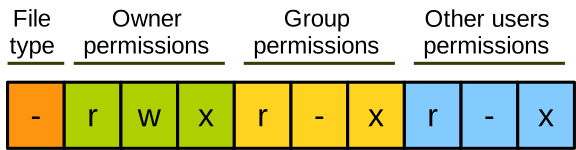
The first character represents the file type.
It’s a dash - for regular files, a d for directories, and you’ll find other characters for special files representing things like devices or IPC channels.
Then we have three blocks of three characters each, representing permissions for subjects.
The first three characters give the permissions for the file’s owner UID, the second set of three characters gives the permissions for the file’s owner GID, and the last three characters give the permissions for anyone else.
The permissions can be read access, permitted with an r and prohibited with a dash; write access, permitted with a w and prohibited with a dash; and execute permission, for executable programs, enabled with an x and prohibited with a dash.
Here is an example of how the permissions could be set up on a university lab machine that is shared between students and faculty:
| Name | Owner | Group | Mode bits |
|---|---|---|---|
foo | alice | faculty | rwxr--r-- |
bar | bob | students | rw-rw-r-- |
baz | charlie | faculty | rwxrwxrwx |
Users are classified into groups, students and faculty, and each file has a user owner, as well as a group owner.
foo is accessible with full permissions by Alice, but can only be read by the faculty group and other users.
bar is readable and writable by Bob and by anyone from the students group; it can only be read by other users.
Finally, baz is fully accessible by anyone.
Authorisation Mechanisms
System administrators use user space applications to configure permissions for files.
An authorised user can change the owner of a file with chown, and the file’s permissions with chmod.
When files are accessed, the permission checks are performed by the kernel upon each access, with the relevant system calls: open, read, write, etc.
When a user authenticates, the authentication program, like login or ssh, needs to run as root, which means it has system administrator privileges.
This is because, if the authentication succeeds, the process needs to switch to the identity of the authenticated user, and the ability to switch identity is a privileged operation that should not be possible for a standard user.
After that identity switch, all subsequent processes will inherit the user’s identity.
The system also integrates programs providing some services that are supposed to be invoked by standard users but that require root privileges.
An example is the passwd command, which users can invoke to change their password.
This program needs to update the central system password file /etc/shadow, which obviously cannot be accessed by normal users, only by root.
So passwd has a special permission bit named the setuid flag, which lets it be invoked by a standard user while actually running with root privileges.
This has important security considerations, which we will cover in more detail in the second lab exercise.
Discretionary Access Control
As we saw, with traditional UNIX file permissions, non-administrator users can change the security configuration of the system because they manage the permissions for their own files.
They do so by updating permission bits and owner UID/GID for the files they own, for example with chmod.
A system in which regular users can update security permissions is called Discretionary Access Control, DAC.
DAC is not ideal from a security point of view, as it assumes that users are fully trusted and that they always behave correctly.
This is not the case in reality.
First, users can make mistakes: imagine a user A executing a wrong chmod command, mistakenly allowing other users to access their private files, for example a private SSH key.
Second, some users or processes can also be actively malicious.
Imagine a remote attacker taking over a user process’s execution flow by exploiting a use-after-free vulnerability.
That attacker could manipulate the program to lower the defences of the system, by changing its security configuration through file permissions.
So, unfortunately, the assumptions behind discretionary access control do not hold in reality, and DAC is not a very secure solution.
We need a protection system that maintains security guarantees even when software outside the trusted computing base is malicious.
Mandatory Access Control
Mandatory Access Control (MAC) addresses the aforementioned problem: with MAC, the security configuration can only be modified by trusted administrators. Every subject (process) and object (file, system resource) receives a security label. Labels are used to define rules describing how processes can interact with each other and with system resources. The set of labels is defined by the trusted administrator, and labels are assigned to processes and objects at creation time. At runtime, the security policy is immutable: trusted software can be used by administrators to update it, but restarting the protection system is needed for the changes to take effect, and this can also only be done by an administrator.
Below is an example of a mandatory access control policy, adapted from the book Operating System Security by Trent Jaeger:
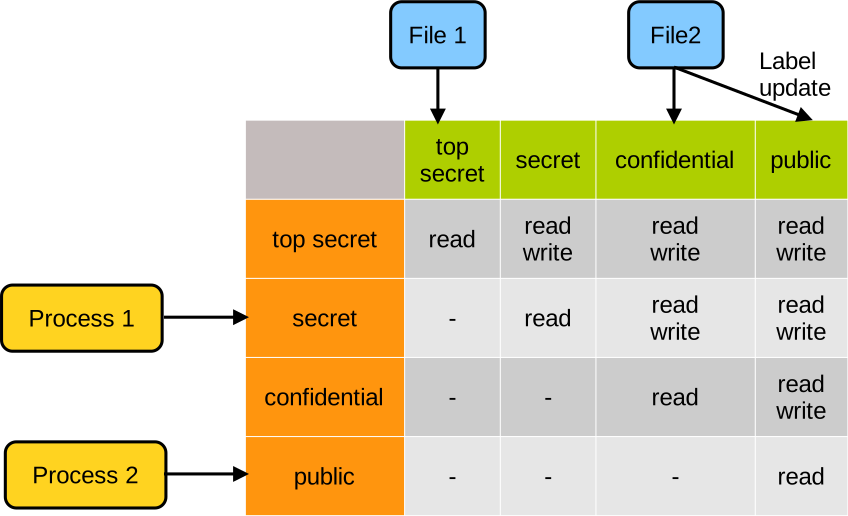
We have our subjects on the left, two processes. Process 1 gets assigned the secret label when it is created. And process 2 gets assigned the public label. On top we have our objects, two files. File 1 gets assigned the top secret label, and file 2 gets initially assigned the confidential label. Note that subject and object labels do not necessarily have to be the same. Within the matrix you can see the permissions: process 1 being secret, it cannot access top secret files like file 1, and can read and write confidential files like file 2. Process 2 being public, it can access neither file 1 nor file 2. If the administrator wants to change the labelling, that would require a restart of the MAC system. For example here file 2 becomes public and can then be read by process 2.
SELinux
Linux has a mandatory access control framework named Security Enhanced Linux (SELinux).
With SELinux, processes, files and system resources get assigned labels that are called contexts.
A context has, among other attributes, a type.
A few examples of context types are httpd_t for a running web server, httpd_sys_content_t for content being served by that server in /var/www/html on the filesystem, or http_port_t for the port the server is listening on.
As defined by the MAC working principles, the security policy is defined by a trusted administrator. Rules explicitly describe the possible operations processes can perform on files and OS resources. For example, our web server will get access to both the files it needs to serve and the ports it needs to listen on. When an action is performed, SELinux checks are done after the traditional filesystem permission checks. Note that, with SELinux, no rule means deny by default, so the policies are quite strict; when they are well-defined, they represent a good way to achieve least privilege for the system.
Below is an example of SELinux policy for 2 processes here, a web server and an SQL database:
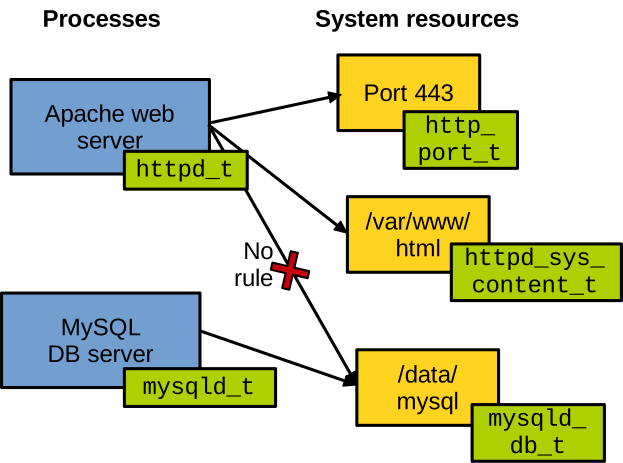
Each process is labelled with its own type. The web server can access the usual port serving HTTPS requests, as well as the files it is supposed to serve on the filesystem. The SQL database gets access to the filesystem location where the database is stored. Because there is no rule allowing it, the web server cannot access the database file. The database also cannot access the web server’s port or the files it serves.
SELinux: Benefits and Limitations. As we saw, MAC implemented with SELinux is very strict and is a good way to enforce least privilege on a fine-grained basis. For example, if the web server is compromised by an attacker, the attacker will only be able to access whatever SELinux allows the web server to access. With traditional file permissions the attacker would get access to many more system resources. If the web server was running as root, which would be terrible from a security point of view, the attacker would gain full access to the entire machine. Even if the server was not running as root, the attacker would still get access to everything the user it runs on behalf of can access. Another benefit of SELinux is that it is widely available, and required for certain compliance standards.
Unfortunately, there are also some downsides to using SELinux. The main issue is that it is difficult to configure, manage, and troubleshoot. Many actors really struggle with it, just Google “how to disable SELinux” to get an idea. It is also sometimes too strict, so it creates some false positives at runtime, flagging legitimate behaviour as security issues.
Linux Security Modules
SELinux is mostly concerned about the rules defining what processes and users can do with which files and system resources. A specific set of such rules represents what is called a policy. To enforce these rules we need a mechanism that will hook into file and resource accesses, and will deny or approve these accesses based on what is defined in the policy. With Linux this mechanism is called Linux Security Modules (LSM). It is a mechanism framework on top of which many access control systems are built, SELinux but also systems like Smack, TOMOYO Linux, or Apparmor:
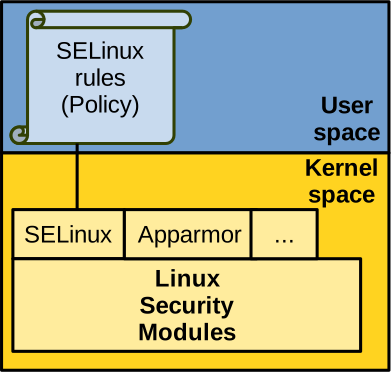
From a high-level point of view, LSM works as follows.
LSM uses hooks on the relevant kernel code paths, at the point the kernel accesses security-critical resources, for example at the time a file is opened.
The security modules in place, for example SELinux, can then permit, deny, and/or log operations for auditing.
Many kernel data structures have a generic void * pointer named security that can be used to hold any kind of relevant security metadata.
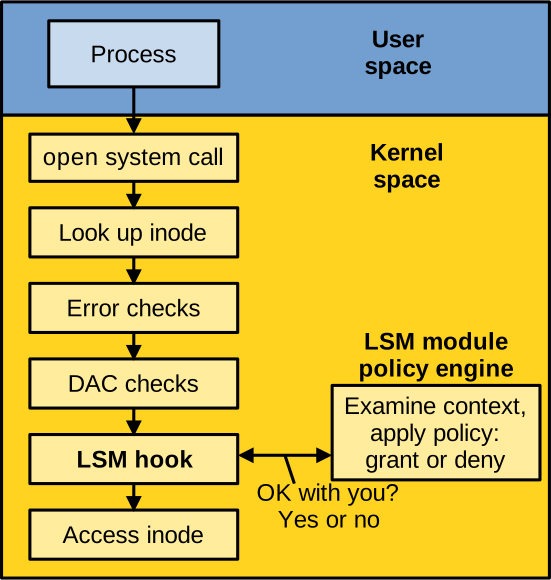
You have an example on the diagram above (adapted from Wright et al., Linux Security Modules: General Security Support for the Linux Kernel): when a process opens a file the kernel starts to process the system calls, and looks up the inode for the file in question. The kernel performs some basic error checks (for example, does the file exist?), then performs the discretionary access control checks first on traditional UNIX file permissions. Next, we have the LSM hook, plugged to the policy in place, that could be for example SELinux. Whatever handler is called there will allow, deny or log the operation. If the operation is allowed, it can then be performed.
Capability Systems
The Confused Deputy Problem
Access control systems are not very efficient in all situations. Here is a classical computer security problem called the confused deputy, which access control systems do not handle well. It has been described in the following paper: Norm Hardy, The Confused Deputy (or why capabilities might have been invented).
Imagine a shared, multi-user system used to compile some code.
Users have a home folder /home/user with their source code src.c.
They invoke the compiler, passing the source file as a parameter, as well as the name of the executable they wish to create, a.out.
They can also dump debug symbols into a separate file, here named debug-info.
The system administrator has also configured the compiler to write down a summary of language usage statistics in a file located within a system directory: /sysx/language-stats.txt:
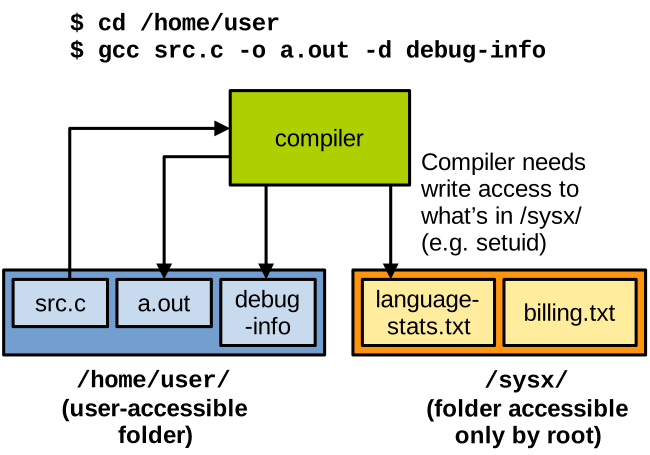
That system folder /sysx/ is supposed to be accessed only by root; however, because the compiler needs to write to it when invoked by the user, the administrator configures the access control system to let the compiler program write to that folder to dump the language usage statistics.
In /sysx there is also a sensitive file that contains some important billing information, billing.txt.
This file should not be accessible to normal users.
If a user somehow learns about the existence of the sensitive file billing.txt, for example by discussing with a colleague, they can trick the compiler into overwriting that file.
For example, by indicating it as the target for writing the debug symbols, as presented here:
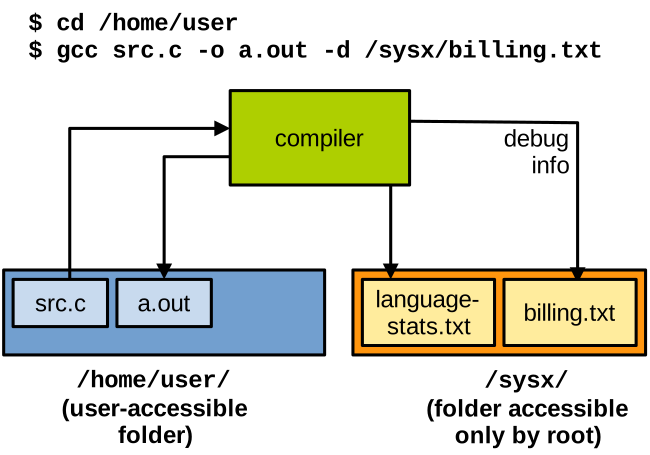
So in effect we have a subject with a certain amount of privilege, which we name a deputy (here the compiler), confused into accessing a resource that the user it runs on behalf of does not have permission to access.
Capability Systems
There is no good way to solve the confused deputy problem with access control systems (DAC/MAC), because they do not make it possible to have the deputy (the compiler) execute with the permissions of the user invoking it: the compiler needs to run with its own permissions, which need to include access to the sensitive folder.
To address that issue, a different approach can be used: capability systems. A capability is a token that can be held by a subject, and that brings together:
- The ability to designate a resource, for example the ability to name a file or reference a particular device; and
- The permissions to access that resource.
In other words, with capabilities, if you can name a resource, you can access it.
This differs from access control systems, where you can name resources that you can’t access: for example, as a standard user you can ls /etc/shadow although you can’t access it.
Capabilities can also embed specific access permissions: e.g., a capability may allow a user to access a file in read-only mode, and another capability would allow another user to access that file in write mode.
In capability systems, subjects (processes, users) are called principals. Each principal is given a set of capabilities corresponding to the system resources (files, memory, CPU time/cycles, ports, devices, etc.) it is authorised to access. The operating system has ambient authority, i.e., it can access all capabilities. Principals that interact with each other can exchange capabilities as a form of permission delegation. For example, a parent process can give a subset of its capabilities to a child process it forks. In another example, process A can give access to part of its address space to process B with which it wishes to establish shared memory-based inter-process communication.
Principals cannot forge capabilities out of thin air, and the only way for a subject to obtain a capability is to receive it through the aforementioned delegation process. Principals can only make copies of capabilities they already have access to, and such a copy can only have similar or lower permissions compared to the original capability it is based upon. In other words, it is not possible for a principal to forge a capability out of thin air. This is a key property of capability systems, called monotonicity.
After the OS boots, it has access to all the capabilities and can access all resources in the system.
The OS then creates the first process, let’s call it init, giving it a subset of the system’s capabilities.
init creates other processes, granting each a subset of its own capabilities based on what each process needs.
Sets of capabilities continue to be subset from parents to children.
Because processes cannot forge capabilities, there is no way for them to increase the permissions that were given by their parents.
Solving the Confused Deputy Problem with Capabilities
This diagram illustrates how capabilities can help solve the confused deputy problem:
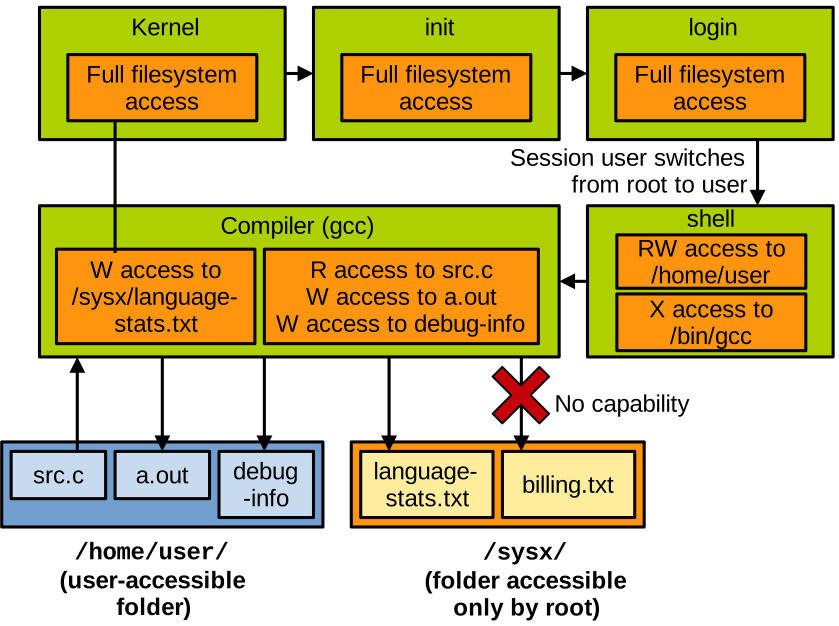
For the sake of simplicity we will only consider capabilities relating to file access.
When the OS boots up, it is initialised with all the capabilities, meaning it has access to the entire filesystem.
It creates the first process init which itself creates login, both of these run as root because the user is not authenticated yet, and they both get a copy of the entire set of capabilities letting them access the entire filesystem.
Once login has authenticated the user, it spawns a shell.
This shell will run on behalf of the user, so login subsets its capabilities for the shell based only on what the user is supposed to legitimately access.
In our example it is read/write access to the content of the user’s home directory /home/user, and execute access to the compiler /bin/gcc.
When the user runs the compiler, the shell subsets its capabilities again and gives the compiler only what it needs: read/write access to the source file src.c, the executable output a.out, and the debug symbols output debug-info.
The compiler also requires a write capability to /sysx/language-stats.txt.
It could be passed down the capability subsetting chain; however, that would let other principals, like the shell, access the file in question, which is not really needed.
That capability can instead be obtained by the compiler from the kernel, which has full access to the filesystem.
In that context, our aforementioned confused deputy problem cannot happen: when it executes on behalf of the user, the compiler cannot have a capability to access the billing file, and won’t be able to overwrite it.