Software Compartmentalisation: Introduction
You can access the slides 🖼️ for this lecture.
In this lecture, we introduce a defensive software design technique that has been used since the early 2000s to protect sensitive systems software, and that has recently gained renewed attention in research: software compartmentalisation.
Systems Software Security Landscape
Most systems software today is seen as a single, monolithic unit of trust. Concretely, this means that if an application (or operating system, hypervisor, library, etc.) has a single vulnerability anywhere in its code base, that vulnerability may allow an attacker to take over the entire application. That is because there is no internal isolation within the application in question. This is very concerning today. Indeed, modern applications integrate components from various sources with different degrees of trust:
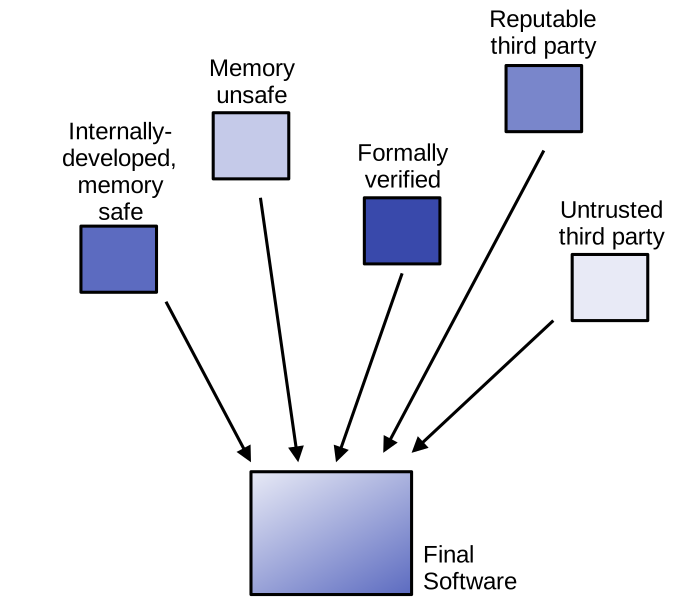
If we consider for example an application that links together several libraries, some of these libraries may have a high degree of trust because they are developed by a reputable third party, or because their correctness can be formally verified. On the other hand, other libraries may be less trusted, because they are developed by untrusted third parties, written in memory-unsafe languages, etc. The code of some libraries can also be under the control of an attacker, as shown in recent examples of supply chain attacks.
In addition to components with variable degrees of trust, systems software also integrates components that are security-critical: code handling secret data (passwords, crypto keys, etc.), performing privileged operations (user authentication, administrative tasks, etc.), etc. Mixing such sensitive software in an application without any form of internal isolation is very concerning from the security point of view. A natural conclusion from that problem statement is that we need to bring isolation and privilege reduction within applications. This can be achieved with a defensive software design technique called software compartmentalisation.
Software Compartmentalisation
Software compartmentalisation decomposes software into lesser-privileged components (compartments) that only have access to what they need to do their job. This approach is different from many other defences: with compartmentalisation, we acknowledge there will be bugs and exploits, and try to limit their impact. This is a direct application to software components of the principle of least privilege.
Let us take a concrete example, illustrated below:
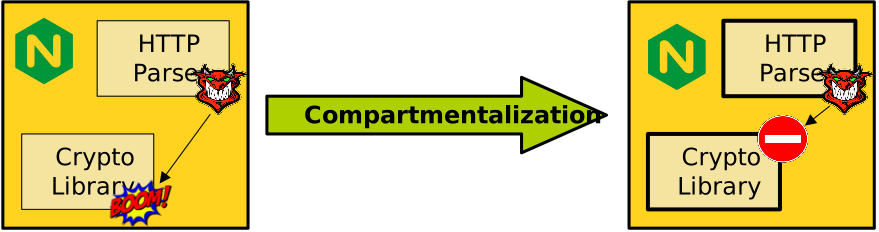
Assume a web server containing several software components and in particular:
- An HTTP parser: this code processes HTTP requests coming from the outside world. Parsers are complex pieces of software that are prone to bugs. Requests could also come from malicious actors and be malformed with the hope of triggering bugs in the parser. In the web server, the HTTP parser has a low degree of trust.
- A crypto library, such as libSSL. It handles HTTPS content encryption and decryption using security-sensitive data (e.g., crypto keys) that we do not want an attacker to get access to. In our example, the crypto library is critical to the security of the application.
Without any form of isolation between the two components, an attacker may exploit a bug in the parser to take over or leak data from the crypto library, which is catastrophic from the security point of view. Software compartmentalisation introduces some isolation between the two components, for example by placing the parser and the crypto library within separate compartments. An attacker triggering a bug in the HTTP parser would be unable to escape the isolation in question and access the crypto library.
(Re)designing for Compartmentalisation
Compartmentalisation is not complete isolation, and the isolated software components are still part of a single application/system: they need to communicate. Traditional examples of compartmentalised software include OS kernels (in particular microkernels), web browsers, web servers, or SSH software. Software can be designed from scratch with compartmentalisation in mind, as is the case for most of these production-ready examples, but compartmentalisation can also be retrofitted into monolithic software. This is a desirable objective given the large amount of legacy monolithic system software that would benefit from being compartmentalised.
It is possible, and even likely, that you have never heard of software compartmentalisation before today. Indeed, it is fair to say that the practice is far from being widespread. Furthermore, although the production-ready examples given above represent highly popular software, the amount of modern software that is compartmentalised today is very small. This current lack of popularity of the approach is due to several reasons, including the high engineering effort required to design for or retrofit compartmentalisation.
Compartmentalisation Fundamentals
Key Idea
The key idea behind compartmentalisation is to restrict control and data flow in the application so that each compartment has only the permissions it requires to do its job. Here permissions mostly refer to memory (data/code) access, but also include filesystem access, system calls, hardware/software resource usage, etc. We can define the per-compartment permissions for our previous web server example using Lampson’s access control matrix as follows:
| Crypto library (comp. 1) | HTTP parser (comp. 2) | |
|---|---|---|
| Crypto keys | read access | no access |
| HTTP request data | no access | read access |
Trust Models
Compartmentalisation can enforce three trust models, illustrated below:

- With the sandbox trust model, part of the program is untrusted, and it is isolated in a compartment from the rest of the program (trusted). There are many examples of sandboxes: a process is sandboxed from the rest of the system by the operating system controlling its address space and system calls, a piece of untrusted JavaScript code downloaded from the web runs in an isolated environment within a web browser, etc.
- With the safebox trust model, part of the program is security-critical, and it is isolated in a compartment from the rest of the program (untrusted). Examples include the OS kernel being safeboxed from user applications, a security monitor running in a separate process from the application it observes, etc.
- Finally, with the mutual distrust model, two or more compartments distrust each other. This is a stronger generalisation of the other trust models. An example here is a trusted execution environment: the application running in an enclave does not trust the host OS, and the host OS itself does not trust the application.
All trust models generalise to more than two compartments.
Compartmentalisation: Security Properties
Compartmentalisation aims to enforce one or several of the following security properties:
- Confidentiality: an attacker cannot read/leak information from outside of a subverted compartment.
- Integrity: an attacker cannot write/tamper with data outside of a subverted compartment.
- Availability: an attacker cannot disrupt (e.g. crash) code running outside of a subverted compartment. This is very hard to achieve in practice, because it requires specific application design patterns to be tolerant of crashes and performance disruption. It is especially hard when retrofitting compartmentalisation for availability, which requires a complete redesign of large parts of monolithic applications.
How to Compartmentalise an Application
The basic steps for compartmentalising an application are illustrated below:
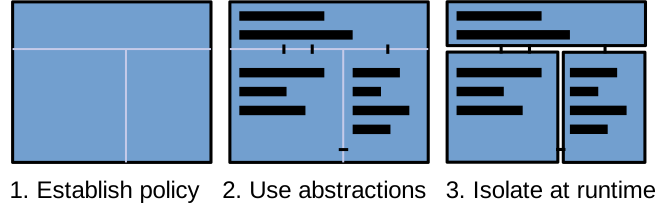
These steps are, in order:
- Establish a compartmentalisation policy: decide what part of the target software goes into what compartment.
- Use compartmentalisation abstractions to indicate in the code compartment boundaries, private/shared data and resources, to establish communication between compartments, and to secure interfaces. In the context of compartmentalisation, abstractions represent simplification layers that expose primitives for the programmer to express compartmentalisation policies within a program.
- At runtime, have an isolation mechanism enforce the partitioning between compartments.
We will cover the different ways to approach each step in detail in the next lectures.
Enforcing Isolation
The isolation between compartments is enforced at runtime with an isolation mechanism. A commonly used mechanism is the use of page tables, meaning that each compartment of a given application is placed within its own process. There are other mechanisms, implemented either in hardware or in software, that we will discuss in more detail in a subsequent lecture. Mechanisms restrict access to memory and system resources for each compartment to what is defined in the policy.
For example, focusing on memory accesses, in a compartmentalised application with two compartments, Comp1 and Comp2, using a hardware memory isolation mechanism (such as page tables), when Comp1 executes we could have the following:
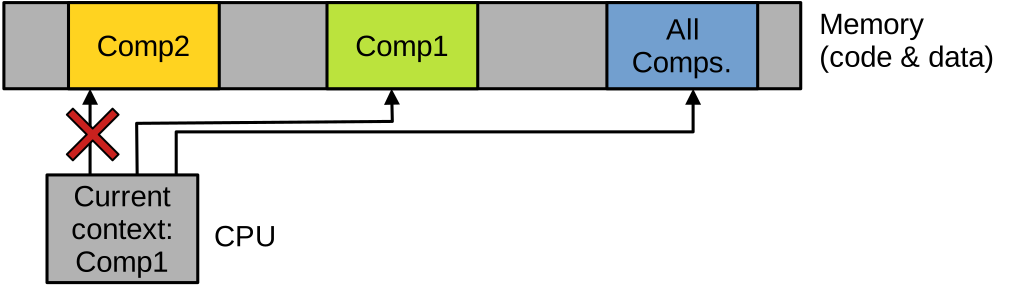
The memory allocated to the application is divided into three areas: one with code and data private to Comp1, another to Comp2, and an area of shared memory for communications between both compartments. When Comp1 runs, it can access its own private data and code, as well as the shared memory, but it cannot access Comp2’s private memory. When Comp2 runs, the permissions should be set up as follows:
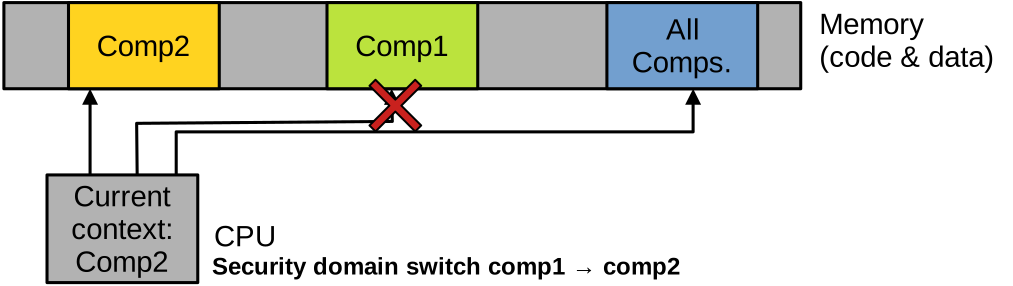
Most compartmentalisation approaches also need a privileged monitor. This is a secure piece of software that has ambient authority (i.e., it is part of the trusted computing base), and is used for various privileged operations, in particular to perform security transitions upon a compartment switch (for example, switching stacks and page tables).
The OS kernel can play that role, or, with certain mechanisms, it can also be achieved through a special privileged compartment. Because of its privileged nature, the monitor needs to be isolated from the other untrusted compartments.
Modern Compartmentalisation Approaches
Software compartmentalisation has been a known practice since at least the early 2000s and the publication of two seminal papers, Privman and Privtrans. Since then, it has not gained significant traction in the industry, for various reasons (e.g., engineering effort or performance impact) that we will detail in the next few lectures.
Recently, the appearance of new hardware isolation mechanisms has triggered renewed interest in compartmentalisation in the scientific community. Governments have been funding important research projects with up to tens of millions of GBP/USD to explore compartmentalisation, such as UKRI Digital Security by Design programme, or the US’ DARPA Compartmentalization and Privilege Management effort.
Examples of Compartmentalisation
To illustrate how an application can be concretely compartmentalised, consider the following code:
int global;

int library_function(int *parameter) {
  char *cryptokey = "private";

  int ret = *parameter + global + 42;
  return ret;
}

int main() {
  int arg = 100;
  global = 50;
  char *password = "secret";

  /* ... */

  int res = library_function(&arg);

  /* ... */

  return 0;
}
This is a monolithic application that is made of two functions, main and library_function.
Both functions operate on variables.
Some variables seem to be security-sensitive, e.g., cryptokey and password.
Other variables are accessed in both functions, e.g., global, as well as arg, whose address is passed from main to library_function.
We can compile and run it as follows:
$ gcc example-monolithic.c -o example-monolithic
$ ./example-monolithic
res: 192
Assume we would like to compartmentalise this application by applying a simple policy: putting library_function in one compartment, and main in the other.
This would ensure that if the code of one of the functions contains a bug exploitable by an attacker, the security-sensitive data (cryptokey for library_function, password for main) handled by the other function stays inaccessible to the attacker.
In terms of abstractions, we will use process-based isolation, placing each function of that application within its own process. That means we will use the page table mechanism to isolate the two compartments. The two functions communicate by accessing the global variable as well as exchanging a parameter and a return value, hence we will need to establish communication between the two compartments using IPC. We will explore two versions of the compartmentalised application, varying the communication mechanism: the first version will use pipes, and the second shared memory.
We will also present how the monolithic application could be compartmentalised using a hypothetical compartmentalisation framework.
Manual Compartmentalisation v1
We need to redesign the application to split it into two processes (i.e., our two compartments):
- Main function compartment.
- Library function compartment.
We also need to rework the code to make sure that the data that should be private to each compartment (in particular password and cryptokey) cannot be accessed by the other compartment.
Finally, we need to establish IPC-based communication between the two compartments to emulate access to a global variable global as well as the function call, which requires passing the value of arg from main to library_function, and returning ret from library_function to main.
Let us consider a first compartmentalised version of that application, using pipes for cross-compartment communications.
It is composed of the following files:
- The code for the
maincompartment, inexample-comp-pipe-main.c. - The code for the
library_functioncompartment, inexample-comp-pipe-lib.c. - A header file that will be included in both
.cfiles,example-comp-pipe.h, indicating the names of the pipes to use for communications.
The full sources for the entire compartmentalised application are available in this archive.
This is the common header file example-comp-pipe.h:
#ifndef EXAMPLE_COMP_PIPE_H
#define EXAMPLE_COMP_PIPE_H

#define PARAM_PIPE_PATH     "/tmp/param.pipe"
#define RESULT_PIPE_PATH    "/tmp/result.pipe"

#endif /* EXAMPLE_COMP_PIPE_H */
In this header file, we simply declare two constant strings indicating what files will be used to represent the pipes needed for communications.
Because a pipe is unidirectional, we need two pipes: one to send the value of global and the argument from the main compartment (i.e., process) into the library_function compartment when library_function is called, the other to send the return value the other way around once the function has completed.
This is the main function compartment example-comp-pipe-main.c:
#include "example-comp-pipe.h"
/* ... */
int global;

int main() {
  int arg = 100, send_fd, recv_fd;
  global = 50;
  char *password = "secret";

  mkfifo(PARAM_PIPE_PATH, 0666);
  mkfifo(RESULT_PIPE_PATH, 0666);

  pid_t pid = fork();
  if (pid == 0) {
    char *args[] = {"./example-comp-pipe-lib", NULL};
    char *envp[] = {NULL};
    execve("./example-comp-pipe-lib", args, envp);
    return -1;
  }

  // open pipe fds
  send_fd = open(PARAM_PIPE_PATH, O_WRONLY);
  recv_fd = open(RESULT_PIPE_PATH, O_RDONLY);

  // send param then global
  write(send_fd, &arg, sizeof(int));
  write(send_fd, &global, sizeof(int));

  // read the result
  int result;
  read(recv_fd, &result, sizeof(int));

  printf("res: %d\n", result);

  // wait for the child to finish
  wait(NULL);

  close(send_fd);
  close(recv_fd);
  return 0;
}
The beginning of the file looks very much like the original monolithic program, apart from the inclusion of example-comp-pipe.h, which contains the paths to the files that will represent the pipes used for communication with the other compartment.
We assume that the binary resulting from the compilation of this file (example-comp-pipe-main) will be the first to be executed to start the compartmentalised application.
After declaring and initialising a few variables, we use mkfifo to create the two pipes.
Next we use fork to create a new process, followed by a call to execve in the child to run the binary that corresponds to the second compartment, example-comp-pipe-lib.
Then we have the communications corresponding to what was a function call in our original monolithic program: we send with write on the first pipe the value of the argument, and the global variable that needs to be accessed by the second compartment.
The second compartment will run the code of library_function and, when that is done, will send the return value on the second pipe: we retrieve from that pipe the return value with read, and display the result.
This is the code for the second compartment, implementing the library function in example-comp-pipe-lib.c:
#include "example-comp-pipe.h"
/* ... */

int global;

int library_function(int *parameter) {
  char *cryptokey = "private";
  int ret = *parameter + global + 42;
  return ret;
}

int main() {
  int arg;

  int recv_fd = open(PARAM_PIPE_PATH, O_RDONLY);
  int send_fd = open(RESULT_PIPE_PATH, O_WRONLY);

  read(recv_fd, &arg, sizeof(int));
  read(recv_fd, &global, sizeof(int));

  int result = library_function(&arg);
  write(send_fd, &result, sizeof(int));

  close(recv_fd);
  close(send_fd);
  return 0;
}
This code is now a full program running in its own process, so we need a main function.
We start by opening the files corresponding to the communication pipes that should have been created by the first compartment when it was invoked.
Recall that the first compartment is supposed to be executed first, and that it creates the pipes before forking the second compartment.
We read from the first pipe the values of arg and global that we need to properly run the code of library_function, then call that function.
Once it is done, we send the return value result to the first compartment on the second pipe.
We can compile and run this first compartmentalised version as follows:
$ gcc example-comp-pipe-main.c -o example-comp-pipe-main
$ gcc example-comp-pipe-lib.c -o example-comp-pipe-lib
./example-comp-pipe-main
res: 192
It behaves similarly to the monolithic version.
Security Benefit of Compartmentalisation.
Notice that the security-sensitive data is only declared within the relevant compartment (password in the first compartment, and cryptokey in the second).
In that context, even if we assume a powerful attacker able to take over an entire compartment, they will still be unable to access the security-sensitive data present in the second compartment, because it is located in a separate process.
Manual Compartmentalisation v2
This second compartmentalised version of our example program uses shared memory for cross-compartment communications. Its structure is similar to the first: we have:
- The code for the
maincompartment, inexample-comp-shm-main.c. - The code for the
library_functioncompartment, inexample-comp-shm-lib.c. - A header file that will be included in both
.cfiles,example-comp-shm.h, declaring a data structure and indicating the name identifying the shared memory area used for communication.
This is the code of the common header example-comp-shm.h:
#ifndef EXAMPLE_COMP_SHM_H
#define EXAMPLE_COMP_SHM_H

#define SHM_NAME "/example.shm"

typedef struct {
    int param;
    int global;
    int result;
} shm_data_t;

#endif /* EXAMPLE_COMP_SHM_H */
This header file declares a data structure that will be held in shared memory and used for communication between the two compartments.
It contains all data flowing between the main and library compartments: the global variable, the function parameter, and the return value.
We also have the name identifying the shared memory: the manual page for shm_open indicates the format for such names: they should be of the form:
A null-terminated string of up to NAME_MAX (i.e., 255) characters consisting of an initial slash, followed by one or more characters, none of which are slashes.
Below is the code for the main function compartment, example-comp-shm-main.c:
#include "example-comp-shm.h"
/* ... */
int global;

int main() {
    shm_data_t *shared;
    int arg = 100;
    global = 50;
    char *password = "secret";

    // Create shm
    int fd = shm_open(SHM_NAME, O_CREAT | O_RDWR, 0666);

    // Map shm
    shared = mmap(NULL, sizeof(shm_data_t), PROT_READ | PROT_WRITE,
        MAP_SHARED, fd, 0);

    shared->param = arg;
    shared->global = global;

    pid_t pid = fork();
    if (pid == 0) {
        char *args[] = {"./example-comp-shm-lib", NULL};
        char *envp[] = {NULL};
        execve("./example-comp-shm-lib", args, envp);
        return -1;
    }

    // wait for the child to finish
    wait(NULL);

    printf("res: %d\n", shared->result);

    munmap(shared, sizeof(shm_data_t));
    close(fd);
    return 0;
}
This code initialises the first compartment and prepares for communication by creating the segment of shared memory with shm_open, and mapping it in the address space with mmap.
The size of this area of shared memory is that of one instance of a shm_data_t object.
In practice the OS will likely round it up to a full 4KB memory page, which is the granularity at which mmap operates.
Once the area of shared memory is ready, the first compartment writes in that area the values of the global variable (global) and function call parameter (arg) it wishes to communicate to the second compartment.
The first compartment then forks and uses execve to start the binary corresponding to the second compartment, which will access the shared memory to read arg and global, run library_function, and write its return value into shared memory.
The first compartment uses wait to ensure the second compartment is done before reading that return value in shared memory and printing it on the console.
The code below is for the library function compartment example-comp-shm-lib.c:
#include "example-comp-shm.h"
/* ... */
int global;

int library_function(int *parameter) {
    char *cryptokey = "private";
    int ret = *parameter + global + 42;
    return ret;
}

int main() {
    shm_data_t *shared;

    int fd = shm_open(SHM_NAME, O_RDWR, 0666);
    shared = mmap(NULL, sizeof(shm_data_t), PROT_READ | PROT_WRITE,
        MAP_SHARED, fd, 0);
    global = shared->global;

    shared->result = library_function(&(shared->param));

    munmap(shared, sizeof(shm_data_t));
    close(fd);
    return 0;
}
We use shm_open to open the shared memory area that was previously created by the first compartment, and map it in the address space with mmap.
The values of global and param are read from that area of shared memory, then library_function can be called.
We can then write the return value into shared memory.
This version behaves similarly to the monolithic one:
$ gcc -g example-comp-shm-main.c -o example-comp-shm-main
$ gcc -g example-comp-shm-lib.c -o example-comp-shm-lib
$ ./example-comp-shm-main
res: 192
As one can see, (re)designing for compartmentalisation, even on a simple example, can require quite a bit of engineering effort. The real effort required to compartmentalise a real-world application is in fact even (much) higher, because our example is overly simple:
- Only a small amount of data is exchanged between the compartments.
- That data does not need to be repeatedly accessed and updated by both compartments, so not much synchronisation or message passing is needed.
- We did not consider securing the cross-compartment interface (more on that in the next lecture).
Framework-Assisted Compartmentalisation
Research efforts have proposed compartmentalisation frameworks to ease the engineering effort required to compartmentalise applications. As we will see shortly, these frameworks can partially automate some of the tasks involved in compartmentalising an application. For example, the FlexOS framework only requires the programmer to use compiler annotations to indicate 1) shared data and 2) cross-compartment gates. After that, the code and data partitioning can be realised automatically. Below is an example of how to use FlexOS’ annotations to compartmentalise the monolithic application we studied above:
int __shared global;

int library_function(int *parameter) {
  char *cryptokey = "private";

  int ret = *parameter + global + 42;
  return ret;
}

int main() {
  int __shared arg = 100;
  global = 50;
  char *password = "secret";

  /* ... */

 int res = __gate(library_function, &arg);

  /* ... */

  return 0;
}
We aim for a similar policy to before: placing main in a compartment, and library_function in another.
Using FlexOS’ annotations, the programmer indicates shared data with the __shared keyword, marking as such global and arg.
The programmer also indicates compartment boundaries by placing gates where cross-compartment transitions need to happen, using the __gate keyword.