Introduction to Virtualisation
You can access the slides 🖼️ for this lecture.
Definition
Let’s start with a simple definition of virtualisation. It is not really complete, but it is a good starting point:
Virtualisation technologies are the set of software and hardware components that allow running multiple operating systems at the same time on the same physical machine
The type of virtualisation we’ll discuss in this unit mostly concerns the goal of running several operating systems (OSes) on the same physical machine. A fundamental challenge here is that by design an operating system expects to be the only privileged entity with total control over the hardware on a computer. In other words, an operating system is not designed to run alongside and share a machine with other operating systems. In that context, how can 2 or more OSes cohabit on a single machine?
To address that problem we use a combination of hardware and software to create a series of virtual machines (VMs) running on a given physical machine, and we run each operating system within its own VM. That way we give the illusion to each OS that it is running alone and in total control on its VM:
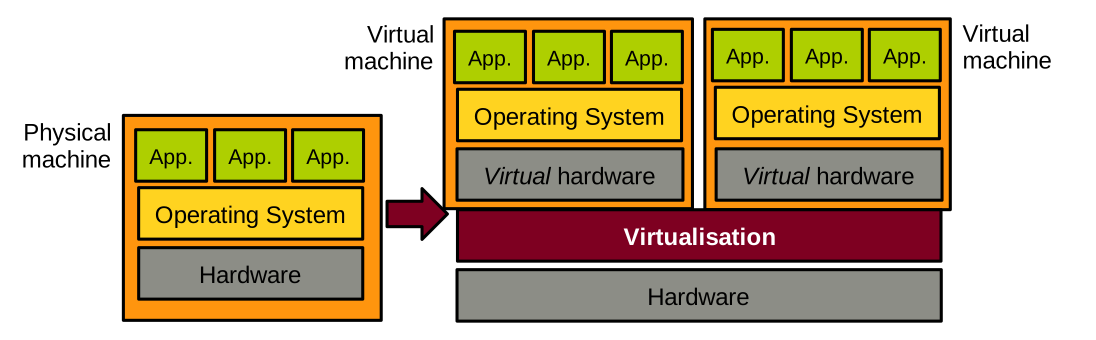
For this approach to work, the virtualisation layer needs to achieve three fundamental high-level objectives, illustrated below:
- The speed of an OS should be the same when running in a VM vs. running natively. The same applies to user-space applications running on top of that OS.
- The code of an existing OS supporting native execution should not have to be updated to run in a virtualised environment. The same applies to the applications.
- The OSes running virtualised on a physical machine should not be able to interfere with each other. For example, they should not be able to access each other’s memory. A virtualised OS should not be able to bottleneck resources such as CPU, memory, or I/O at the expense of the other virtualised OSes running alongside it.
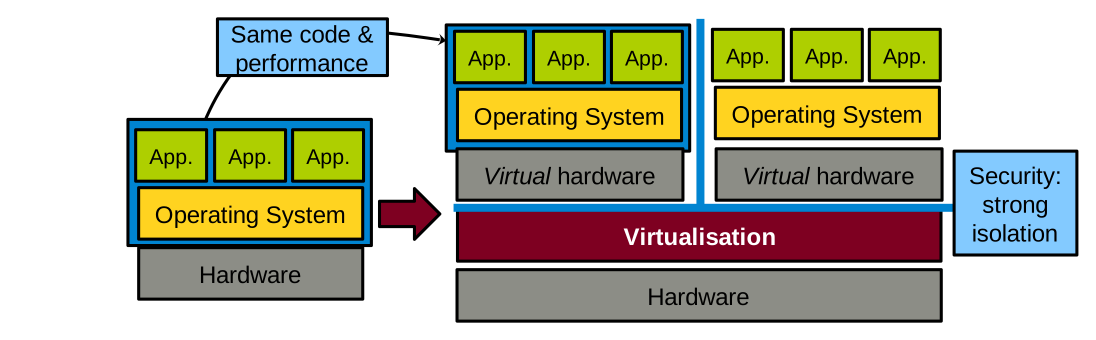
Points 1 and 2 above are necessary for adoption: businesses are unlikely to adopt virtualisation solutions if the performance hit is too high, or if it means changing OSes and applications, which is a significant engineering effort. Point 3 relates to security: virtualised OSes running on the same physical machine are often controlled by distrusting parties, and the virtualisation layer must enforce isolation guarantees.
A Bit of History
In the 1960s IBM produced System/360 (S/360), a family of computers of various sizes (i.e. processing power) built using the same architecture. A client could buy a small model for testing/prototyping, and a large mainframe later. Following that model, clients often realised they wanted to take a set of software applications running on multiple small models and run them all on a single large model. This is called consolidation, and it is one of the main use cases for virtualisation.
14 models were produced between 1965 and 1978. The model 67 introduced a virtualisable architecture: a physical machine of that model could appear as a set of multiple, less powerful versions of itself: virtual machines (VMs).
In 1974, a seminal paper on the topic of virtualisation was published: Formal Requirements for Virtualizable Third Generation Architectures.
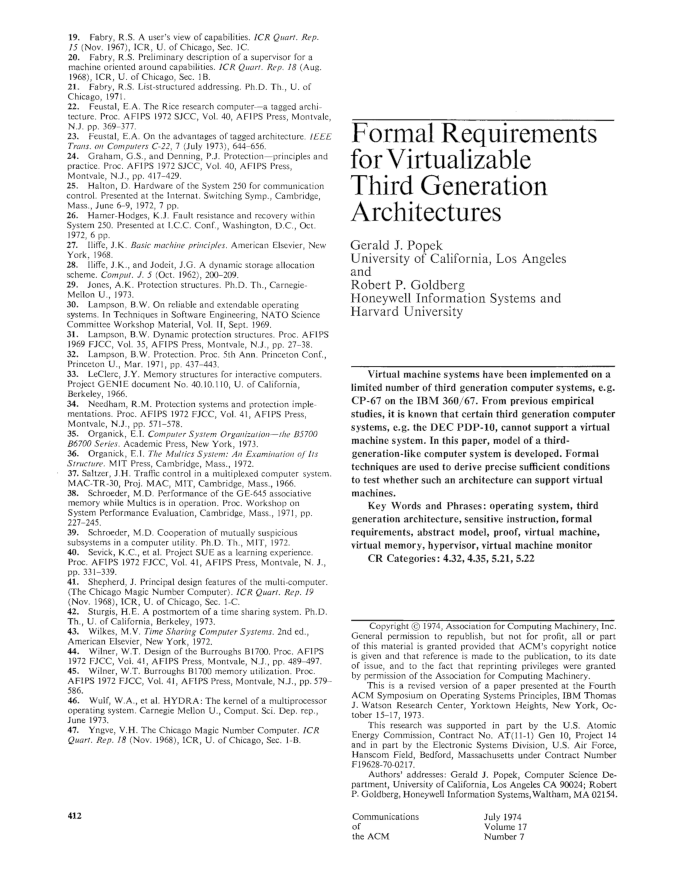
This paper, co-authored by computer scientists Gerald J. Popek and Robert P. Goldberg, listed the requirements for an Instruction Set Architecture (ISA) to be virtualisable. It also described the properties that the systems software managing virtual machines (the virtual machine monitor or the hypervisor) must have for virtualisation to be possible on that ISA. We will study that paper in detail in one of the next lectures. Indeed, the principles defined in this paper are still relevant today, and they have guided the design of modern virtualisable ISAs such as Intel/AMD x86-64, ARM64, or RISC-V.
At the time the Popek and Goldberg paper was published, virtualisation was not in high demand. In the 1990s and early 2000s, that changed. A growing need for virtualisation was motivated by various factors: the rising need for workload consolidation, the continuous increase in computing power, or the boom of data centres during the dot-com bubble. The problem was that the most widespread ISA at the time, Intel x86-32, was not properly virtualisable based on the requirements described in the Popek and Goldberg paper. At that time, several software-based virtualisation solutions trying to virtualise x86-32 by overcoming the ISA’s limitations came out of academic research: Disco from Stanford, and Xen from Cambridge. These solutions later transitioned to the industry: the authors of Disco founded VMware, and Xen was for a long time the main virtual machine monitor used by Amazon Web Services.
In the 2000s, the demand for virtualisation exploded. The modern ISAs that we still use today were designed with virtualisation in mind, following the principles defined by Popek and Goldberg. These ISAs include hardware support for virtualisation, which is leveraged by today’s virtual machine monitors such as Linux’s KVM, VirtualBox, Microsoft’s Hyper-V, or the current versions of Xen.
Use Cases
Consolidation
Consolidation consists in taking a set of software applications, e.g. a web server, a mail server, and other software, initially running on X physical machines, and running everything on a smaller set of Y physical machines (Y < X) — possibly even a single machine, by creating X virtual machines.
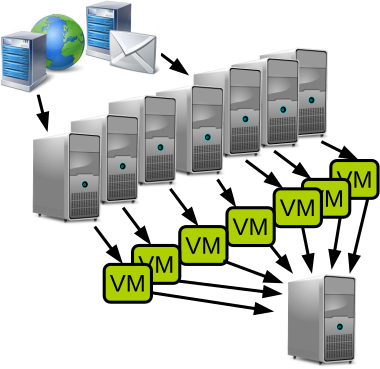
As previously mentioned, this is the historical motivation for developing virtualisation technologies.
Consolidation gives most of the benefits of multi-computer systems without the associated financial and management costs. The financial savings are clear: we need to buy fewer computers. The management savings include saving space and reducing the workload for system administrators by having fewer machines.
The benefits of multi-computer systems that can be maintained on a single or small set of machine(s) include:
- Heterogeneity of software dependencies: if we have several applications with different dependency needs in terms of operating system/library models and versions, it is easy to run each application within its own virtual machine set up with the proper environment for that particular application. Environments from different virtual machines do not need to interfere with each other, and can evolve independently along with the needs in terms of dependency updates.
- Reliability: if one application crashes the system through a bug/resource hog, the fault will be contained within the VM and will not affect other virtual machines running on the same host.
- Security: same as for reliability, if one application gets hacked and the attacker manages to take over the operating system, the attack will still be confined to the containing VM and the attacker won’t be able to access other VMs running on the same host.
Software Development
Virtualisation offers significant advantages for software development by enabling multiple VMs to run on a single physical host, each with its own operating system and system libraries. This flexibility allows developers to emulate diverse environments without the need for multiple physical machines. For example, a developer working on a Windows machine but developing software for the Linux kernel features can use a VM to run different Linux distributions on the same host, ensuring compatibility and testing across versions.
Provisioning VMs is rapid and cost-efficient compared to setting up physical hardware, making it ideal for iterative development and continuous integration workflows. Furthermore, VMs are self-contained units that encapsulate the entire software stack including the operating system, libraries, and dependencies: they provide a reliable and reproducible environment for development, automated testing, and even deployment. This isolation reduces configuration conflicts and simplifies collaboration across teams.
These are the logos of a few technologies that are extensively used in software development:

- VirtualBox and VMware Workstation can run a Linux VM on a Windows host for Linux development without the need to install Linux natively.
- Vagrant allows automating the provisioning (installation) of one or several VMs for quick iterations of the development/testing/deployment cycle.
- Docker creates containers that are VM-like environments that can be set up automatically and almost instantaneously. We’ll talk more about containers later in this course unit.
Migration, Checkpoint/Restart
The state of a running VM is easily identifiable, hence it is relatively simple to checkpoint/restart and live-migrate that VM.
Checkpoint/restart consists in taking a snapshot of the VM’s state and storing it on disk. That snapshot can then be restored later for the VM to resume in the exact same state it was when the snapshot was taken. This is useful when executing long-running jobs (e.g. HPC applications, ML training, etc.): their progress can be saved with this technique to avoid restarting the entire job in case something goes wrong during their execution (e.g. crash).
Live migration consists in moving a VM from one physical host to another transparently, i.e. without the VM’s users noticing it: there should be no need for reconnecting, and no noticeable performance drop during the migration. This is useful in many scenarios, e.g., to free resources for maintenance, power saving, load balancing, or when a fault is expected.
Both checkpoint/restart and live-migration are straightforward to realise with a VM. This is in opposition to checkpointing/migrating an application/a process, which is more complicated because the state of an application is made of many elements (including a lot of kernel data structures) that are hard to properly identify.
This seminal paper on VM live migration is worth a read: Clark et al., Live Migration of Virtual Machines, NSDI’05.
Hardware Emulation
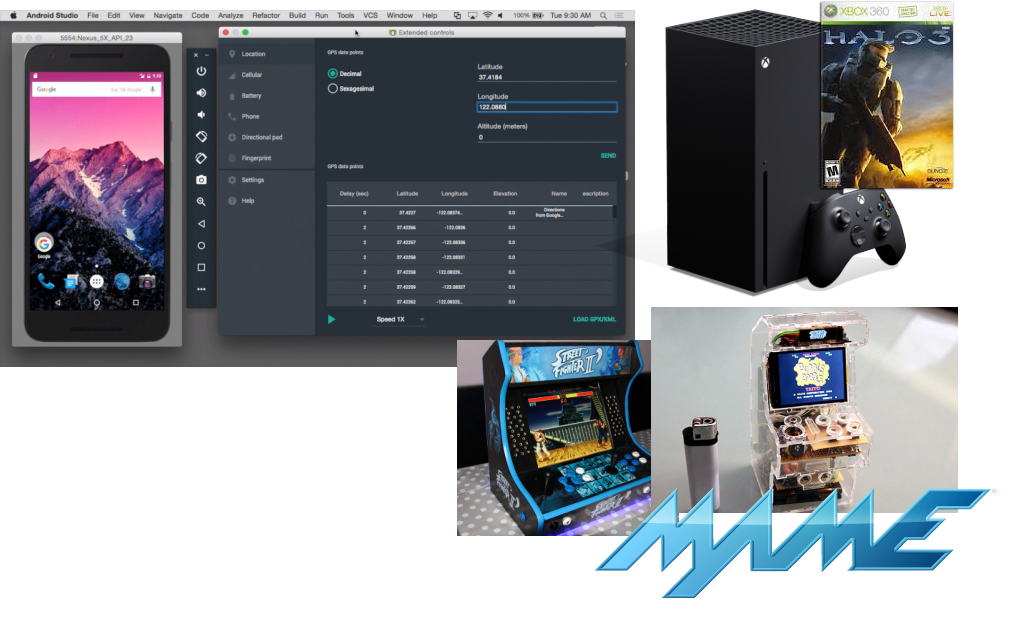
Emulation allows creating virtual machines whose CPU has an architecture (ISA) that is different from that of the host computer. This is useful for software development or to provide backward compatibility. A few examples are illustrated below. The development frameworks for smartphone applications (iOS/Android) are generally used on standard desktop/laptop machines running Intel x86-64 CPUs, and allow the creation of virtual machines representing smartphones, which generally embed ARM64 CPUs, for testing purposes. Modern video game consoles provide some degree of retro-compatibility with previous generations; for example, the Xbox Series X, released in 2020, can run Xbox 360 games that came out starting in 2005. Emulation can also let users create virtual machines for hardware that is not widely available anymore on modern hardware, e.g. old arcade machines.
Cloud Computing
Virtualisation enables cloud computing, a computing paradigm in which cloud providers own a large quantity of computing resources (server farms) and provide remote access to these resources to their clients, known as tenants. This allows tenants to offload local computing workloads to the provider’s infrastructure. Tenants share access to the provider’s resources, and it is common for multiple clients of a cloud provider to execute their workload on the same physical host. Because, as a general rule, tenants do not trust each other, it is very important for the resource sharing enabled by the cloud to be secure: the entire cloud business model relies on the proper isolation between tenants’ workloads. Imagine if there was no such isolation between two distrusting clients whose workloads are co-located on the same host. One of these clients may be able to read and/or modify the code/data related to the other’s workload, which would negate most of the benefits of cloud computing.
This strong isolation required between tenants’ workloads is achieved by placing their applications in separate virtual machines. As we will see next, security/strong isolation between VMs is one of the design principles of virtualisation.
There are several ways for clients to leverage the cloud:
- Infrastructure as a Service (IaaS), in which clients rent VMs running on the provider’s infrastructure to run their workloads, e.g. a web server.
- Platform as a Service (PaaS), in which tenants develop and deploy their own applications using dedicated cloud frameworks, e.g., Google App Engine.
- Software as a Service (SaaS), where clients replace a commonly-used local service (e.g. an internal web server) with the cloud provider’s solution, e.g. using Gmail or Outlook 365 for emails.
- Function as a Service (FaaS), a newer paradigm in which developers deploy on the provider’s infrastructure individual functions that run on demand and automatically scale without managing servers.
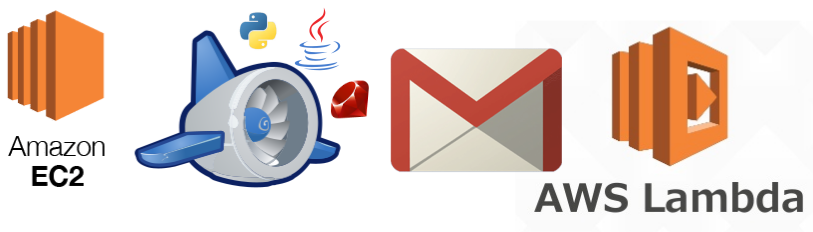
The main goal of cloud computing for tenants is to save on management, infrastructure, development, and maintenance costs. Below are a few logos of popular services: AWS EC2 (IaaS), Google App Engine (PaaS), Gmail (SaaS) and AWS Lambda (FaaS):
Security
Because the isolation between the virtual machines running on the same host is so strong, virtualisation has many security applications beyond cloud computing.
Sandboxing confines an untrusted workload within a VM, ensuring that it cannot access the rest of the host’s resources. Beyond the obvious need for that in cloud computing, sandboxing is also useful when doing virus/malware analysis, running honeypots, and more generally running any piece of code that is not fully trusted (e.g., executables downloaded from the internet). Qubes OS, whose logo is illustrated below, is a security-focused desktop operating system that uses virtualisation to isolate each application into a separate VM to reduce the impact of security breaches.
VM introspection consists in analysing the guest’s behaviour from the host. This is quite useful in security-oriented scenarios; however, it can be a difficult task because of the lack of visibility into what is going on inside a VM when viewed from the host.
Virtualisation: In-depth Definition
Let’s now see a more in-depth definition of the concept of virtualisation. It is adapted from Hardware and Software Support for Virtualization by Tsafrir, Bugnion and Nieh:
Virtualisation is the abstraction at a widely-used interface of one or several components of a computer system, whereby the created virtual resource is identical to the virtualised component and cannot be bypassed by its clients
This applies to a virtual machine: the abstraction at the software (OS)/hardware interface. The virtual machine presents to the OS a set of virtual hardware which is identical to its physical counterpart, so existing OSes designed for physical machines can run as is in a VM. Guest OSes cannot escape this VM abstraction: as we will discuss, the isolation between a VM and the virtualisation layer or other VMs is very strong.
Multiplexing, Aggregation, Emulation
Virtualisation, in its general definition, is achieved by using/combining three main principles:
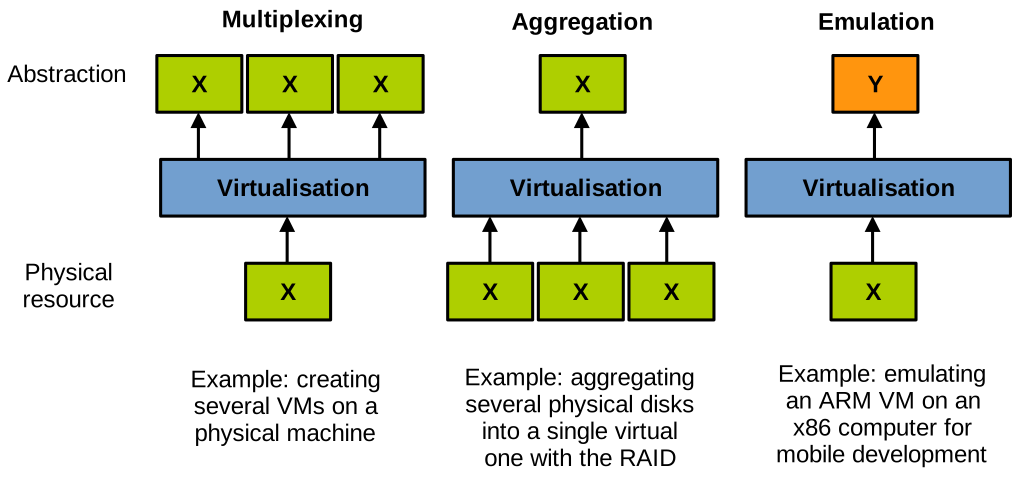
- Multiplexing consists in creating several virtual resources from a single physical resource. A well-known example of multiplexing is the creation of several VMs on a single physical host machine.
- Aggregation consists in pooling together several physical resources into a single one. An example here is RAID, which groups together several storage devices into a single one with higher performance/capacity/reliability.
- Emulation consists of creating a virtual resource of type Y on a physical resource of type X. An example here is emulating a virtual machine of a different architecture than the host.
Virtual Machines
There are several different types of VMs, illustrated below, and in this course unit we are only interested in a subset of them (highlighted in red in the diagram):
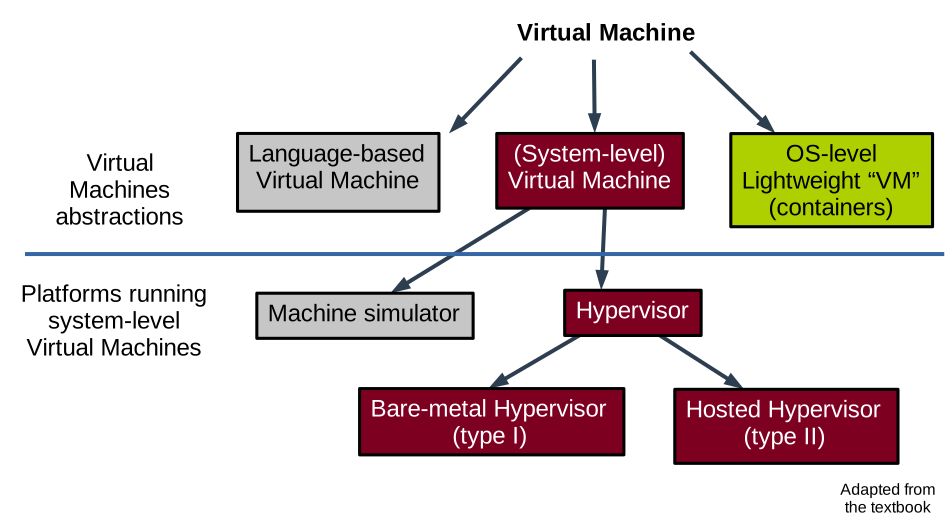
System-level Virtual Machines
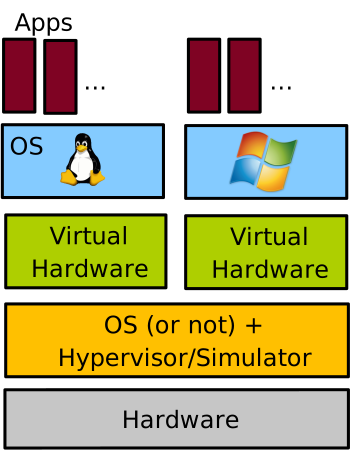
System-level virtual machines create a model of the hardware for a (mostly) unmodified operating system to run on top of it.
Each VM running on the computer has its own copy of the virtualised hardware. This is the type of VM one creates when e.g., running two different OSes (here Linux and Windows) each within its own VirtualBox VM on a single physical machine:
Machine Simulators and Emulators
Machine simulators and emulators create on a physical host machine a virtual machine of a different architecture. We already discussed emulation: it is useful for reasons of compatibility with legacy applications/hardware, software prototyping, etc. An example here would be to use QEMU in its full emulation mode.
Architecture simulators simulate computer hardware for analysis and study. This is useful for computer architecture prototyping, performance/power consumption analysis, research, etc. An example of a popular computer architecture simulator is Gem5. With emulation each guest instruction is interpreted in software, which is extremely slow: it is common to see 5x to 1000x slowdown when running in an emulated environment compared to native execution.
Hypervisor/VMM-based Virtual Machines
Contrary to emulation, a hypervisor-based VM creates a VM of the same architecture as the host. The hypervisor is also called Virtual Machine Monitor (VMM). This is the main type of VMs we will study in this course unit.
Hypervisor-based VMs rely on direct execution for performance reasons: the speed of software running in these VMs is very close to native execution. With direct execution, the VM code executes directly on the physical CPU, at a lower privilege level than the hypervisor, for security reasons that we will study in depth. A hypervisor still needs to rely on emulation for a very small subset of the instructions the guest executes: the VMM emulates only sensitive instructions. These are the instructions that would allow the VM to escape the VMM’s control if executed natively (e.g., installing a new page table). Upon encountering a sensitive instruction, the VM switches (traps) to the hypervisor which emulates it: trap-and-emulate model. Once the VMM is done emulating the sensitive instruction, the execution of the VM can resume directly on the CPU.
Examples of VMMs/hypervisors are Xen, Linux KVM, VMware ESXi, MS Hyper-V, Oracle VirtualBox, etc.
OS-level Lightweight “VMs”
OS-level lightweight sandboxing technologies create isolated environments that may look similar to a VM from the user’s point of view. However, there is no virtualisation of the hardware, and as such there is no virtual machine: all the isolation is managed by the host OS using mechanisms that restrict the view of OS resources for the software running within the sandbox environment. Containers represent a prime example of such lightweight OS-level virtualisation technologies. We will cover containers briefly in the last lecture of this course unit.
Hypervisors: Memory Denomination
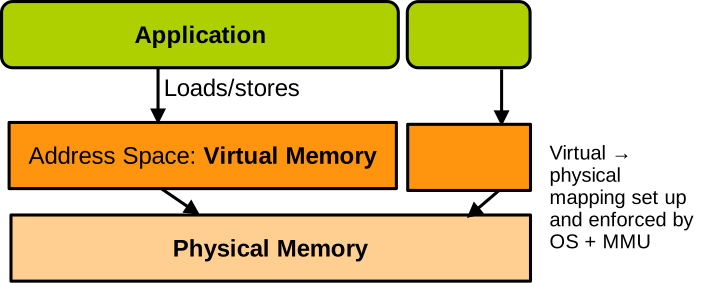
We need to cover one last definition, related to how memory is organised in virtualised scenarios. For a non-virtualised machine, software running on the CPU executes load and store instructions to access memory. These load and store instructions target virtual addresses, and the MMU transparently maps these accesses to the corresponding physical memory based on the translation information contained in the page table currently in use. The page table is set up by the OS and is walked on every memory access to determine the target physical address.
When running virtualised, we have something like this:
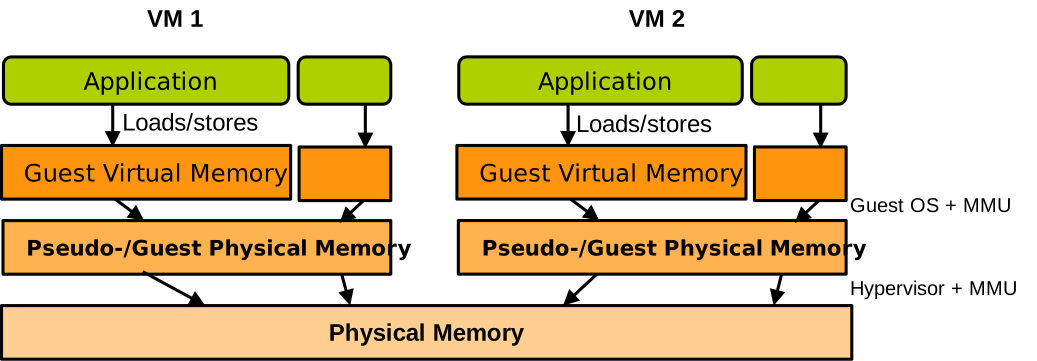
There is another level of translation added, which is taken care of by the hypervisor. It corresponds to the memory that the guest thinks is its physical memory. It is called pseudo physical memory or guest physical memory. Like virtual memory, it just corresponds to another level of indirection and does not hold any data – only physical memory does. So when software running in the VM accesses memory with load and store instructions, it targets virtual addresses – guest virtual addresses. The page table installed by the guest OS translates these accesses into guest physical memory accesses, and the hypervisor must somehow ensure that these guest physical memory accesses are translated into physical memory accesses. We will see how this is done soon.