Operating Systems Basics
The slides for this chapter are available here.
Motivation
Virtualisation consists of running several operating systems (OSes) on the same computer. To understand how this is possible, we need to understand the basics of how an OS works and what it expects from the hardware. This lecture focuses on the CPU and memory; I/O will be covered later.
Basic OS Principles
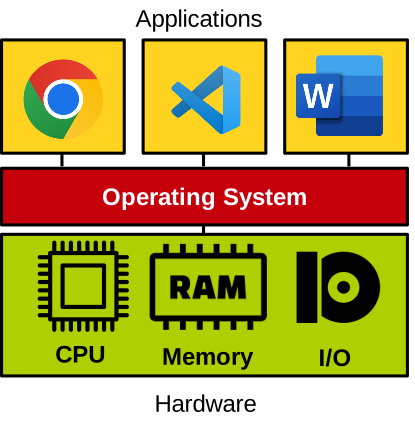
A computer consists of hardware: a CPU, memory, and I/O devices (e.g., disk, network). The OS directly manages this hardware and provides standardised abstractions for applications to use it safely. Applications cannot access hardware directly for stability and security reasons.
Examples of abstractions include processes and threads for CPU/memory, filesystems for storage, and sockets for networking.
These abstractions are accessed via system calls (e.g., open, read, write, mmap on Linux).
Boot Process
When a computer powers on, the motherboard firmware (BIOS) performs basic hardware initialisation and runs the bootloader (e.g., GRUB). The bootloader loads the OS kernel, which then initialises hardware and itself before running applications. This is illustrated here:

Execution Model
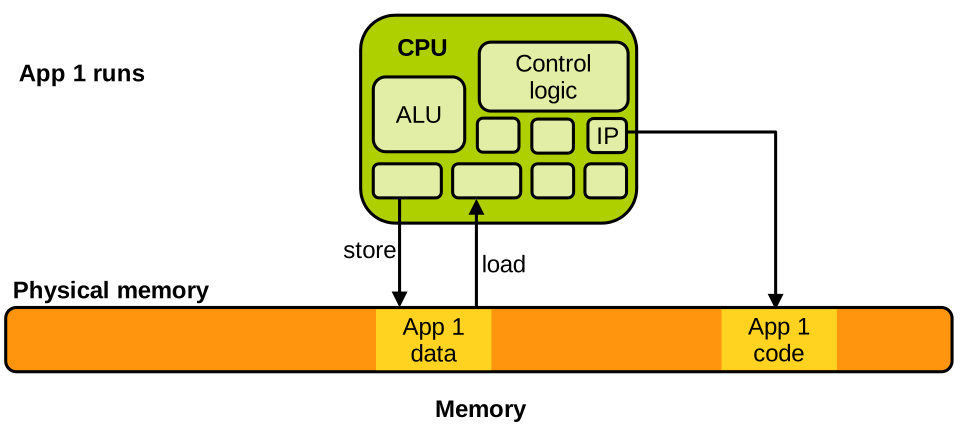
The CPU consists of an ALU, control logic, and registers. The instruction pointer (program counter) points to the next instruction in memory. Load/store instructions read/write data from/to memory. Let’s assume we don’t have virtual memory for now: memory is just a large array of bytes determined by how much RAM the machine has, indexed from address 0 (@0 below) to the address of the highest byte. The state of an application on the CPU is defined by the contents of its registers, which can be saved/restored during context switches.
Basic Execution Model
Below is a simple sketch of a CPU and the associated memory based on the above description when an application named App 1 runs. Parts of the memory contain this application’s code and data. The instruction pointer points to the instruction currently being executed by the CPU within the application’s code, and if it’s a memory access instruction (load/store), it accesses the application’s data:
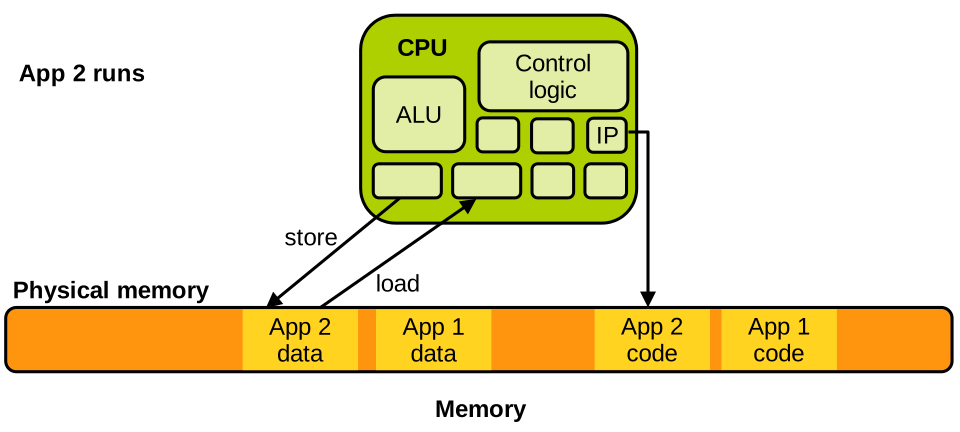
Let’s assume the scheduler now decides to schedule another task, App 2, on the CPU. This application has its own data and code, which are also located in memory:
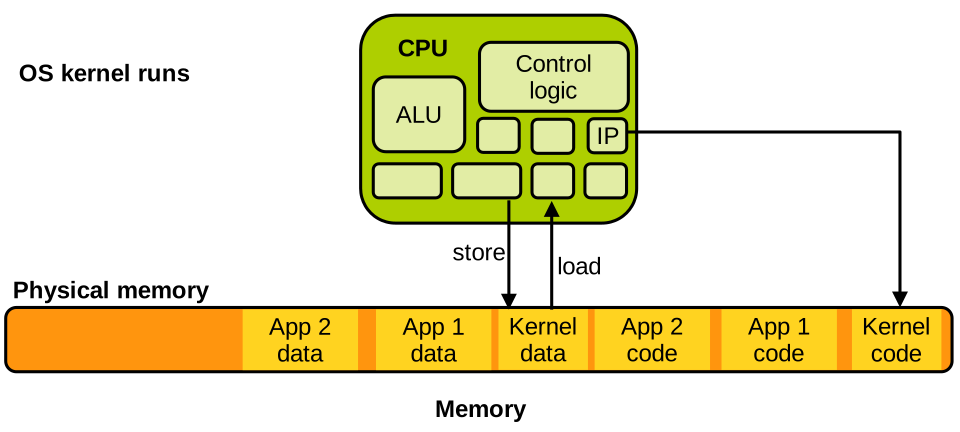
The operating system is itself nothing more than a large computer program, so when it runs, things look the same: the OS kernel code and data are also somewhere in memory:
Context Switches
A context switch happens when the OS scheduler decides to switch the task currently executing on the CPU with another task. Let’s assume that app 1 was running but needs to be scheduled out and replaced by app 2. We have seen that the state of a task on the CPU consists of the content of the registers: hence, context switching between the two applications involves switching the content of all relevant registers. The values of these registers are first saved in app 1’s memory: they correspond to the state of app 1 at the time it is scheduled out. The CPU will reload them later when app 1 resumes execution. The CPU registers are then loaded with the values corresponding to app 2’s state. These values come from app 2’s memory, and they were saved there the last time app 2 was scheduled out. The instruction pointer is among the updated registers, and after the context switch it will point to the next instruction app 2 should run: it can then properly resume. This is illustrated here:
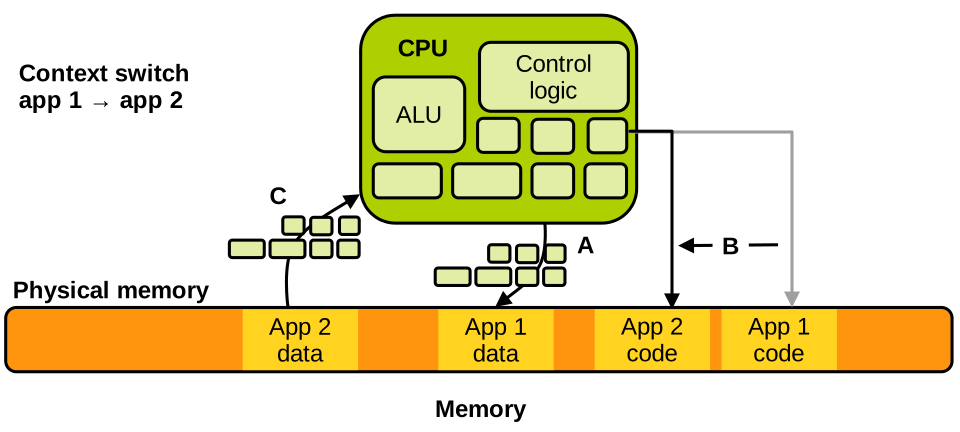
The way context switches work make the scheduling in and out of tasks completely transparent from the point of view of the tasks’ execution: the implementation of the programs these tasks run does not have to know that they may be scheduled out for an unknown amount of time.
Kernel Invocation
The goal of an operating system is to run as little as possible, making sure that the applications doing useful things get most of the CPU cycles. But when is the kernel invoked? The kernel executes only at 2 occasions:
- At boot time, after the bootloader loads it; and
- At runtime, when an interrupt occurs.
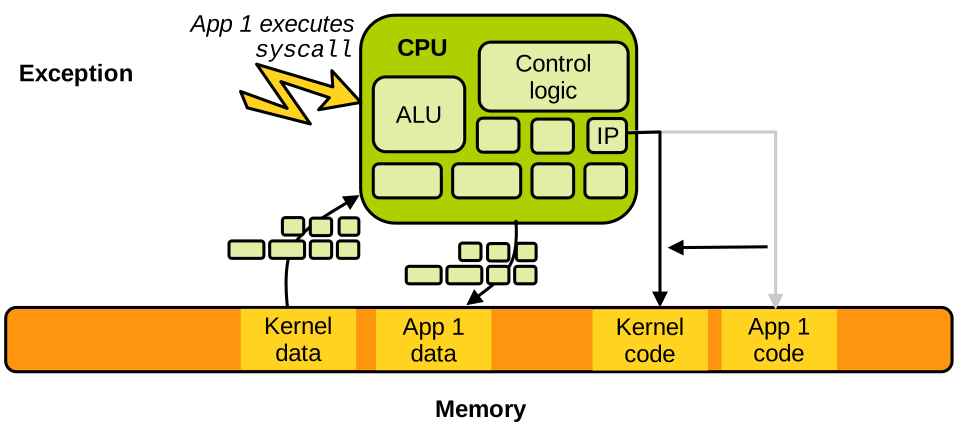
That’s it. After boot time, the kernel runs primarily in response to interrupts. Interrupts are notifications sent to the CPU that can originate from I/O devices, for example the network card signalling that a network packet is ready to be retrieved. Interrupts can also originate from the CPU itself when certain instructions are executed under particular circumstances, leading to events named software exceptions. Examples of such events are faults, e.g., division by zero, page faults, and voluntary transitions from the application to the kernel: system calls. More on these very soon.
Let’s walk through a simple example to understand how the CPU manages an interrupt. Assume App 1 is running on the CPU, and an interrupt arrives from the network card. When the interrupt is received, the application must pause immediately and the kernel needs to acknowledge the interrupt and act on it; then the application can resume. This is realised very similarly to a context switch, but this time the CPU state switches from the application’s to that of the kernel. This is sometimes called a world switch, i.e., a switch between the application’s world and the kernel’s world:
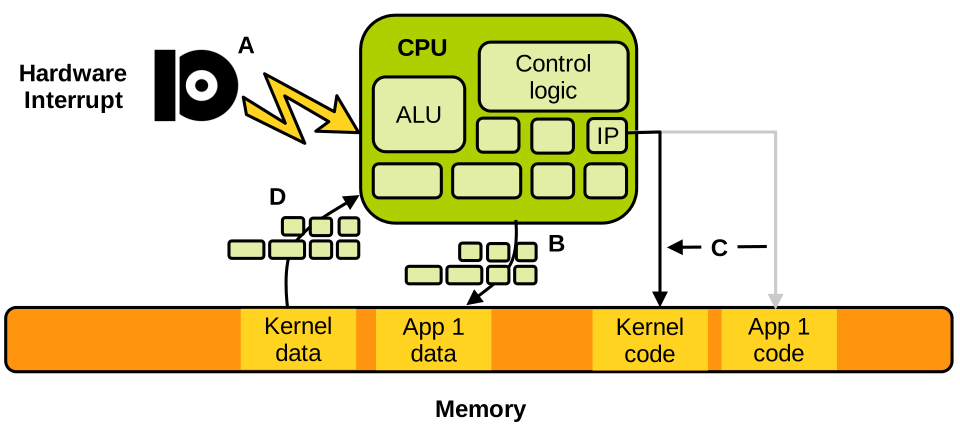
The different steps illustrated above are:
- A. App 1 runs, and the interrupt is received.
- B. App 1’s state of execution is saved.
- C. and D. The kernel state of execution is loaded. This generally corresponds to a “clean” state of execution with the instruction pointer pointing to the interrupt handler entry point.
Once the kernel is done processing the interrupt, the state of the application is restored and it resumes: the interrupt was processed completely transparently from the application’s point of view:
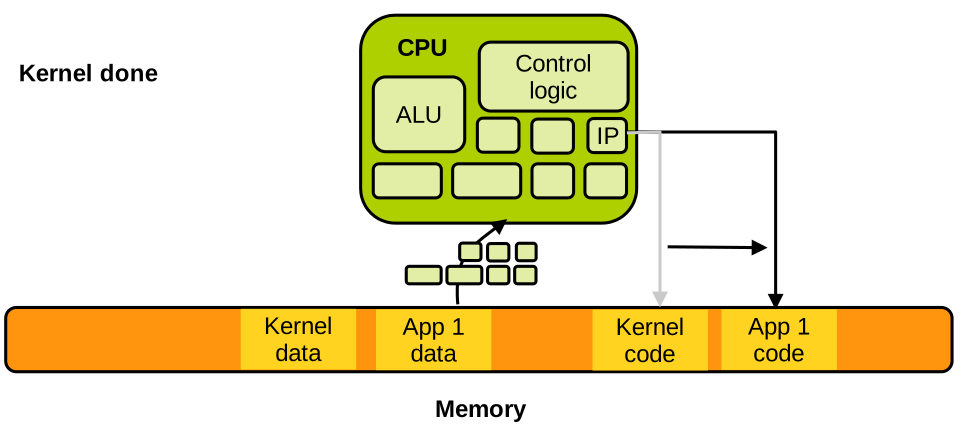
Our example was of a hardware interrupt, but things are exactly the same for a software exception. When an application performs a division by zero, the CPU receives an interrupt immediately, switches to the kernel, which will act upon the fault: in that case it is likely to kill the task and schedule another one. Similarly, when the application accesses a memory page that is not mapped (page fault), the kernel will either kill the application if it determines this is an illegal access, but it may also e.g., map this page if it is a case of on-demand allocation, or bring it from swap if it was swapped out.
Security
Memory Isolation
A very important security invariant for operating systems is that two applications should not access each other’s memory. Imagine if your mail client falls under the control of an attacker following the execution of a malicious attachment: if that now malicious mail client was able to peek into the memory of your password manager, where your passwords are often present in clear, it would be game over for you. The same concern applies to two applications executing on behalf of two different distrustful users on a shared machine: we don’t want them to access each other’s memory. There are some exceptions to this rule, e.g., when applications want to share memory to establish communication, but in general two applications should be strongly isolated from each other.
Another important security invariant is that applications should not be able to access the kernel’s memory. Indeed, the kernel is responsible for the isolation between applications. So imagine if an application executing on behalf of a standard (non-administrator) was able to update the kernel’s memory to give itself administrator privileges, that would be terrible from the security point of view.
Virtual Memory
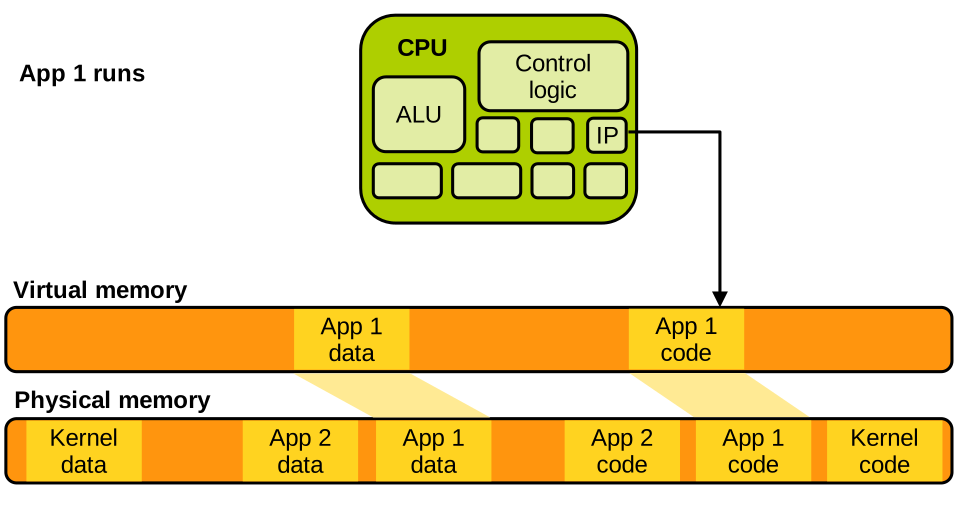
The OS enforces the aforementioned invariants using the Memory Management Unit (MMU), which maps virtual addresses to physical addresses. Each application is given an isolated view of memory, preventing cross-application and application/kernel interference.
Virtual memory gives each application access to a virtual address space. It’s a very large array of bytes that the application accesses using standard load and store instructions. Once virtual memory is enabled (very early during the boot process), the CPU cannot access physical memory anymore, so past the boot process all loads and stores target virtual memory.
The MMU maps virtual addresses to physical ones and performs the translation transparently upon each load/store. Today, modern CPUs store that translation information in page tables. Each application is given its own page table defining a private address space for that application. Page tables are set up and maintained by the kernel, in such a way that each application sees only its own code and data. For example, when App 2 runs, its page table is set up as follows:
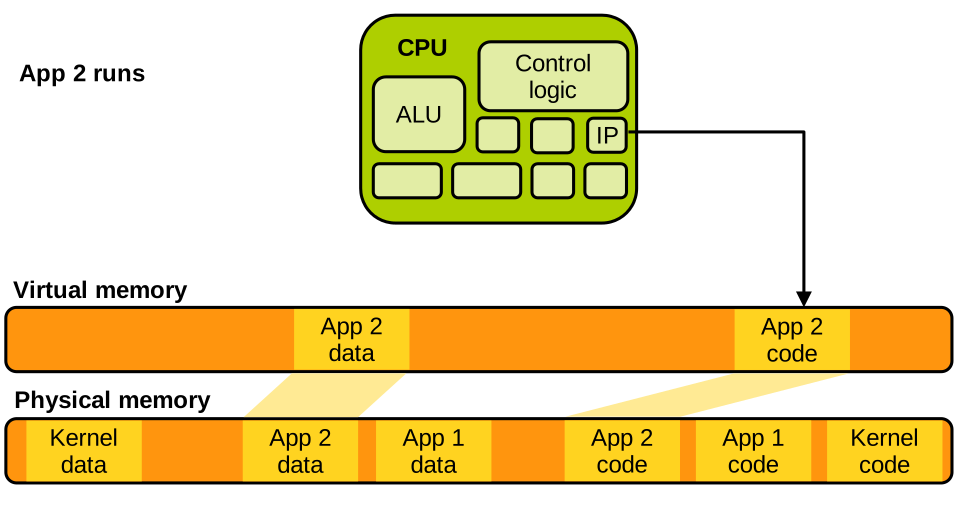
App 2 can only access its own code and data. It can access neither App 1’s memory, nor the kernel’s, because that memory is simply not mapped within its address space. Similarly, when App 1 runs, we have the following:
When the kernel runs it can generally access the entirety of memory:
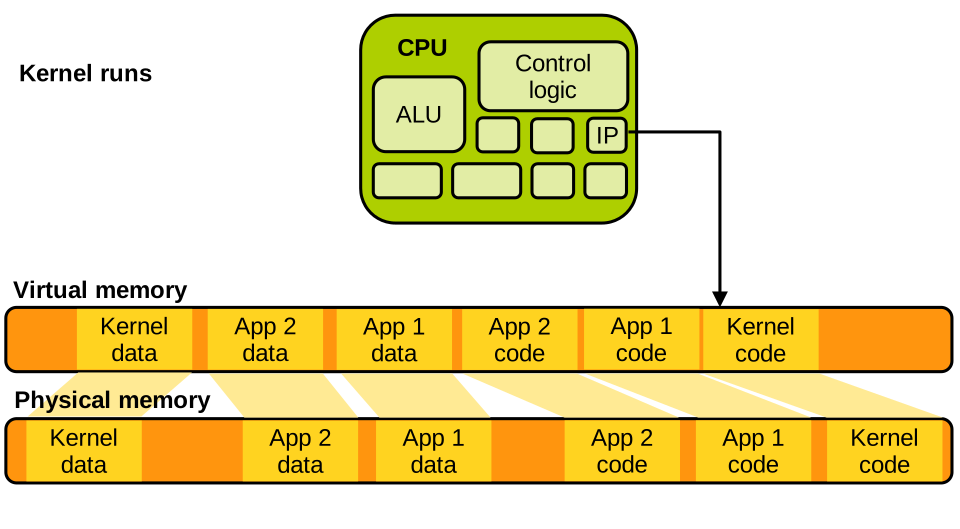
This is required for the OS to do its job; e.g., to perform a context switch, it needs to access both tasks’ memory.
System Calls
Applications cannot directly execute kernel code for security reasons. To request OS services, they use system calls. System calls are invoked through a special instruction that triggers a software exception. This is an interrupt, so things work exactly as we described previously: the CPU switches from running the application to running the kernel, the kernel processes the system call and once done resumes the application’s execution:
If we decompile an application invoking the clock_gettime system call and we look at the machine code executed when that invocation is done, we see the following:
00000000004672b0 <__clock_gettime>:
#...
  4672f8:    mov    %r12,%rsi
  4672fb:    mov    %ebp,%edi
  4672fd:    mov    $0xe4,%eax
  467302:    syscall
# ...
This is Intel x86-64 assembly.
We can see that some values are written into registers, which corresponds to setting up the parameters of the system call and indicating what system call is being invoked (0xe4 is 228 in base 10 which is the system call ID of clock_gettime).
Then the syscall instruction is executed, which triggers the exception.
Once the kernel runs it will inspect the registers in question to determine what system call is being made and what its parameters are, and act accordingly.
Privilege Modes
Some CPU instructions are privileged, e.g., installing page tables or shutting down the CPU. We cannot let an application run them directly: imagine if an application could install a new page table, it would be able to map (hence, access) any part of the physical memory and the strong isolation we said was crucial to the computer’s security would be broken.
Privilege modes ensure applications cannot execute these instructions. At any point in time the CPU runs in one of the two available privilege modes. More precisely:
- When applications run, the CPU is in user mode.
- When the kernel runs, the CPU is in supervisor mode.
Privileged instructions can only be executed in supervisor mode, and they trigger an exception when executed in user mode. So if an application tries to install a new page table, the instruction for doing that will trap to the kernel which will likely kill the app.
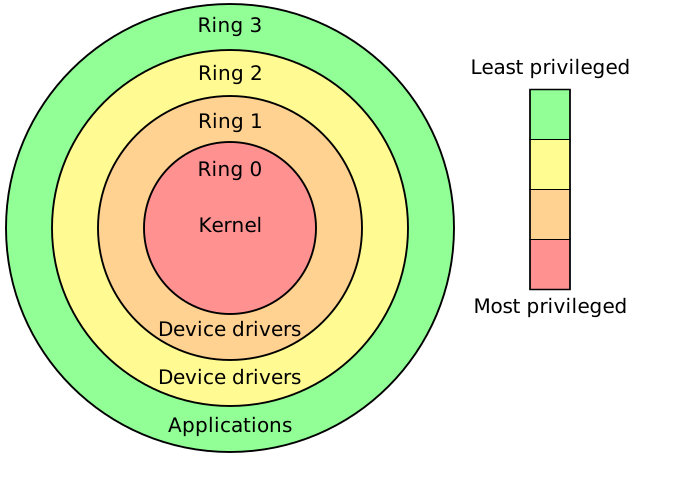
On x86, these are implemented as protection rings: ring 0 for kernel (most privileged), ring 3 for user (less privileged). Rings 1 and 2 were used in x86-32 to run software that required some privileges (e.g. device drivers), but they were not used much and were dropped for x86-64, which only kept rings 0 and 3, i.e. supervisor and user modes.
x86’s rings can be illustrated as follows:
Other ISAs have very similar CPU privilege mechanisms.