Introduction to C
You can access the slides 🖼️ for this lecture.
Here we will briefly introduce the C programming language. The vast majority of systems software is written either in C or in C++, which is an extension of C. These languages are also known to be memory-unsafe, a concept we will study in detail in this unit and that has very important implications in terms of security. For these reasons, knowledge of C programming is quite important in systems security.
This is a short introduction covering the basics of the language, its standard library, pointers, and memory management. Readers already familiar with these areas can skip this part. For readers with absolutely no knowledge of the language, this will not be a comprehensive overview of C, so make sure to check the recommended additional readings available on Canvas.
The C Programming Language
C is a very old programming language. It was designed in the 70s, but it is still widely popular today. In fact, it is one of the top 10 programming languages in most popularity rankings. There are many popular programs written in C:

C is the default programming language for systems software: operating systems (e.g., Linux or macOS), web servers (Apache, Nginx, etc.), database systems (e.g., SQLite), virtual machine monitors (e.g., Xen). Many language runtimes such as Perl or Python are written in C, as well as other tools that programmers use daily, for example Git.
There are many reasons why C is still a popular programming language. First, it is low-level and lets the programmer manipulate hardware, such as the CPU or memory, quite directly. This is convenient when writing low-level software such as operating systems. Second, because of the simplicity of the language, programs written in C can be very fast and can have a very low memory footprint: this is crucial in domains such as high-performance computing and embedded systems. C has also established a popular syntax, which is reused by many languages that came afterwards, such as Java, C++, and many others. Finally, C is portable: you will find compilers translating C code for each modern CPU architecture.
All these benefits come at a cost: C leaves a lot of room for the programmer to make mistakes, in particular when manipulating memory. We say that C lacks memory safety, and the bugs that can be introduced this way can lead to serious security issues, as we will see later in this unit.
Despite these problems, C is still extensively used in many domains even beyond systems software: HPC, embedded systems/IoT, etc.
Hello World in C
This is the traditional “hello, world” program, written in C:
#include <stdio.h> // needed to use printf which is declared in stdio.h

// main is the program entry point
int main() {
    printf("hello, world!\n"); // print "hello, world!" on the console
    return 0;                  // returning from main exits the program
}
The program starts by including stdio.h, which is part of the standard library and will give us access to a function to print text to the console.
Then we have the definition of the main function: it returns an integer (int) and does not take any parameters.
In C main is the entry point, which means it contains the code that will run when the program starts.
Within main we use the printf function to print "hello, world!" to the console.
As you can see, every statement in C ends with a semicolon: ;.
The program returns 0 from main.
0 is an integer code that, as a convention, means success in C.
Returning from the main function will also exit the program.
C is a compiled language, which means we first need to transform our source code, which is nothing more than a text file, into an executable program that can be run:
$ gcc hello.c -o hello
$ ./hello
hello, world!
We compile on the command line with GCC, a C compiler.
It takes the source file as input, here it is hello.c.
Then we have -o and the name of the executable we want to create, here it is hello.
Once the compiler is done, the program can be executed by simply typing ./hello.
Warning and Errors. Another important aspect of the compiler is that it will check for programming mistakes and will emit warnings and errors. These will be displayed on the console. Errors are unrecoverable and will stop the compilation process, while warnings are not. Make sure to fix warnings and errors in the order they are emitted by the compiler. Please also make sure that all the code you produce as part of this unit compiles without any warning or error.
Variables
In C, like in many languages, variables have a name, a type, and a value.
For example, in the code below, the first variable declared is named a:
#include <stdio.h>

int main() {
  int a;                 // declare a of type int (signed integer)
  int b; int c;          // b and c of type int
  int d = 12;            // declare d of type int, and set its value
  int x, y = 10, z = 11; // declare x, y and z, set values for y and z

  a = 12;      // set a's value to 12
  b = 20;      // set b's value to 20
  c = 10 + 10; // set c's value to 20
  a = b;       // a = 20
  d++;         // d = d + 1
  y *= 2;      // y = y * 2;
}
a’s type is int, which denotes a signed integer, and after the assignment, a’s value is 12.
Each variable must be declared before being used.
This is done as shown in the code snippet, with the type followed by the name of the variable: int a;.
You can also see how to declare a variable and set its value in a single statement (as with d), and how to declare several variables of the same type in a single statement (as with x, y, and z).
Next, in the code snippet, we manipulate these variables, assigning them values.
You can also see a bit of arithmetic; in particular, pay attention to the d++ statement: it corresponds to incrementing d by one.
The next statement, y *= 2, corresponds to multiplying y by 2.
Types
In C types have two main functions. First, they help the compiler check the validity of the operations applied to variables. Second, they define how much memory space should be allocated to store variables. C has 3 basic types: integers, floating-point numbers, and characters:
int my_integer = -12345;
float my_float = 42.5;
char my_char = 'a';
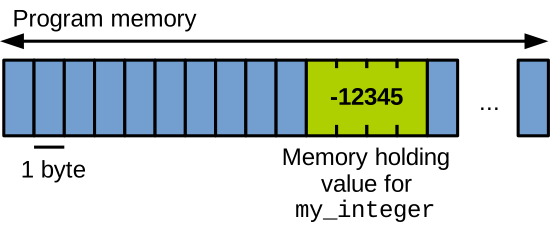
If we look inside the program’s memory at runtime, we’ll see that the compiler reserved a certain amount of space (bytes) for each variable.
For example, here we have my_integer, which is an int (a signed integer).
On an Intel x86-64 CPU an int is stored on 32 bits, which is 4 bytes:
Qualifiers, Storage Size in Memory
Types can be augmented with qualifiers to request more or less space:
int so_short = sizeof(short int);
int so_int = sizeof(int);
int so_uint = sizeof(unsigned int);
int so_long = sizeof(long int);
int so_longlong = sizeof(long long int);
int so_float = sizeof(float);
int so_double = sizeof(double);                           // storage sizes on x86-64:
printf("size of short:         %d bytes\n", so_short);    // 2 bytes
printf("size of int:           %d bytes\n", so_int);      // 4 bytes
printf("size of unsigned int:  %d bytes\n", so_uint);     // 4 bytes
printf("size of long int:      %d bytes\n", so_long);     // 8 bytes
printf("size of long long int: %d bytes\n", so_longlong); // 8 bytes
printf("size of float:         %d bytes\n", so_float);    // 4 bytes
printf("size of double:        %d bytes\n", so_double);   // 8 bytes
Such qualifiers allow storing larger/smaller numbers.
For example, on Intel x86-64, the type short int will be stored on 2 bytes, so it can store fewer signed integers than a traditional int.
Conversely, the type long int will be stored on 64 bits, which is 8 bytes.
float and double are used for floating-point numbers, stored respectively on 4 and 8 bytes on x86-64.
Finally, pay attention to the unsigned qualifier, which lets the programmer indicate that a variable will only store positive integers.
With the qualifiers long/short we can request larger/smaller storage sizes.
The storage size for a given type depends on the architecture, and the programmer should use sizeof to get the exact size of a type on a given machine.
Printing to the Console
As we have seen earlier, the printf function allows us to print text on the console, which is also called the standard output.
It takes as its first parameter what is called a format string, which contains the text to print.
It then takes zero or more additional parameters, which are variable names, referencing the variables whose values should be printed within the format string.
These values replace the special markers located in the format string.
int i = -42;
float f = 12.34;
char c = 'a';
long unsigned int lui = 500;
double d = 42.42;

// prints "-42, 12.34, a, 500, 42.42":
printf("%d, %f, %c, %lu, %lf\n",
    i, f, c, lui, d);
Markers depend on the type of the variable one wants to print.
For example, we use %d for signed integers, %f for floats, and %c for characters.
Markers for types corresponding to numbers can be prefixed with l to indicate longs and doubles.
You can see a few examples in the code snippet above.
If you run this code, the program will display the value of each variable, separated with a comma.
Arrays
Like most languages, C supports arrays.
You can see here how to declare a one-dimensional integer array named array, and how to set each of its elements to a certain value:
int array[4];  // declare an array with 4 elements of type int
array[0] = 42; // set the elements' content
array[1] = 43;
array[2] = 44;
array[3] = 45;
printf("%d\n", array[2]); // print the 3rd element of the array
Note that array indexes start at 0 in C.
With the printf statement you can also see how to reference a particular array slot to print its value.
C also supports arrays with multiple dimensions: the array named arr2d is a two-dimensional array:
int arr2d[2][2];  // declare a 2-dimensional 2x2 array of ints
arr2d[0][0] = 12; // set the elements' content
arr2d[0][1] = 13;
arr2d[1][0] = 14;
arr2d[1][1] = 15;
See how it is declared, with the size of each dimension indicated between brackets. It can then be indexed with 2 sets of brackets, one for each dimension.
Although there is no string type per se in C, strings are represented as arrays of characters.
See this example with str, which contains the string hi:
char str[3];  // in C, strings are array of characters...
str[0] = 'h';
str[1] = 'i';
str[2] = '\0'; // ... that end with the `\0` termination character
Note that in C, to be valid, a string must end with the character \0, which is the termination character.
Make sure when you declare an array that it has enough space for what you want to store plus the termination character.
An important thing about arrays in C is that they are laid out contiguously in memory. We can illustrate the memory layout of each of the arrays in the code snippets above as follows:

array is an array of integers, so on x86-64 each of its elements will have a size of 4 bytes.
They are laid out in memory one after the other: array[0] first, then array[1], and so on.
Similarly, the integers of the two-dimensional array arr2d are laid out contiguously, dimension by dimension.
Finally, regarding the string str, on every architecture the size of a character is one byte.
So the array str looks as follows in memory: h, then i, then the termination character \0.
Conditionals, Functions
Conditionals.
In C we write conditionals as follows: we start with the if keyword, followed by the condition:
int num = 10;

if (num > 0) {
    printf("Number is positive\n");
} else if (num < 0) {
    printf("Number is negative\n");
} else {
    printf("Number is zero\n");
}
If the condition is true, which in C translates into the condition evaluating to something different from 0, the code coming next within brackets will run.
If the condition is false (in other words, if it evaluates to 0), you can add as many else if statements to evaluate additional conditions.
The code within the brackets of the final else will run if none of the previous conditions evaluated to true.
Another form of conditional is the switch-case statement:
int choice = 1;
switch(choice) {
  case 1:
    printf("choice is 1\n");
    break;
  case 2:
    printf("choice is 2\n");
    break;
  default:
    printf("choice is neither 1 nor 2\n");
}
It allows running code based on the value of what’s in between parentheses after switch, here it is choice.
If the value of choice is 1, the code after case 1 will be executed.
If it is 2, the code after case 2 will be executed.
And if it is anything else, the code after default will run.
Make sure to end each of the pieces of code after case with a break to exit the body of the switch.
Functions.
Regarding functions, here you can see how we define a function named add:
int add(int a, int b) {
    return a + b;
}

int main() {
  int result = add(2, 2);
  printf("2 + 2 = %d\n", result);
}
It takes two integers as parameters, a and b, and returns an integer which is in effect the sum of the two parameters.
You can also see how it is called from the main function, which stores its return value in a variable and prints it.
Loops
The for loop will start with i equal to 0, will iterate until i is no longer inferior to 5, and will increment i after each iteration with i++:
int i;

for (i = 0; i < 5; i++) {
    printf("For loop iteration %d\n", i);
}
The while loop does exactly the same thing, however you just specify a condition between parentheses, which when true will have the iterations continue.
That is why i needs to be incremented manually within the loop’s body:
int i = 0;
while (i < 5) {
    printf("While loop iteration %d\n", i);
    i++;
}
Command Line Parameters
Regarding the command line parameters you can pass to your program, in C they are managed through the arguments of the main function:
int main(int argc, char **argv) { // 'char ** argv' means 'char argv[][]'
    printf("Number of command line arguments: %d\n", argc);

    for(int i = 0; i<argc; i++)
      printf("argument %d: %s\n", i, argv[i]);  // no need for braces when the
                                                // body of the loop is a single line
    return 0;
}
argc is an integer that indicates the number of command line parameters.
Note that the first parameter is always the name of the program being executed, so that number will be at least 1.
argv is an array of strings that contains the values of the command line parameters.
In the example code above, the program iterates over all command line parameters and prints the value of each of them.
Custom Types
You can create your own types with the typedef keyword.
This is useful to alias other types, for example long types with several qualifiers, into a single and easy to write type.
For example, in the code below we can alias long long unsigned int with my_int, which is much shorter to write.
After the typedef, we can use my_int anywhere we would have used long long unsigned int.
typedef long long unsigned int my_int;

// 'my_int' is now equivalent to 'long long unsigned int'

int main(int argc, char **argv) {
    my_int x = 12;
    printf("x is: %llu\n", x);
    return 0;
}
Custom Data Structures
You can create custom data structures by aggregating primitive types.
This is done with the struct keyword.
In the code below we have an example of a custom struct person, which has 3 fields:
- A
name, which is a string (an array of characters) - A
size_in_meters, which is a float - And a
weight_in_grams, which is an int
struct person {
    char name[10];
    float size_in_meters;
    int weight_in_grams;
};

void print_person(struct person p) {
    printf("%s has a size of %f meters and "
        "weights %d grams\n", p.name,
        p.size_in_meters, p.weight_in_grams);
}

int main(int argc, char **argv) {
    struct person p1;
    p1.size_in_meters = 1.6;
    p1.weight_in_grams = 60000;
    strcpy(p1.name, "Julie");
    struct person p2 = {"George", 1.8, 70000};
    print_person(p1);
    print_person(p2);
    return 0;
}
In main we can declare a variable p1 which is of type struct person.
Then we can set a value for each of the fields with the . operator.
We also use strcpy (string copy), from the standard library, in order to set the name to “Julie”, which is much faster than setting each character one by one.
Similarly, we have another variable p2, this one declares and sets values for each of the data structure’s fields with a one-liner.
Next we call the print_person function twice, which is defined above: this function prints the value of each field of a struct person.
Observe how it references each field with the . operator.
Rather than typing struct person each time you want to reference your custom type, you can use a typedef.
Below, after having defined a struct named s_person, we can alias it with typedef into person, which is much simpler to use.
Next we just have to use the type person each time we want to refer to our custom data structure type.
typedef struct s_person {
    /* fields here ... */
};

typedef struct s_person person;

void print_person(person p) { /* ... */}

int main(int argc, char **argv) {
    person p1;
    person p2 = {"George", 1.8, 70000};
    /* ... */
}
The fields of an instance of a custom data structure are laid out in memory contiguously and in order. Assume we have the following code:
struct person {
    char name[10];
    float size_in_meters;
    int weight_in_grams;
};

/* ... */

struct person p1 = /* ... */;
Then p1 will be laid out in memory as follows:

The struct person’s fields are a string, a float, and an int.
They are laid out contiguously in memory, in the order defined in the struct declaration, so on x86-64 we have:
- 10 bytes for the string
name, 1 byte for each character - 4 bytes for the float
size_in_meters - 4 bytes for the int
weight_in_grams