Core Concepts
You can access the slides 🖼️ for this lecture.
Computer Security
Computer security has been historically focused on protecting physical machines to prevent theft of or damage to the hardware. Today, in many scenarios the value of the data that is processed, stored, and exchanged by computers is greater than that of the hardware itself. Thus, modern computer systems security focuses on information security: the key ideas are to prevent theft of or damage to the information handled by the computer, and to prevent disruption of the various services provided by computer systems. In other words, systems security aims to safeguard computer systems against unauthorised 1) access, 2) modification, and 3) disruption.
Computer systems security can be broken down into these two main components:
- Software security: protecting applications and systems software against vulnerabilities and their exploitation; and
- Hardware security: protecting CPU/memory/devices against attacks.
Software and hardware security are heavily intertwined: the software relies upon hardware features to enforce various kinds of software-level security policies and invariants. To that end, the software controls the hardware and makes a series of assumptions that it behaves correctly. There are also many forms of attacks that cross the software-hardware boundary.
On the software side, systems security is concerned with the safety of systems software. Systems software comprises various types of low-level software that manipulate the hardware directly, or that are at least considered close to the hardware: these include operating systems, virtual machine monitors and other virtualisation technologies, and low-level applications such as language runtimes/interpreters, web servers, system utilities, etc.
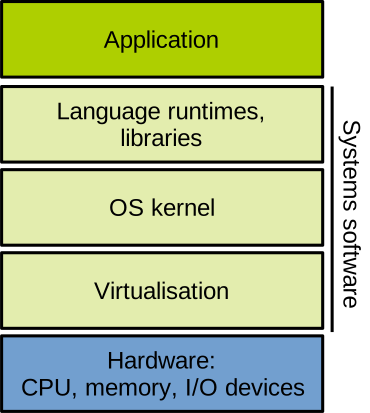
We are going to see a lot of such stacked diagrams in this unit. A computer system can be represented as a stack of layers: the hardware (CPU/memory/devices) is at the bottom, and the software on top of it. The software itself is a pile of stacked layers of abstractions, with the low-level components (those manipulating the hardware more or less directly) such as the OS kernel or a virtual machine monitor at the bottom, and higher level components (applications and libraries) executing on top. The idea is that a high-level layer generally needs to go through the stack to access the lower-level components: for example, applications rarely invoke the operating system directly, but rather make use of libraries to do so. Applications don’t access the hardware directly either, but must request services from the operating system to do so.
Why is Systems Security Important?
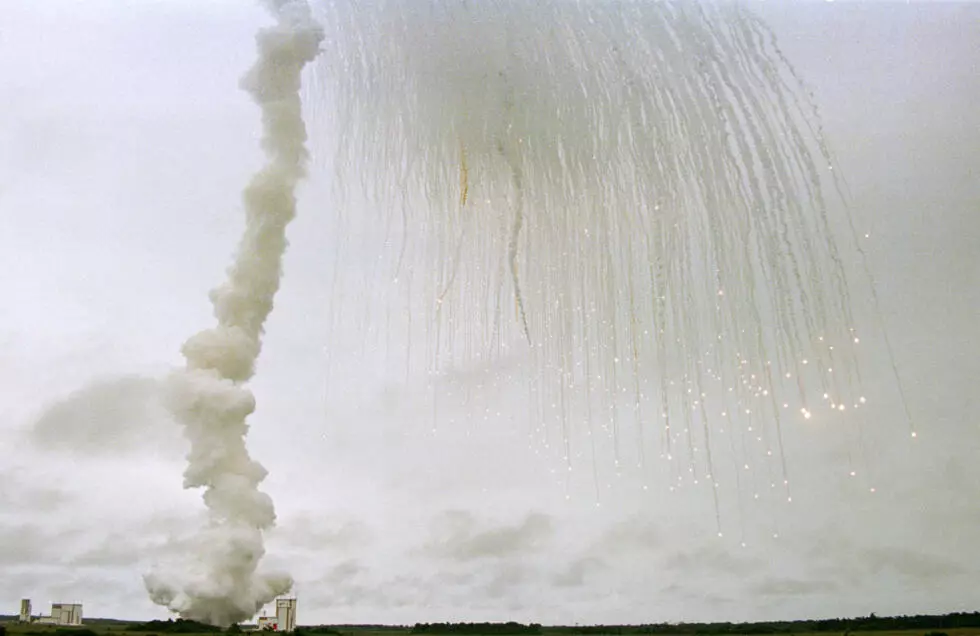
On 4th June 1996, the first flight of the European Space Agency’s Ariane 5 rocket took place. 40 seconds after lift-off, the rocket went off track and disintegrated, as shown in the picture above. The root problem was a 16-bit signed integer overflow in a software module. That module integrated code originally written for Ariane 4, the previous generation’s rocket. That code made assumptions that no longer held for Ariane 5, which led to the overflow and ultimately the destruction of the rocket. It was not even doing anything useful after lift-off, so one may ask why it was even running. The total cost of the incident (i.e., of the bug) was $370 million.
Beyond this particular incident, today our world is massively computerised, and the impact of cyberattacks is huge: critical service disruption, financial losses, theft and destruction of critical and personal data, etc. In 2017, private records from more than 160 million US and UK citizens were stolen from the Equifax credit reporting agency following a cyberattack. The lawsuits that followed led to Equifax having to pay up to $700 million in settlement. In 2024, a cyberattack on London hospitals affected more than 800 planned operations and 700 outpatient appointments, requiring them all to be rescheduled.
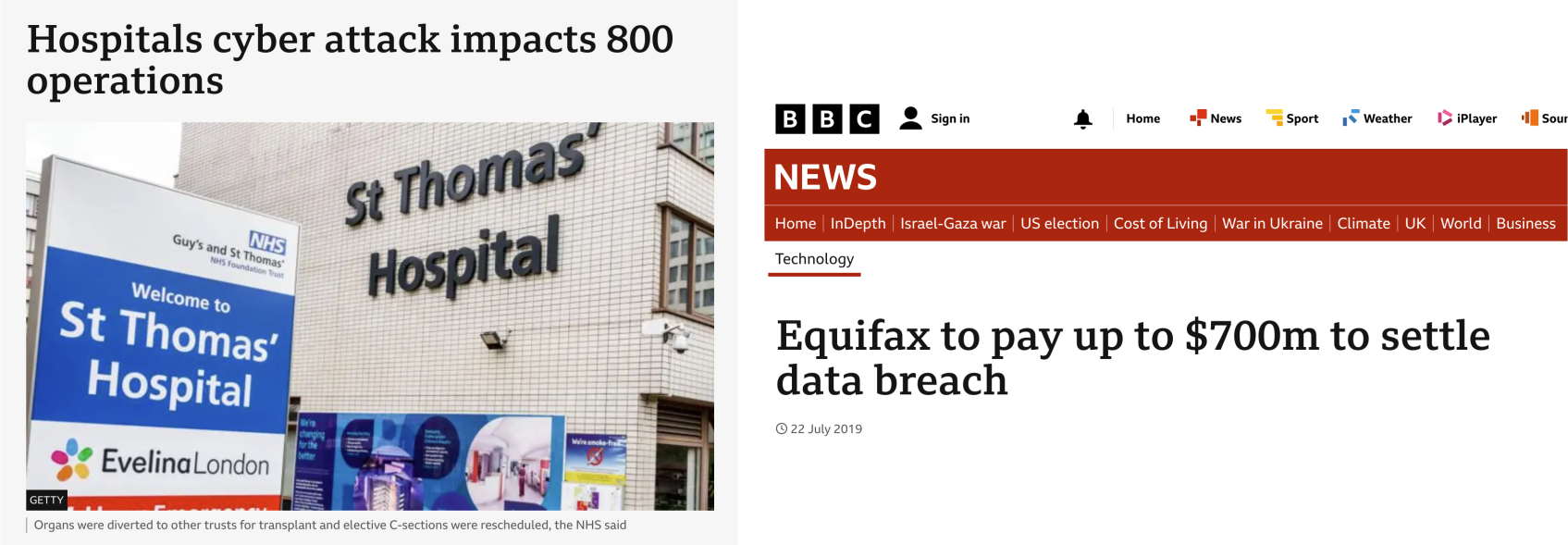
These are just a few examples of how bad things can be, and the problems illustrated here are made even more concerning as computer systems are increasing in complexity, so the likelihood of vulnerabilities that enable cyber incidents and attacks is increasing, and the threats/attack vectors are constantly evolving.
Attack Surface
Computer systems are not perfect and programmers implementing them make mistakes and introduce bugs. Some of these bugs represent security vulnerabilities that can be exploited to mount attacks with various effects on the system integrating the buggy and vulnerable software/hardware component. Vulnerabilities can be present at every level of the hardware/software stack:
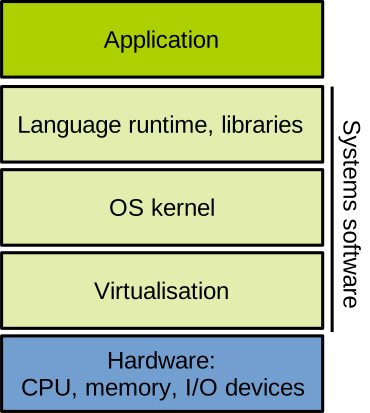
At the application level, any bug that can be triggered by external input (e.g., network, command line arguments, etc.) that may be under the control of an attacker represents a potential security issue. Taking our previous example, the Equifax breach, the attack was made possible because of a bug in Apache Struts: CVE-2017-5638 was a vulnerability in a web application parser allowing an attacker to execute code remotely and completely take over the server hosting the web application.
Vulnerabilities in commonly used software are classified and referenced as Common Vulnerabilities and Exposures (CVEs): each identified security issue gets its own number made up of the year it was discovered and an identifier.
Going down the stack, vulnerabilities can also be present in libraries and language runtimes that are used to run most applications.
A very serious example here is the 2018 NodeJS event-stream attack.
An attacker took over the event-stream library repository, and released a malicious version of the library, designed to steal from crypto wallet software.
The attack was widespread as event-stream was used extensively (~100 million downloads that year).
Further down the stack, the operating system is a cornerstone of security in a computer system, because it executes with a high level of privilege, so an attacker taking over an OS or making that OS misbehave can do a lot of damage. Operating systems are also, in most cases, huge and complicated pieces of software, implemented with millions or tens of millions of lines of code: the chances of these gigantic codebases containing bugs are very high. A famous example of an OS vulnerability is Linux’s CVE-2016-5195 (Dirty CoW): to exploit it, a normal (non-root) user triggers a race condition to obtain write access to read-only memory mappings and escalate privileges to become the administrator (root). This was used to, among other things, root Android phones.
Virtualisation software suffers from the same issues as the OS layer: it is complex software that runs with elevated privileges. The Xen virtual machine monitor suffered in 2014 from CVE-2014-7188, which is a read overflow in the interrupt controller emulation, allowing code running in an unprivileged virtual machine to leak data from the virtual machine monitor or from other virtual machines running on the same host. Imagine an attacker renting a cloud VM, able to steal critical data from either the other tenants running on the same physical machine or the cloud provider. The patch to fix the issue required an emergency forced reboot of about 10% of Amazon Web Services’ Elastic Cloud (AWS’s VM renting offering), which was a severe interruption of service.
Finally, at the bottom of the stack, the hardware is often assumed to work perfectly by computer system developers working on the software stack. Unfortunately the hardware is not exempt from bugs and vulnerabilities. In 2017, the Spectre and Meltdown vulnerabilities were discovered by researchers. These vulnerabilities allow an attacker to leak data between processes or from the kernel by exploiting the speculative execution engine of Intel processors. The speculative execution feature of modern processors can be tricked into leaking data from processes and the kernel. Some countermeasures were developed in software and through CPU microcode updates, but they introduced non-negligible performance slowdowns.
Vulnerabilities
As said above, modern software and hardware used in production are increasingly complex. The Linux kernel v6.12 is made up of 26 million lines of (mostly C) code. An Apple Silicon M3 Max SoC has 92 billion transistors. Given the scale and complexity of these components, there is simply no way to prove that they are 100% correct and bug-free.
In fact, they are likely not correct and bug-free: software/hardware designers and engineers are human; they make mistakes and introduce bugs. Many bugs are mostly silent under normal operation, so they are hard to detect, and may live for years in codebases without being identified. These bugs have various consequences: obviously they can lead to software/hardware instability or crashes, which is already bad enough (see the Ariane 5 issue mentioned above). Furthermore, some bugs, when triggered in a certain way, will allow an attacker to cause harm to the computer system integrating the buggy software/hardware component: these are vulnerabilities.
Attacker’s Objectives
A malicious actor attacking a computer system may want to:
- Read what they are not supposed to read: sensitive data such as passwords or crypto keys, information about the target system (e.g., open ports) to enable further attacks, etc.
- Write what they are not supposed to write: corrupt sensitive data structures to escalate privilege, inject malicious code and data, forge access tokens, escape detection, etc.
- Control what they are not supposed to control: disturb operation (denial of service), execute code to enable further attacks, etc.
Defender’s Objectives: The CIA Triad
On the defence side, these are the high-level security properties we want computer systems to maintain:
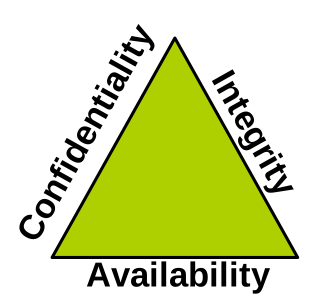
- Confidentiality: preventing unauthorised disclosure of sensitive information. Examples of confidentiality enforcement include using encryption, access control, secure deletion, etc.
- Integrity: preventing unauthorised tampering with sensitive information. Examples include using checksum verification, digital signatures (keys), etc.
- Availability: preventing disturbances to the operation of a computer system, for example with denial of service protection, redundancy/replication, backups, etc.
Another important concept is that of identity, i.e., making sure that an actor is who they claim to be. This can be achieved by using passwords, certificates, and other identification methods.
Trust Models
When protecting a computer system, establishing trust models means reasoning about what components of the system are trusted to work correctly vs. what components are not. Taking the point of view of the different actors that may interact with a particular computer system, the trust model will vary. Here is an example in the context of Infrastructure as a Service (IaaS, i.e., the renting of virtual machines – VMs – in the cloud). We can represent the system as follows:
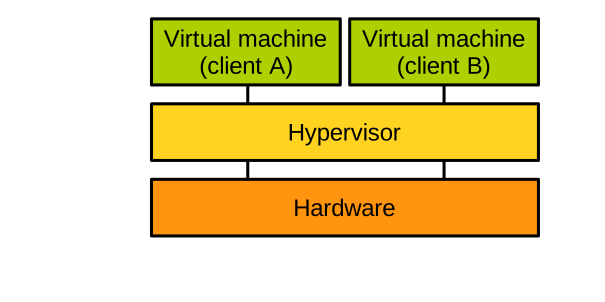
A cloud provider is offering virtual machines (VMs) for rent to clients (also called tenants). The cloud provider owns the host hardware, and uses a virtual machine monitor (also called hypervisor) to multiplex the hardware between these VMs. Each tenant gets their own VM. From a high-level point of view, the cloud provider does not trust the tenants: they may run arbitrary, possibly malicious, software within their VM. The tenants trust the cloud provider to provide a working service, but tenants do not trust each other: for example, two competing companies may end up renting 2 VMs located on the same host, and company A does not want its data to be accessed by company B – even if it is located on the same physical host.
From the cloud provider’s point of view, the trust model is as follows:
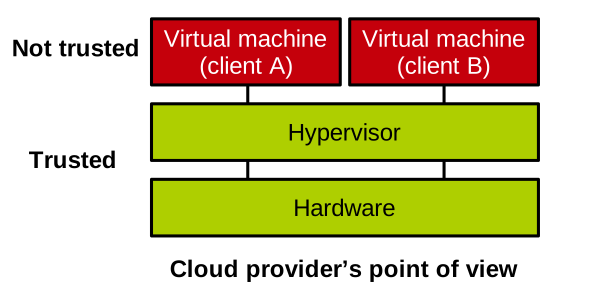
The hardware and the hypervisor are trusted to work correctly. The hypervisor enforces the isolation between VMs, and as mentioned, we do not want one VM being able to access the memory of another. The hypervisor must also enforce the isolation between VMs and itself: this is important because in most virtualisation scenarios the hypervisor has access to the memory of the entire machine, i.e., the memory of all VMs, and we do not want a VM to force the hypervisor to access the memory of another VM on its behalf. The VM/hypervisor isolation is controlled by the hypervisor and enforced through hardware mechanisms, so both entities need to be trusted to work correctly: if that is not the case, the system is not secure.
From the point of view of a tenant (e.g., A), the trust model is the following:
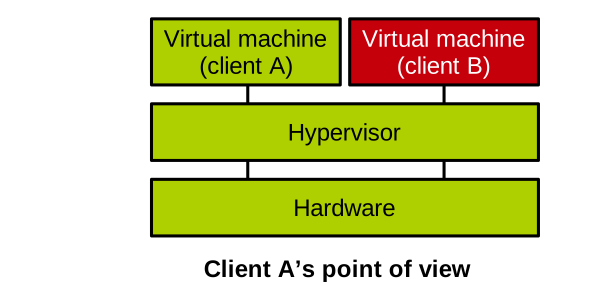
Tenant A does not trust the software running in the VM rented by tenant B. A does trust that the hardware and hypervisor work correctly; otherwise, as described above, nothing would prevent the other tenant, B, from accessing or disturbing A’s VM. From B’s point of view, the trust model is similar: B does not trust A’s VM, but it trusts the hypervisor and the hardware.
Through that example, we can see that trust models vary depending on which actor and scenario are considered.
Trusted Computing Base
The trusted computing base (TCB) is the set of software and hardware components that are critical to the security of the system: they are assumed to be working correctly to maintain the target security guarantees. TCBs are the components shown in green in the picture illustrating our examples of trust models. The TCB should always be as minimal as possible to make it easy to secure: the more software/hardware we need to trust, the greater the chance that the TCB contains bugs/vulnerabilities, and the less likely our trust model is to hold. The TCB should also always be isolated from non-critical components of the system: they are not trusted, and if their interactions with the TCB are not controlled, the security of the system is at risk. In our IaaS example, from the cloud provider’s point of view, the TCB includes the hardware and host systems software (hypervisor, host kernel/firmware/boot process).
Threat Model
When reasoning about a system to secure/defend, in addition to establishing at least one trust model and defining the corresponding trusted computing base, security practitioners must also establish a threat model. It represents a series of assumptions about what the attacker can and cannot do.
Next, we discuss a few examples of threat models within the context of our IaaS scenario.
Attacks always come from untrusted system components and are aimed at trusted components. If we first take the point of view of the cloud provider and consider the relevant trust model, our threat model is as follows:
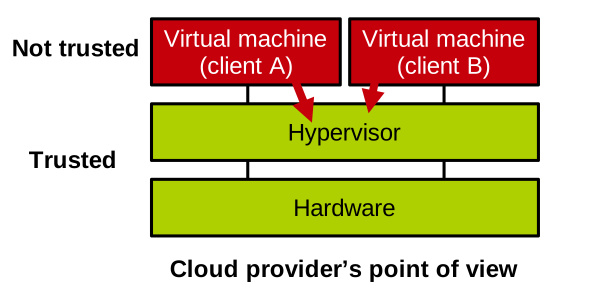
The provider does not trust the tenants, so this is where attacks come from. Tenants may attempt to exploit the interface exposed by the virtual machine monitor to trigger bugs at that level and disturb or access the memory of other tenants or the hypervisor. Tenants may also attempt to leverage hardware vulnerabilities (e.g., side channels) to achieve these goals.
From tenant A’s point of view, we have the following threat model:
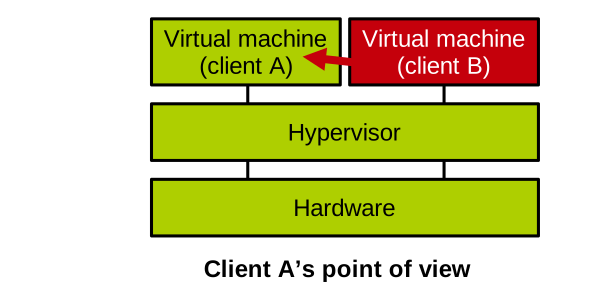
A does not trust B, which is where attacks come from. In addition to B attacking the hypervisor or the hardware to get to A, as explained in our scenario from the cloud provider’s point of view, B may also try to subvert A, assuming the two virtual machines interact somehow.
If we now take the point of view of tenant B, let us, for the sake of illustration, consider a trust model that is slightly different from the one seen above. In that trust model, B does not trust A, but it also does not trust the virtual machine monitor:
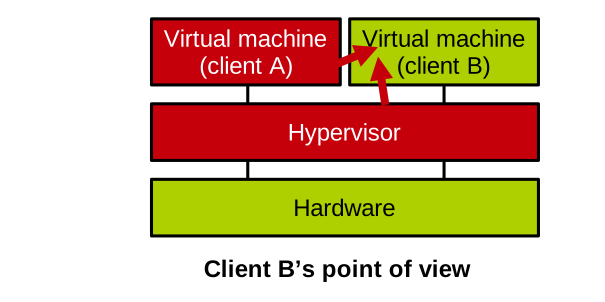
That is a viable trust model: many companies are reluctant to use the cloud to offload some of their internal IT workloads because they fear the cloud provider having access to their business data. With that trust model, our threat model is as follows: attacks can come from A, but also from the hypervisor. That is a particularly difficult threat model to protect against, because the hypervisor runs on the CPU at a higher privilege level than B’s VM. Still, there are some modern hardware mechanisms that allow preserving B’s VM confidentiality even in the presence of an untrusted hypervisor: they are called trusted execution environments, and we will cover them in a future lecture.
Isolation Approaches
We have seen that to protect a system and enforce a trust model, trusted components need to be isolated from untrusted components: in our example, the hypervisor must be isolated from VMs, a particular VM needs to be isolated from the other VMs running on the same host, etc.
There are three high-level isolation models, corresponding to three trust models:
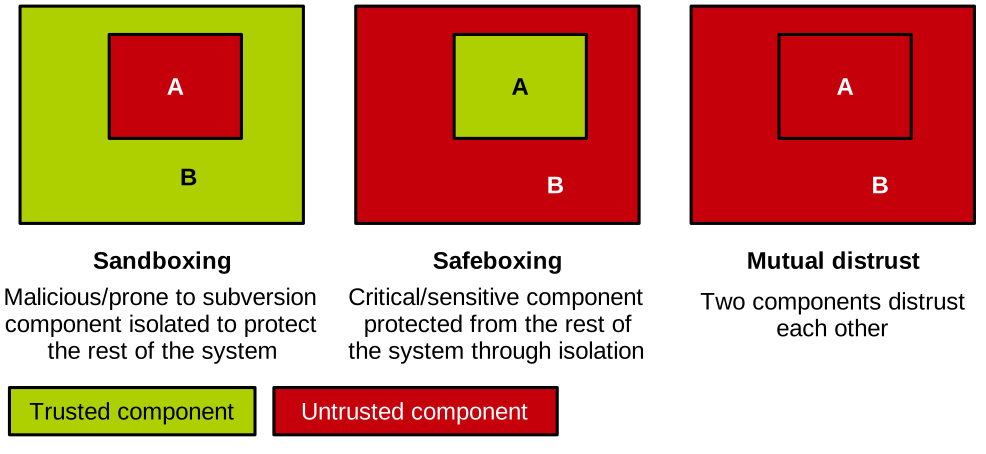
Sandboxing an untrusted component means isolating it from the (trusted) rest of the system. Sandboxing is applied to components with a low degree of trust, prone to being subverted: third-party software, code written in unsafe languages, etc. This approach is quite widespread in today’s computer systems: a process is isolated from the rest of the system by the operating system. Similarly, a VM is isolated from the rest of the system by the hypervisor. Taking a different example, web pages belonging to different sites and running in different tabs are sandboxed in a web browser. The web browser also sandboxes the execution of untrusted code such as JavaScript.
Safeboxing a trusted component corresponds to isolating it from the (untrusted) rest of the system. Safeboxing is applied to components that are particularly critical to the security of a system: the TCB or part of it, as well as components manipulating critical data. The approach can, for example, be used to isolate a crypto library in a web browser, or code manipulating cleartext passwords in memory in the context of a password check.
Finally, mutual distrust corresponds to the isolation of components that distrust each other. There are many examples of mutual distrust scenarios: peers communicating within a peer-to-peer network, a web browser and an HTTP server exchanging requests and web pages over a network connection, different processes communicating through inter-process communication, and our past example of a VM interacting with an untrusted hypervisor.
The Principle of Least Privilege
The principle of least privilege states that each component (processes, users, etc.) in a system should only be granted the minimum permissions required to perform its duties correctly. This limits the damage that can be done to the system should this component be subverted by an attacker. This principle was introduced in the paper The Protection of Information in Computer Systems in 1975 by Saltzer and Schroeder. This is a seminal paper in the field of computer systems security, well worth reading.
The principle of least privilege is applied extensively today, and examples are plentiful:
- The privilege levels of execution on modern CPUs prevent standard applications from executing privileged instructions (e.g., the ability to map memory or to shut down the computer), reserving that privilege to the operating system only.
- Many computer systems manage permissions with access control techniques, such as user-based file access permissions, application permissions (to access the camera, microphone, location, etc.) on mobile systems, etc.
- The program
sudo, that is supposed to be used only for the operations requiring root privileges - etc.
The principle of least privilege is an ideal objective that we try to approach as much as possible when securing a computer system. In practice, it is hard, not to say impossible, to fully achieve it: for reasons of complexity or performance, system components often end up overprivileged.