Memory Safety
You can access the slides 🖼️ for this lecture.
The concept of memory safety relates to making sure that the CPU running a program accesses memory at the right location and at the right moment. This is enforced in memory-safe languages such as Python or Java with a series of checks and mechanisms that, for various reasons, are unfortunately absent in the most popular languages used to write systems software, C and C++: they are memory-unsafe. This has severe security implications. Here we present the concept of memory safety in detail.
Introduction
Memory safety is about protecting a program from a whole class of bugs that arise when the program accesses memory it should not, for example, when indexing an array out of bounds, overflowing a buffer, or accessing freed memory. Some of the protections against these issues are applied at compile time, and others at runtime. A major problem is that the programming languages used to write most systems software, C and C++, lack most of these protections: we say that C and C++ are not memory safe. When memory safety violations occur, not only can the program crash or exhibit strange behaviour, but, more concerning, these violations represent security issues that can be exploited by attackers to compromise availability (for example, crash a program or a system), confidentiality (leak sensitive data/secrets), and integrity (corrupt important data or code, for example, to escalate privileges).
Memory Safe vs. Unsafe Languages
Memory Safe Languages.
Contrary to C and C++, high-level languages such as Java or Python are said to be memory safe.
They enforce a series of rules at compile time and/or runtime to prevent memory safety violations.
These rules include checking for out-of-bounds accesses, preventing deallocated memory from being accessed or even referenced, making sure that memory can be deallocated only once, and that invalid references such as NULL pointers cannot be dereferenced, making sure that memory is always initialised before being read, and is always accessed through variables of the proper type, etc.
Here is an example of buggy code in Python, where we access an array out of bounds:
numbers = [1, 2, 3]
# Python will throw an out-of-bounds exception here:
print("The fourth number is:", numbers[3])
If you try that code, you’ll get an exception: Python performs a bounds check at runtime when the array is indexed:
$ python3 out-of-bounds.py
Traceback (most recent call last):
  File "/tmp/out-of-bounds.py", line 3, in <module>
    print("The fourth number is:", numbers[3])
                                   ~~~~~~~^^^
IndexError: list index out of range
Memory Unsafe Languages. As we mentioned, contrary to higher-level languages, the most popular languages for systems software, C and C++, are not memory safe. They lack the majority of the memory safety violation checks we mentioned:
- There are no checks for out-of-bounds array and buffer accesses;
- There are no checks for the presence of pointers to deallocated memory or their dereferencing;
- There are no checks for buggy behaviour such as double frees on the same buffer, the dereferencing of invalid or
NULLpointers, or reading uninitialised memory; - The type checking system of C/C++ can easily be bypassed, for example, with casts (which are often needed to write functional programs).
Here is an equivalent C implementation of the Python program we saw on the previous slide:
int numbers[3] = {1, 2, 3};
// In C, no compile-/runtime notification: program misbehaves and prints garbage:
printf("The fourth number is: %d\n", numbers[3]);
Like its Python counterpart, this program indexes the numbers array out of bounds; however, it compiles without any warning or error:
$ gcc out-of-bounds.c -o out-of-bounds
$ ./out-of-bounds
The fourth number is: -968883968
The program does not even crash at runtime, but rather prints garbage.
C/C++: Unsafety by Design
The lack of memory safety checks in C/C++ is neither an error nor an oversight in the languages’ specification. The languages’ designers deliberately chose not to implement all the aforementioned checks because they conflicted with the objectives of the languages:
- Because C needs to be fast, we cannot afford runtime checks on bounds, pointer validity, or type correctness.
- Because C needs to have a controllable memory footprint, we similarly cannot afford to hold a lot of metadata about bounds and reference validity.
- Because C requires a predictable execution time in scenarios such as real-time systems, we cannot afford the nondeterministic latencies brought by automatic memory deallocation techniques such as garbage collection.
- Finally, because C is used to write low-level software such as operating system code, it needs to be able to access arbitrary areas of memory, for many tasks such as device communications, setting up page tables, etc.
Trading Off Safety for Speed. To illustrate how the lack of memory safety makes C significantly faster than higher-level languages, let’s look at the following example program:
#define N 100000000  // 100 million

int main() {
    int *arr = malloc(N * sizeof(int));
    for (int i = 0; i < N; ++i) arr[i] = i;

    clock_t start = clock();

    long long sum = 0;
    for (int i = 0; i < N; ++i) {
        // bound check here would be: if (i<N)
        sum += arr[i];
    }

    clock_t end = clock();

    printf("Sum = %lld\n", sum);
    printf("Time = %.3f seconds\n",
      (double)(end - start) / CLOCKS_PER_SEC);

    free(arr);
    return 0;
}
This code initialises an array with the numbers from 0 up to 100000000-1.
It then sums up all of these numbers and prints the result, as well as the time it took to perform the sum.
The time is computed by using the clock function to get a timestamp before and after the sum, and subtracting the two.
Here is the equivalent program in Python:
import time

N = 100_000_000  # 100 million

# Create the list
arr = list(range(N))  # [0, 1, 2, ..., N-1]

# Start timer
start = time.time()

# Sum with bounds-checked access
sum = 0
for i in range(N):
    sum += arr[i]  # Bounds check every time

# End timer
end = time.time()

print("Sum =", sum)
print("Time = {:.3f} "
  "seconds".format(end - start))
The Python version performs exactly the same operations. When we run these two programs, the C version is about 75 times faster (!) than the Python one:
$ gcc speed.c -o speed
$ ./speed
Sum = 4999999950000000
Time = 0.072 seconds

$ python3 speed.py
Sum = 4999999950000000
Time = 5.412 seconds
The performance difference is due in part to the fact that all of Python’s memory safety checks slow the program down significantly.
Common Memory Safety Issues
Memory safety bugs happen in C programs when the developer makes mistakes. Let’s study the main types of memory safety issues.
Buffer/Array Overflows. We have already briefly discussed the buffer overflow, a very common class of bugs. Consider the code below:
int array[4] = {0, 1, 2, 3};

for(int i=0; i<=4; i++)
  array[i] *= 2;          // when i == 4, overflows array
That code contains an array being indexed out of bounds.
This is a subclass of buffer overflows: arrays are laid out contiguously in memory and are, in essence, buffers.
When i equals 4, the array array is indexed out of bounds: the memory past the array is read, multiplied by two, and then written, which is obviously a bug.
The issue can also happen the other way around: addressing an array or a buffer out of bounds before its location in memory (e.g., array[-1]) is a buffer underflow.
Overflows and underflows can both happen in read and write mode.
Use-After-Free/Dangling Pointers.
Another very common error is the use-after-free.
In such a scenario, a buffer previously allocated with malloc is freed with free, and at some point later a pointer referencing that buffer is dereferenced.
From the free statement onwards, the pointer is invalid and references unallocated memory: dereferencing it is obviously a bug.
Below is an example of use-after-free:
int *buffer = malloc(1 * sizeof(int));
// do something with buffer here ...

// after that free, buffer points to unallocated memory:
// it's a dangling pointer (invalid reference)
free(buffer);

// more code here ... the programmer forgets that buffer now points to invalid memory

*buffer = 42; // use after free
Double Free. Freeing the same pointer twice or more is another programmer mistake that may happen when managing memory manually. This will generally trigger some misbehaviour by the memory allocator, which is, once again, a bug. Below is an example of double free:
int *buffer = malloc(1 * sizeof(int));
// do something with buffer here ...
free(buffer);

// more code here ... the programmer forgets that buffer has already been freed

free(buffer); // double free
NULL Pointer Dereference.
Another common bug is the dereferencing of a NULL pointer.
NULL is encoded as 0 in C, so dereferencing a NULL pointer in effect corresponds to accessing the memory at address 0.
Most operating systems do not map the first page of the address space, so in most cases this will translate into the program crashing.
However, if something happens to be mapped at address 0, the program will rather misbehave.
Below is an instance of buggy code dereferencing a NULL pointer:
 int *ptr = NULL;

 // more code here ... the programmer forgets to call malloc ...

 *ptr = 42; // dereference NULL (address 0)

 // ...

 free(ptr); // another problem: try to free a NULL pointer
Reading Uninitialised Memory. In C, static memory (e.g., global variables) that is uninitialised in the code is zeroed out at load time. Regarding dynamic memory (the stack, including local variables and parameters, as well as anything on the heap), its content is not zeroed out at the time of allocation: an uninitialised local variable or an uninitialised heap buffer will contain garbage, and should not be read before being written. Below is an example of buggy code reading uninitialised stack and heap content:
int x;                           // stack variable
int *ptr = malloc(sizeof(int));  // heap content

// what ends up in y and z? We do not know!
int y = x;
int z = *ptr;
So a very important thing to note here is that most of the programming mistakes leading to these memory safety violations are hard to detect. At compile time, the compiler will not emit any warning or error. At runtime, these bugs will lead to the program misbehaving, sometimes quite silently: it may seem to be running fine, although there is actually a bug under the hood. For these reasons, memory errors can be hard to detect and sometimes live silently within production code bases for years or even decades. They can also be quite difficult to reproduce and to debug.
How Do These Errors Sneak In?
The examples of each type of memory safety violation we covered are overly simple, and it’s unlikely that someone would be silly enough to make these mistakes on such small pieces of code. In that context, one may wonder what the chances are for these bugs to happen in real-world production code bases, which are often maintained by experienced programmers.
Memory safety bugs are in fact very common, including in production code written by experienced programmers. Recent numbers by Google and Microsoft show that about 70% of the security vulnerabilities found stem from memory safety-related bugs. The NSA reports that the most prevalent type of disclosed software vulnerabilities are memory safety ones.
Systems software production code bases are generally large, with code bases that can reach tens of millions of lines of code. This complexity makes it quite hard to reason about the code and its safety, to decide when an object can be freed, how to determine the proper size to give to a buffer, the proper number of iterations for a loop, and so on. These code bases also evolve significantly over time, with many programmers contributing to them, bringing even more complexity and increasing the chances of programming mistakes sneaking in, leading to memory safety violations.
Spatial & Temporal Memory Safety
There are two main classes of memory errors, spatial and temporal memory errors.
Spatial Memory Safety corresponds to the enforcement of accesses within the bounds of addressable objects and allocated memory. Examples of spatial violations include buffer over/underflows, indexing arrays out of bounds, etc. The diagram below illustrates examples of spatially valid (green arrows) and spatially invalid (red arrows) memory accesses:
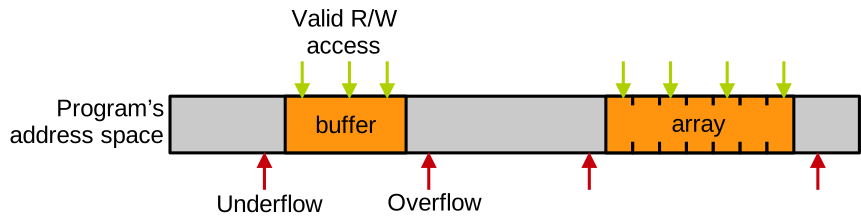
An attacker can exploit these errors to tamper with or leak sensitive data and code, execute malicious code, and disturb or crash the program – in other words, the attacker can break all aspects of the confidentiality/integrity/availability triad.
Temporal Memory Safety corresponds to the enforcement of accesses to memory while it is valid. Temporal violations happen when memory that is no longer valid because it has been deallocated, or not yet valid because it has not been initialised yet, is accessed. Below we can see an example of temporally valid and invalid memory accesses:
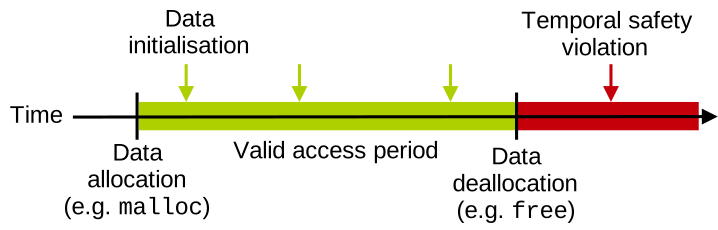
The invalid access is a use-after-free, with a buffer allocated, initialised and accessed legitimately, freed, and accessed again after the free operation. Any access past the moment free was called is a temporal safety violation. Similarly to spatial errors, temporal ones allow an attacker to break all aspects of the confidentiality, integrity, and availability triad.
Beyond Memory Safety: Undefined Behaviour
Memory errors lead the program into what is called undefined behaviour. The concept of undefined behaviour is aptly named: the C FAQ defines it as:
“Anything at all can happen; the Standard imposes no requirements. The program may fail to compile, or it may execute incorrectly (either crashing or silently generating incorrect results), or it may fortuitously do exactly what the programmer intended.”
That echoes well the “silent manifestation” aspect of memory errors we mentioned previously. Once again, the important thing to remember is that even if the program seems to run fine, if there is a memory error, then there is a problem, and it needs to be fixed. In other words, if the program misbehaves only one time out of 1000, it is not correct. As mentioned previously, the reason why the compiler/runtime does not trigger errors when these errors are present is that we want to have fast and efficient C programs.
Beyond memory errors, there are other programming mistakes that lead to undefined behaviour:
- Signed integer under/overflows
- Oversized shifts
- Passing a function as parameter to
sizeof - Casting an
int *into afloat *and dereferencing - Etc.
For more information about what may lead a C program into undefined behaviour, see this section of the C standard. Here is an example of integer overflow:
#include <limits.h>
// integer overflow: INT_MAX is the largest number that can be stored in an int
printf ("%d\n", (INT_MAX+1) < 0);
We add 1 to the maximum integer that can be stored in an int, INT_MAX, and check if the result is inferior to 0.
That should probably be false, but because we are overflowing the integer, the program misbehaves and prints that it is true.
Once again, following a memory error or any other issue leading a program into undefined behaviour, the entirety of its execution is invalid: the program must be considered as buggy and needs to be fixed, even if it seems to run fine.