Operating Systems: Introduction
You can access the slides 🖼️ for this lecture.
Here we start to discuss operating systems and the relevant security aspects.
What is an Operating System?
An operating system (OS) is a piece of software that manages hardware and software resources by acting as an intermediary layer between users/applications and the computer’s hardware. The interface exposed by the operating system to users and applications is both convenient to use and secure. Well-known examples of OSes are Windows, Linux, or macOS.
From a very high-level point of view, the intermediary layer that is the operating system on a computer can be represented as follows:
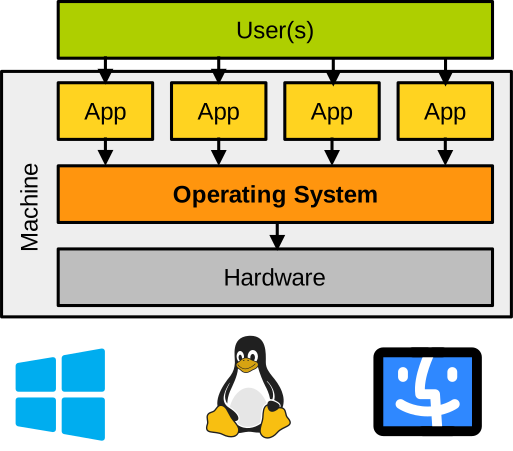
Functions of an Operating System
An operating system provides many functionalities, named services. We can classify some of the most crucial services of an OS based on the type of hardware component they manage:
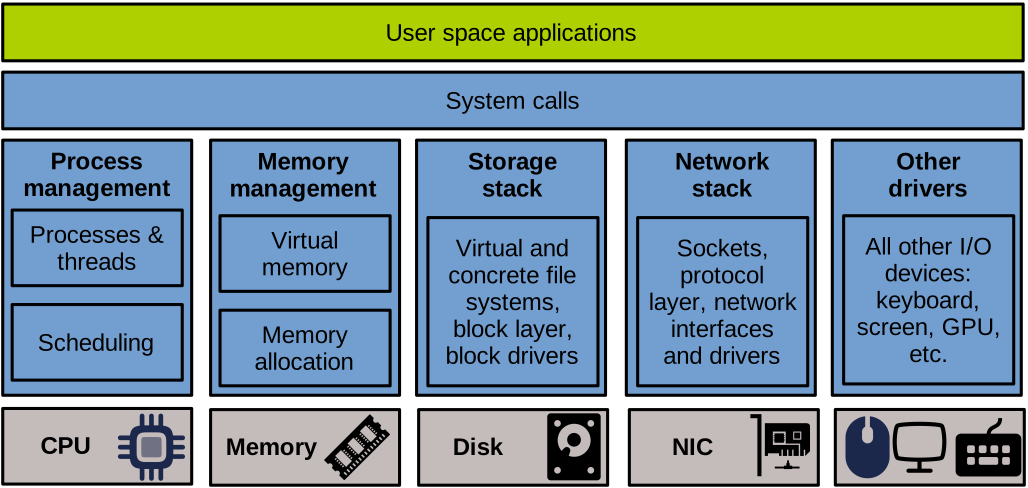
System Calls. The system call layer represents the API exposed by the operating system to applications. It is the one and only interface through which applications can call the OS in order to request services.
CPU Management Services. To let programs execute on the CPU, the operating system creates abstractions such as processes and threads, and offers services to manage these abstractions. These services let applications create and destroy processes and threads, manage their state and life cycle, context switch them in and out of the CPU, let them communicate via inter-process communication mechanisms, and synchronise using locks or notification primitives, allocate resources for their execution, etc. A particular and well-known service relevant to process and thread management is scheduling: it is the component of the OS that decides which process/thread should run on the CPU, and for how long.
Memory Management Services. To let programs use memory, the OS provides services for programs to allocate/deallocate memory. The OS also manages virtual memory to create and maintain programs’ address spaces, enforce memory protection, establish memory sharing between communicating applications, swap pages to disk, etc.
Storage Services. Most OSes implement a storage stack to let applications access secondary storage. Such stacks are generally quite complex and multi-layered, with a virtual file system exposing a common file abstraction to applications, file systems handling file access requests, a block layer abstracting and optimising access to disk-like devices, and device drivers managing particular models of disks.
Network Services. OSes also integrate network stacks that are, similarly to storage stacks, complex and made of multiple software abstraction layers piled on top of each other. The socket layer exposes a practical interface for applications to access the network. Transport layers handle packets of data to send/receive. Network layers take care of packet routing and delivery, and lower-level layers manage MAC addressing and also include network device drivers.
Other Services and Drivers. OSes implement many other services including time management, power management, resource virtualisation (e.g., containers), display and sound management, etc. Beyond storage and networking, OSes also implement other drivers for a plethora of I/O devices such as keyboards and mice, screens, printers, sound devices, GPUs, etc.
A (Very) Brief History of Operating Systems
In the 1950s and 1960s, the ancestors of today’s operating systems were called resident monitors. In essence, they were glorified punch card/magnetic tape queue managers: the resident monitor would execute on a batch system, loading and running programs (jobs) sequentially from a queue, one after the other. The term resident denotes the fact that, unlike programs, the monitor would always be present in memory to clean up after a program’s execution and load the next one. An example of a resident monitor from 1960 is IBSYS, running on IBM’s mainframe computers.
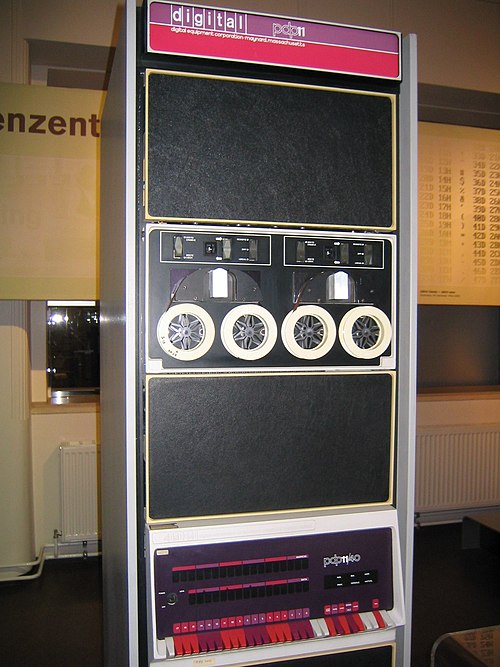
In the 1970s, time-sharing systems appeared: several users and several programs could use the same computer at the same time. The sharing of the computer brought relevant security issues: how to isolate users and programs to avoid disturbances or attacks? Unix (Bell Labs) is a prime example of such time-sharing systems. The Unix OS kernel was originally written in (architecture-specific) assembly in 1970, and the C programming language was developed to build cross-architecture programs aimed at running on top of Unix. The Unix kernel ended up being mostly re-implemented in C to make it portable across architectures. This is one of the machines Unix was running on, a DEC PDP 11:
Personal computers became popular in the 1980s. Their first OSes ran on the command line only, e.g., Microsoft’s MS-DOS, then GUI-based OSes appeared in the 1990s-2000s. The main ones are still very active today, although they have evolved considerably since their inception: Windows, Linux, or macOS. The 2000s saw the rise of networking and Internet support, which raised security requirements as computers networked together may not trust each other. Personal computer OSes also quickly saw an explosion of the software (applications, libraries) and hardware (CPU architectures, devices) they needed to support, earning them the label of general-purpose operating systems.
In the 2010s, we have seen the explosion of mobile computing and associated OSes (Android, iOS). Another technology that took off is cloud computing, which was made possible by a series of OS technologies, notably virtualisation (virtual machines, containers), enabling several operating systems to run on the same machine. In both mobile and cloud computing, security aspects are absolutely critical: modern smartphones may contain tons of personal data, and, as we will see in the virtualisation part of this unit, the entire business model of cloud computing rests on the trust that the tenants sharing a physical machine are properly isolated from each other.
In contrast to general-purpose OSes, many specialised OSes have been proposed, focusing on particular types of hardware and/or applications in order to optimise various performance objectives such as computation speed, memory footprint, reliability, power consumption, etc. An important class of specialised operating systems, embedded and real-time OSes, began in the 1980s with the rise of microcontrollers. They cater for very specific constraints such as the limited amount of resources (RAM/CPU power) of these platforms, power consumption requirements, the need to complete certain operations in bounded time, etc. Embedded and real-time OSes are still very relevant today (e.g., IoT/Edge computing) and security/safety is a central concept in most usage scenarios.
OS Architectures
OSes can be classified based on their internal software architecture, i.e., how the different components (services) making up an OS kernel are organised together. That aspect of OS design has a significant impact on their performance and security guarantees.
The monolithic kernel OS model (e.g., Linux) packs all OS services tightly together to maximise performance. There is no isolation between services, which raises security concerns. The microkernel OS model (e.g., Minix, QNX) establishes a minimal kernel, the microkernel itself, with core services (scheduling, memory management, etc.) running with full privileges on the machine, decoupled from other services (filesystem, device drivers, etc.) that are isolated from each other and from the microkernel. This yields security benefits at the cost of a performance slowdown compared to monolithic solutions. More exotic/research OS models have been proposed, generally consisting of various forms of specialised OSes: multikernel, exokernel, unikernel, etc. We will discuss the security implications of monolithic, microkernel, and other modern OS models later in the unit.
OS Kernel vs. Distribution
An important terminology distinction to make at this stage of the unit is the difference between an OS kernel and an OS distribution. An OS kernel represents the code and data for the program that is the operating system: on a standard machine, it is the only piece of software that can control the hardware directly. Examples of OS kernels include Linux, the Windows NT kernel, the macOS XNU kernel, etc. An OS distribution is a set of software that includes a kernel and a series of additional programs representing system utilities: libraries, package managers, a graphical user interface, some default applications, etc. Examples of OS distributions include Ubuntu, Fedora (both Linux-based), Windows 11, macOS, etc.
The difference between a kernel and a distribution can be illustrated as follows:
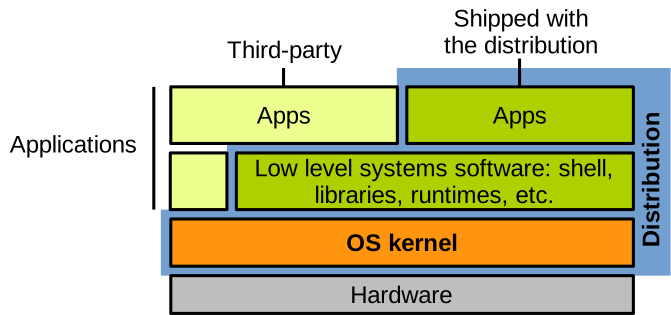
⚠️ OS distributions are sometimes referred to as “operating systems”, although they contain much more than the OS, and many of the applications/libraries they embed have little to do with the goals and objectives of an OS. In this course unit, when we mention an operating system we refer to an OS kernel, not an OS distribution.
Security Aspects
Security Goals of an OS. An OS aims to provide convenient resource mechanisms for applications: processes, filesystems, memory management, etc. For performance reasons, the OS must efficiently multiplex (schedule) the accesses by applications to the resources in question. Moreover, the OS is also in total control of the machine and, as such, is in charge of ensuring the security of all applications.
Here, security implies the correct design and implementation of the OS’s resource management and scheduling strategies. Depending on its trust model, a secure OS must not allow an application to access the address space of another application, to write to a file it does not have permission to access, or to hog the CPU at the expense of other applications. In practice, such issues can happen when OS mechanisms are misused inadvertently (fault tolerance), and, most importantly, maliciously (adversarial context). In absolute terms, the concept of a secure operating system is an oxymoron, an ideal goal that can hardly be fully achieved, as no system of modern complexity is entirely secure.
The security goals stated by an OS generally describe which subjects (e.g., applications, users) can or cannot perform what operations (e.g., read, write, execute) on what objects (e.g., files, sockets, bytes in memory). With these goals in mind, the OS aims to apply the principle of least privilege and maintain confidentiality/integrity/availability. Being as secure as possible means approaching as much as possible a state of least-privilege, and that objective is often at odds with other goals of OSes, namely performance and convenience of usage.
OS Trust Models. The trusted computing base (TCB) of an OS is the set of components enforcing security goals. The OS TCB needs to:
- Mediate all security-sensitive operations.
- Be correct.
- Not be tampered with by software outside the TCB.
An OS’s TCB depends on the security objectives and the application scenario, but generally includes the hardware, boot process, all OS code, and some privileged applications:
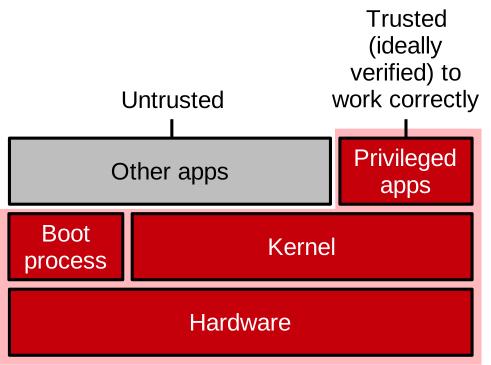
That is a huge amount of software and hardware that we trust to run the computers we are increasingly reliant upon! An OS’s TCB can be hard to precisely define, and it is generally impossible to formally prove its correctness.
Threat Models.
A threat model defines what an attacker can do. For an OS, the threat model generally encompasses a plethora of attacks coming from a variety of vectors. Examples include:
- A remote attacker sending malformed network packets.
- A local attacker using a malicious user application, trying to escalate privilege and become root.
- A malicious hardware device misbehaving, trying to compromise the driver/OS code.
- A compromised boot process loading malicious kernel components or a rootkit.
- An attacker accessing the kernel log to steal sensitive information (e.g. to break certain defences such as ASLR) or to erase traces of intrusion.
- Etc.