Operating Systems: Basic Practical Aspects
You can access the slides 🖼️ for this lecture.
In this part of the unit we present an extremely simplified model of how an OS runs on an extremely simplified model of modern computer hardware. In doing so, we investigate what the OS expects from the hardware, what security properties an OS needs to enforce, and how it does so. Concerning the hardware, we focus on CPU and memory. We will see how the OS interfaces with devices (I/O) later.
Basic OS Principles
A computer is made of hardware: CPU, memory, and I/O (disk and network). Software runs on top of that hardware, and the OS manipulates the hardware directly: in most scenarios the OS is the lowest layer of software in direct contact with the hardware. Applications represent higher-level layers: they run on top of the OS. In other words, applications need to go through the OS to do anything important with the hardware:
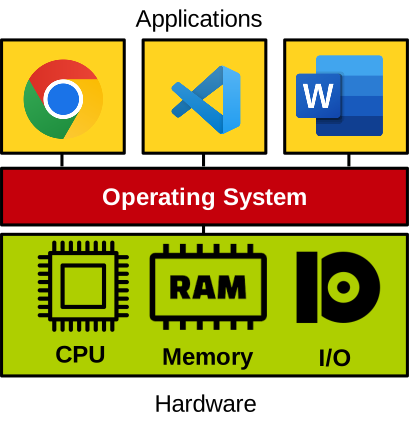
This is mandatory for safety and security reasons, as we cannot let applications access the hardware without the supervision of the OS. Letting applications manipulate the hardware directly would lead to problems such as a malicious application accessing the memory of another application, or a faulty application crashing the entire computer.
The OS provides standardised abstractions for applications to use the hardware safely: processes and threads for CPU/memory, filesystem for storage, sockets for network, etc. These abstractions are accessed through a standard API, system calls (sometimes abbreviated syscalls):
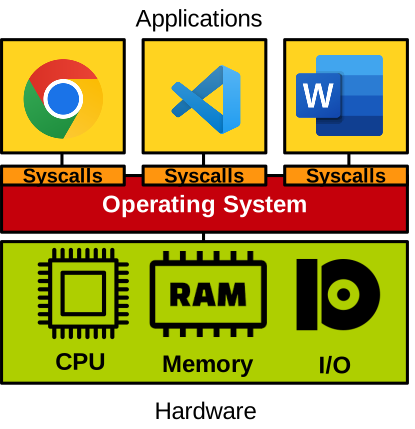
On Linux, examples of system calls are open, read, write, mmap, etc.
You can see the full list of system calls supported by Linux here.
Boot Time
Below is a simplified illustration of what runs on a CPU when a computer starts:

The basic steps are:
- Power on.
- The motherboard firmware (BIOS) runs first, and performs basic hardware initialisation.
- The BIOS loads the bootloader (e.g., GRUB), which begins to run.
- The OS kernel is loaded by the bootloader, and begins to run.
- The OS boots: it initialises more hardware as well as itself.
- Once the OS’ initialisation is done (dashed line), it can run applications.
For the sake of simplicity, we assume a single core here, i.e., only a single program can run at a time. Here we use the term program in a broad sense: it can be an application, the OS kernel, the bootloader, etc. Once the OS finishes booting (dashed line above), the CPU mostly runs applications. These applications are, from time to time, interrupted to execute the operating system.
Execution Model on the CPU
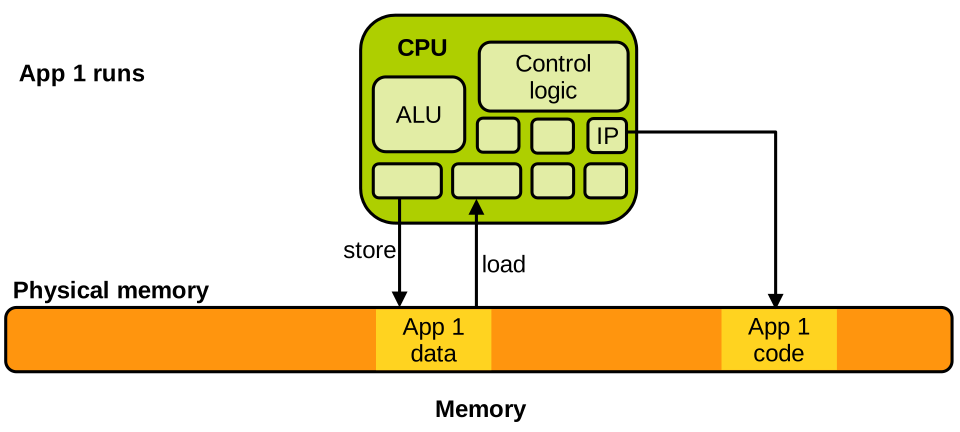
A basic CPU contains, among other things, an Arithmetic Logic Unit (ALU), some control logic, and registers. One particular register is the instruction pointer (or program counter): it points within the code segment to the instruction currently being executed by the CPU. General-purpose registers are used to hold the operands for operations realised in the ALU. Data can be loaded from memory into registers with load instructions, and stored from registers into memory with store instructions.
For now let’s just assume that our CPU accesses physical memory directly without any form of virtual memory. With that in mind, an application App 1 running on the CPU can be illustrated as follows:
When another application App 2 runs, we have something similar:
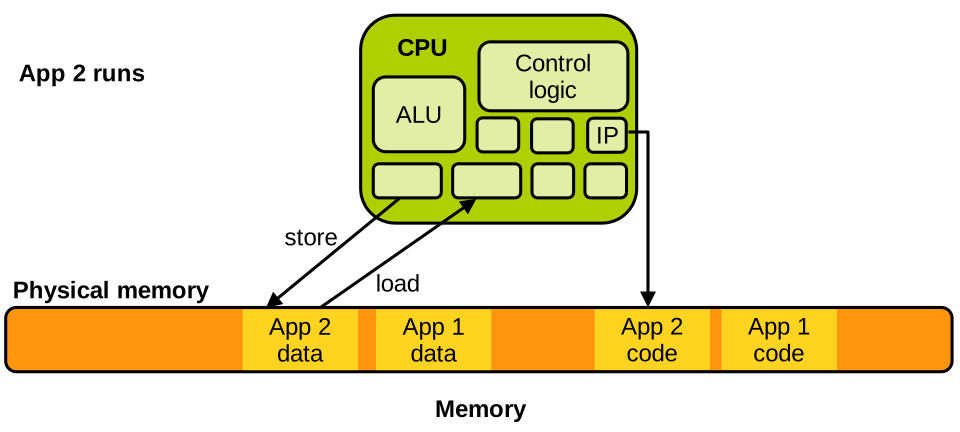
Obviously, App 2’s data and code segments are present at different locations compared to App 1’s. The OS kernel is no different: it also has data and code segments, and when it runs on the CPU we have:
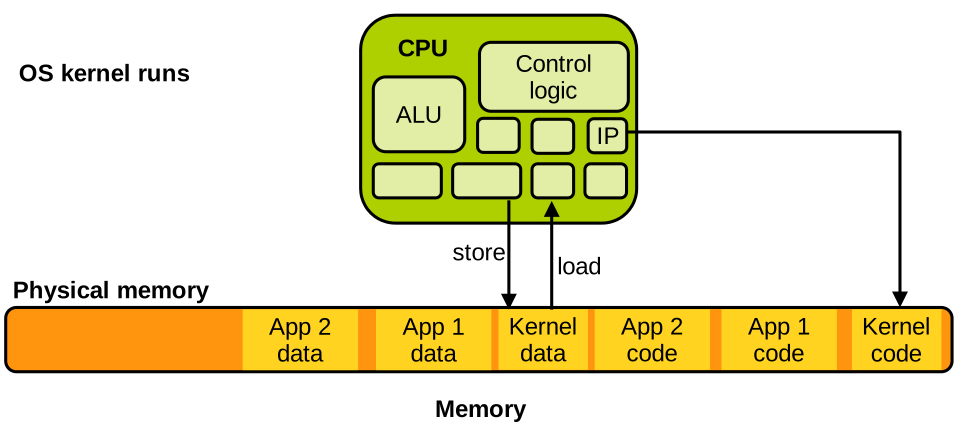
The state of an application at any given point in time during its execution on the CPU corresponds to the content of the CPU registers. It can be easily saved and restored to/from RAM. One scenario in which this is needed is a context switch. Assume that App 1 is running on the CPU, but the scheduler decides that App 2 should run instead: App 1 needs to be removed from the CPU and replaced by App 2. This is a two-step process, illustrated below:
- Saving App 1’s CPU execution state in memory (step A below). That state is, once again, the content of CPU registers.
- Loading App 2‘s CPU execution state (registers’ content) from memory into the CPU (step C below). That loaded state has been either saved in memory the last time App 2 was context-switched out of the CPU, or it is an initialisation state if App 2 has just started to execute.
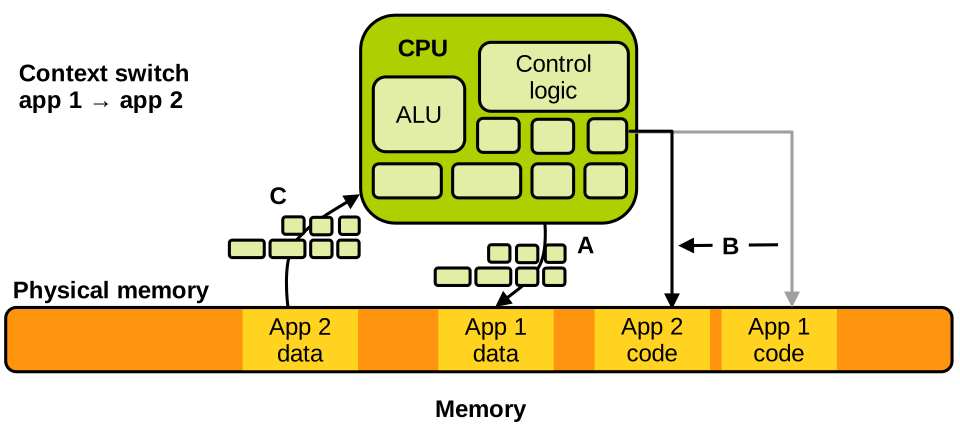
Once the state for App 2 has been loaded, the instruction pointer register will point to whatever instruction App 2 was executing the last time it was context-switched out of the CPU, or to its entry point if it just started running. The context switch is done, and the execution of App 2 can then resume.
From a high-level point of view, context switches work as described with all modern CPUs. The key idea is that being context-switched in and out of the CPU is completely transparent from the applications’ point of view: their code is not aware of (and does not need to manage) the fact that their execution may be interrupted/restored at any time.
Kernel Invocation
We have seen that our CPU alternatively executes kernel and application code. Application code runs when applications are context-switched on the CPU. What about the kernel? When does the CPU start executing kernel code? Kernel code runs on the CPU only on 2 types of occasions:
- At boot time, after the bootloader finishes loading the kernel, as we have seen (step 5 in our boot time model above); and
- At runtime, when an interrupt is received by the processor.
That’s it: past boot time, an interrupt is the only way for the CPU to enter the kernel and start to run OS code. There are 2 types of interrupts:
- Hardware interrupts. These are notifications from I/O devices; for example, a network card sends an interrupt to the CPU to notify it that a network packet has arrived.
- Software exceptions. These are instances of the CPU interrupting itself; for example, because it executed an incorrect operation such as a division by zero.
Let’s see what happens on the CPU when an interrupt is received. Assume the CPU is running App 1:
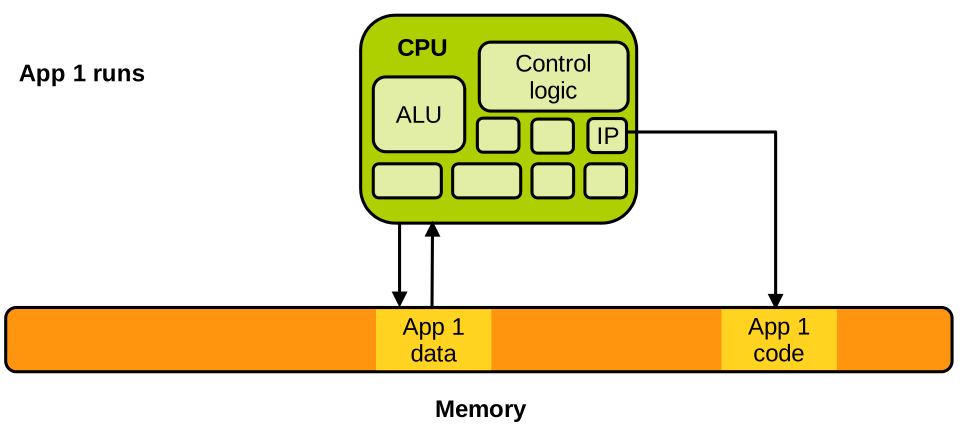
Now assume the CPU receives a hardware interrupt from an I/O device. As soon as the interrupt is received, the CPU pauses the execution of App 1 and saves its execution state (CPU registers) in memory, similarly to what we have seen with a context switch. Next, a predefined kernel execution state is loaded on the CPU:
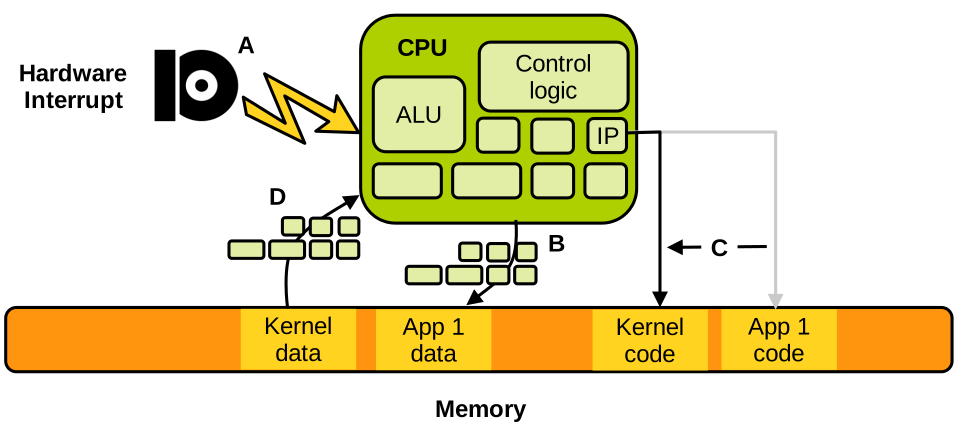
That predefined OS execution state corresponds to the entry point of the hardware interrupt handler, i.e., the code responsible for determining what to do when a hardware interrupt is received. That code will determine what hardware interrupt has been received and act accordingly. For example, in the case of a received network packet, it will acknowledge the interrupt and schedule the packet to be retrieved from the network card. Once the interrupt handler is done, the kernel stops running and the state of the previously interrupted application App 1 is restored:
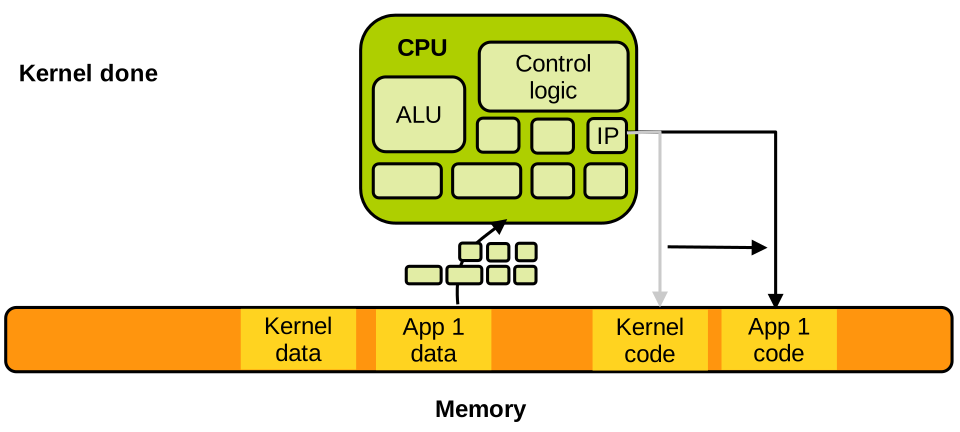
Similar to the context switch we saw earlier, the interrupt handling by the OS is completely transparent from the applications’ point of view. In the case of a software exception, for example if App 1 runs and its code executes a division by zero, things work exactly the same. App 1 is interrupted, its state is saved in memory, and the kernel starts to run:
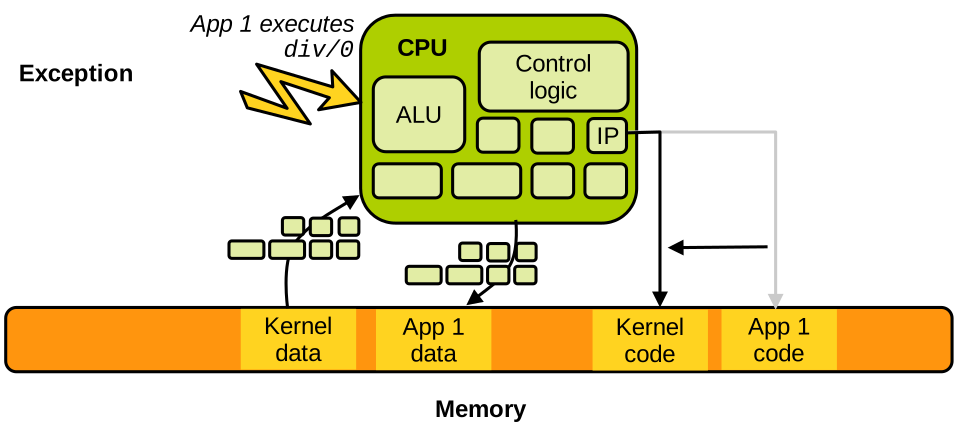
The kernel state that will be loaded here is the entry point for the division by zero interrupt handler. Once the handler is done, the kernel resumes the execution of the application. Note that upon an unrecoverable exception, which is generally the case for a division by zero, the kernel will kill the application and resume the execution of another application. Other exceptions are recoverable, for example a page fault triggering on-demand memory allocation.
OS Security Principles
A crucial OS security invariant is that we cannot have an application read/write the memory of another application or of the kernel. If that invariant is not maintained at all times, there can be no security guarantees in our system. An application reading/writing the memory of another application may be stealing passwords/secrets, or tampering with critical data and code. An application reading/writing the memory of the kernel could achieve the same objectives, as the kernel is a privileged component that can generally access all the memory in the system. So we absolutely want to avoid this happening:
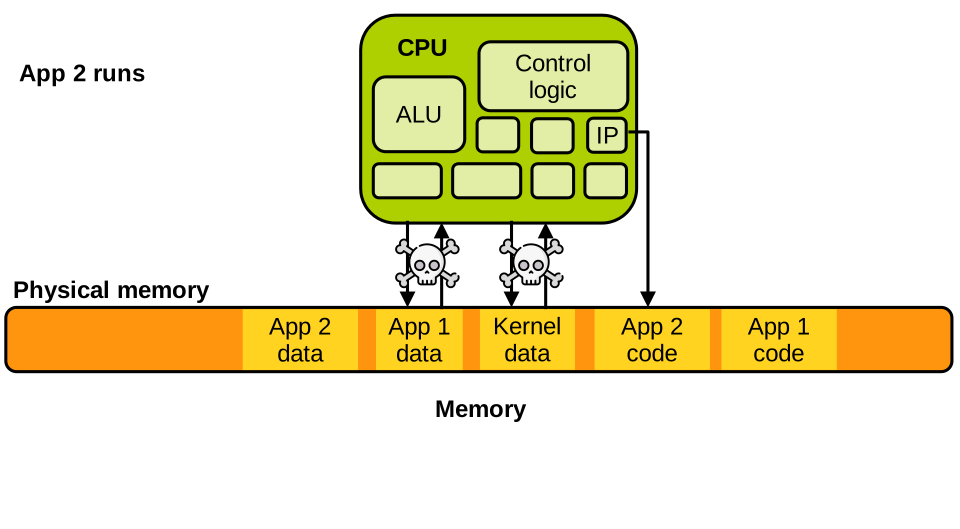
To enforce that invariant, the OS sets up the CPU’s MMU to enable virtual memory and perform virtual-to-physical address mapping. With virtual memory, an application is tricked into thinking it has access to 100% of the memory: its virtual address space. The address space of each application is set up in such a way that it does not contain any memory that the application is not supposed to address. For example App 1’s virtual address space contains only its code and data:
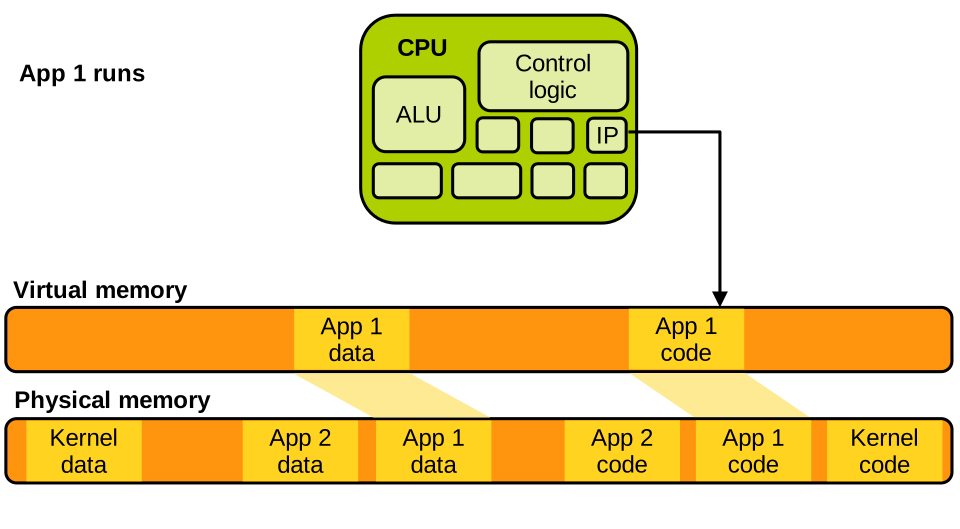
The same applies to App 2:
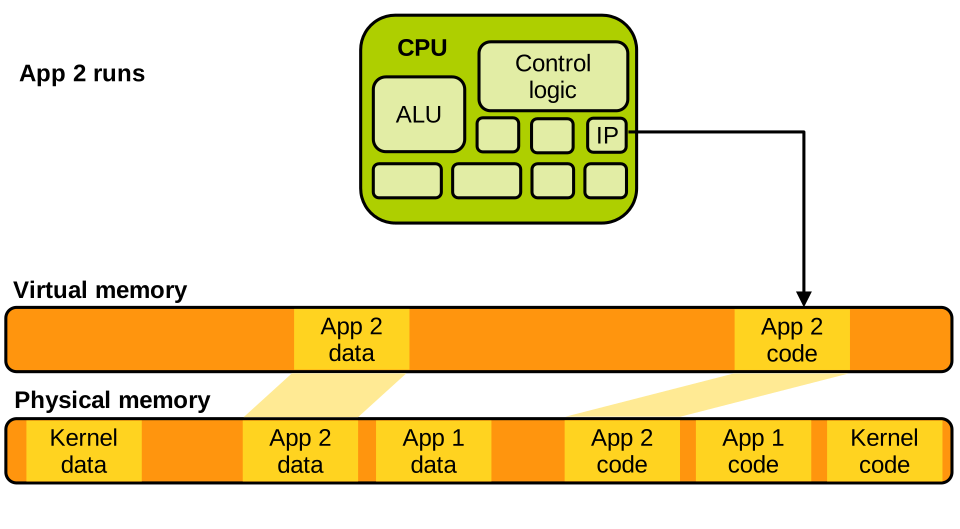
The kernel generally needs to access the entirety of memory:
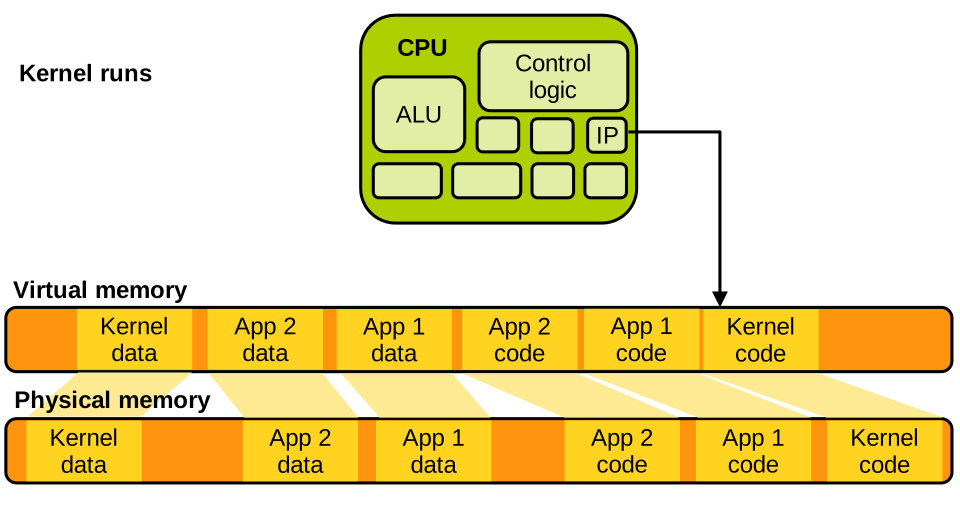
The address space of an application does not map the physical memory relating to other applications or to the kernel: this way, the key security invariant mentioned above is enforced.
System Calls
Based on what we just discussed, if an application cannot access kernel data/run kernel code for security reasons, how can it invoke OS services?
As we know, the only way for an application to call the OS is to issue a system call. It works as follows: when invoking a system call, the application executes a special instruction that triggers an exception; as with other interrupts and exceptions, the CPU interrupts the application and starts running the kernel to manage the system call:
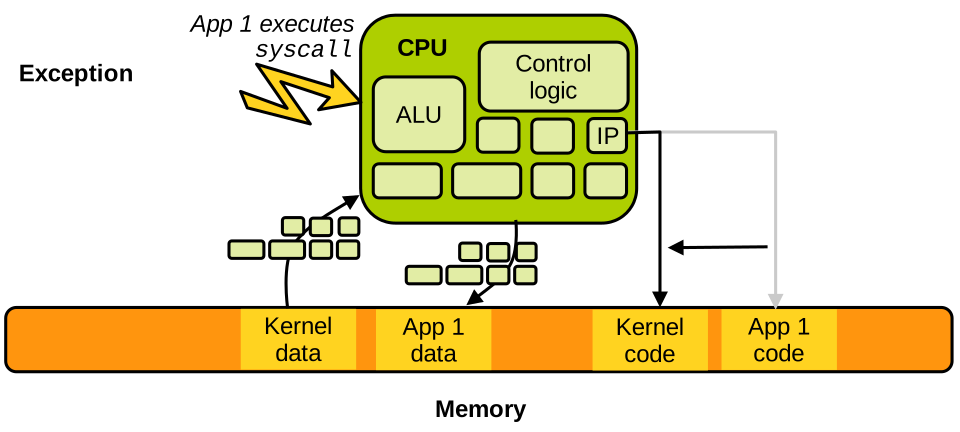
Application programmers generally do not invoke system calls directly, but rather do so through the use of libraries.
Many functions exposed by the C standard library, such as read(), write(), etc., have a similar name and prototype as the system call they invoke, providing a language/source-level interface to the OS.
That source-level interface is called an Application Programming Interface (API): a source-level communication interface and convention for software components tightly coupled (e.g., compiled) together.
The libc itself often needs to invoke the OS to issue system calls. We cannot rely on an API to achieve that, because the libc and the kernel are two software components that are not compiled together. More generally, the kernel cannot assume that applications/libraries invoking it are written in any particular programming language, so we need a communication interface and convention operating at the binary level, an Application Binary Interface (ABI). This machine-level convention defines how to invoke a system call on a particular architecture:
- What parameters to put in what registers upon invocation.
- What machine instruction(s) to use to effectively trigger the exception to switch to the OS.
- What register should hold the return value when returning from the OS.
Linux uses the System V ABI, which states that for x86-64 a system call is invoked by an application as follows.
- Place arguments in order in the
%rdi,%rsi,%rdx,%r10,%r8and%r9registers. - Place the system call identifier, which is an integer identifying uniquely what system call to invoke, in the
%raxregister. - Invoke the
syscallinstruction, which triggers the exception and traps to the kernel. - Upon return to user space, the kernel places the system call return value in
%rax.
To see an example of this ABI in action, let’s take a look at the disassembled Libc function clock_gettime, that invokes the system call of the same name:
00000000004672b0 <__clock_gettime>:
#...
  4672f8:	mov    %r12,%rsi
  4672fb:	mov    %ebp,%edi
  4672fd:	mov    $0xe4,%eax
* 467302:	syscall
# ...
As we can see, the first parameter, the integer clk_id, is first placed in %rsi (moved from another register).
Then the second parameter is set up in %rdi in the same way (recall that %edi are the lower 32 bits of %rdi).
Finally, the system call identifier of clock_gettime is placed in %rax: it is 0xe4, which is 228 in base 10. You can confirm that it corresponds to clock_gettime in the Linux system call table.
At that stage the system call is ready to be invoked: executing the syscall instruction will trigger an exception and switch to the OS, which will inspect the content of the registers to determine what system call is being invoked, with what parameters, and act accordingly.
Invoking a System Call Manually.
Now that we know how a system call is invoked by an application/library, we can try to invoke one manually by exercising the ABI with a bit of assembly code.
Below is an assembly program that prints "Hello, world!" to the standard output.
This can be realised by calling a single system call, write, on the file descriptor corresponding to the standard output (1).
.global _start

.text
_start:
    # write(1, message, 14)
    mov $1, %rax
    mov $1, %rdi
    mov $message, %rsi
    mov $14, %rdx
    syscall

    # exit(0)
    mov $60, %rax
    xor %rdi, %rdi
    syscall

message:
    .ascii "Hello, world!\n"
This program first prepares the invocation of the write system call: it places the write system call identifier (1) in %rax.
Then it places the first parameter 1 (standard output’s file descriptor) in %rdi, the second parameter (a pointer to "Hello, world!\n") in %rsi, and the number of characters to write (14) in %rdx.
write is then invoked with a syscall instruction, which should produce the output.
Once that is done, we can exit the program with an exit(0) system call: we place exit’s identifier (60) in %rax, 0 in %rdi (xor’ing a register with itself is a fast way to zero its content), and we execute syscall.
The program can be assembled, linked, and executed as follows:
$ as syscall.s -o syscall.o
$ ld syscall.o -o syscall
$ ./syscall
Hello, world!
Privilege Modes
Some CPU instructions are privileged, and they should only be executed by the kernel. Examples include the instructions that allow installing new page tables, communicating with I/O devices, shutting down/resetting the CPU, etc. If applications could run these instructions freely without supervision from the OS, all the security guarantees that an OS is trying to enforce would break. To make sure only the OS (and not applications) can invoke these instructions, modern CPUs implement privilege modes. At any time the processor can be in one of two modes:
- User mode, when applications run.
- Supervisor mode (also known as kernel mode), when the kernel runs.
When a privileged instruction is executed, it succeeds if the CPU is in kernel mode, and triggers an exception, trapping to the kernel, if executed in user mode. This way, any attempt by applications to invoke privileged instructions can be caught by the OS and mediated/prevented based on the situation.
Privilege modes have various names according to the architecture; on x86 they are called protection rings. For x86-32, we have the following:
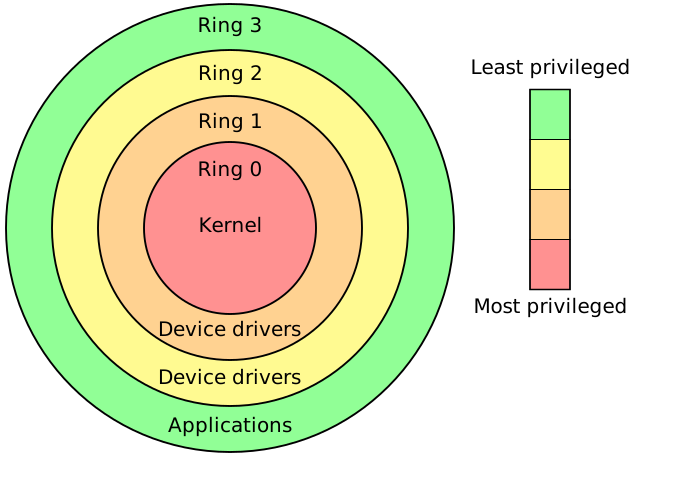
Ring 0 represents the highest privilege level: this is where the OS kernel executes, and all instructions can be freely invoked in that ring. Ring 3 is the lowest privilege level, restricting the use of all privileged instructions: this is where the applications run. Rings 1 and 2 represented intermediate privilege levels on x86-32, and were used to run deprivileged kernel components such as drivers. These were dropped in x86-64, leaving only ring 0 (supervisor mode, for the kernel) and ring 3 (user mode, for applications).
User/Kernel World Switches.
On x86-64, when the syscall instruction is invoked, the CPU switches from user mode (running the application) to supervisor mode (running the kernel).
It then jumps to a predefined piece of code, the system call handler.
This is a form of control flow integrity: any system call invoked by the application will run the same kernel system call handler, which performs all the necessary checks on the system call parameters.
The kernel starts to run and handles the syscall.
Once done, the kernel executes the sysret instruction, which triggers the return to user code by switching the CPU to user mode and jumping to the instruction following the syscall in the application code.
That process can be illustrated as follows:

Switches in both directions between user and kernel mode are called world switches. From the performance point of view, such world switches are very costly: they take hundreds, if not thousands of CPU cycles, among other overheads such as cache pollution.