Process Management
You can access the slides 🖼️ for this lecture.
Here we discuss one of the core responsibilities of an operating system: process management. As mentioned previously, we will focus on Linux.
Processes
A process is an instance of a running program in the system. The OS gives each program the illusion that it runs alone and has exclusive access to all of the machine’s resources. This way, all applications in the system can run independently of each other. This is achieved as follows:
-
Regarding memory, each process has its own address space, and it can address most of it.
-
Regarding the CPU, each process is scheduled in and out of the CPU completely transparently.
-
A process also has handles to system resources maintained by the kernel: file descriptors, sockets, etc., and an execution state/context: the values in CPU registers at any given point in the program’s execution.
Process Identifiers (PIDs).
Each process has a unique integer identifier in the system, called the process identifier, the PID.
A process can obtain its PID with the getpid system call.
Below is an example of a C program printing its PID to standard output:
#include <stdio.h>
#include <stdlib.h>
#include <unistd.h>

int main() {
    printf("my pid is: %d\n", getpid());
    return 0;
}
We can list all processes running in the system with their pid with the following command:
$ ps -e
The Process Tree.
Apart from the first process created from scratch right after the kernel boots, every other process is created by another process: a parent/child relationship therefore exists between the creating process, the parent, and the created process, the child.
After the kernel boots it creates the first process which gets the PID 1.
This process has historically been called init, but can take different names.
PID 1 then creates children, that may create children, etc.
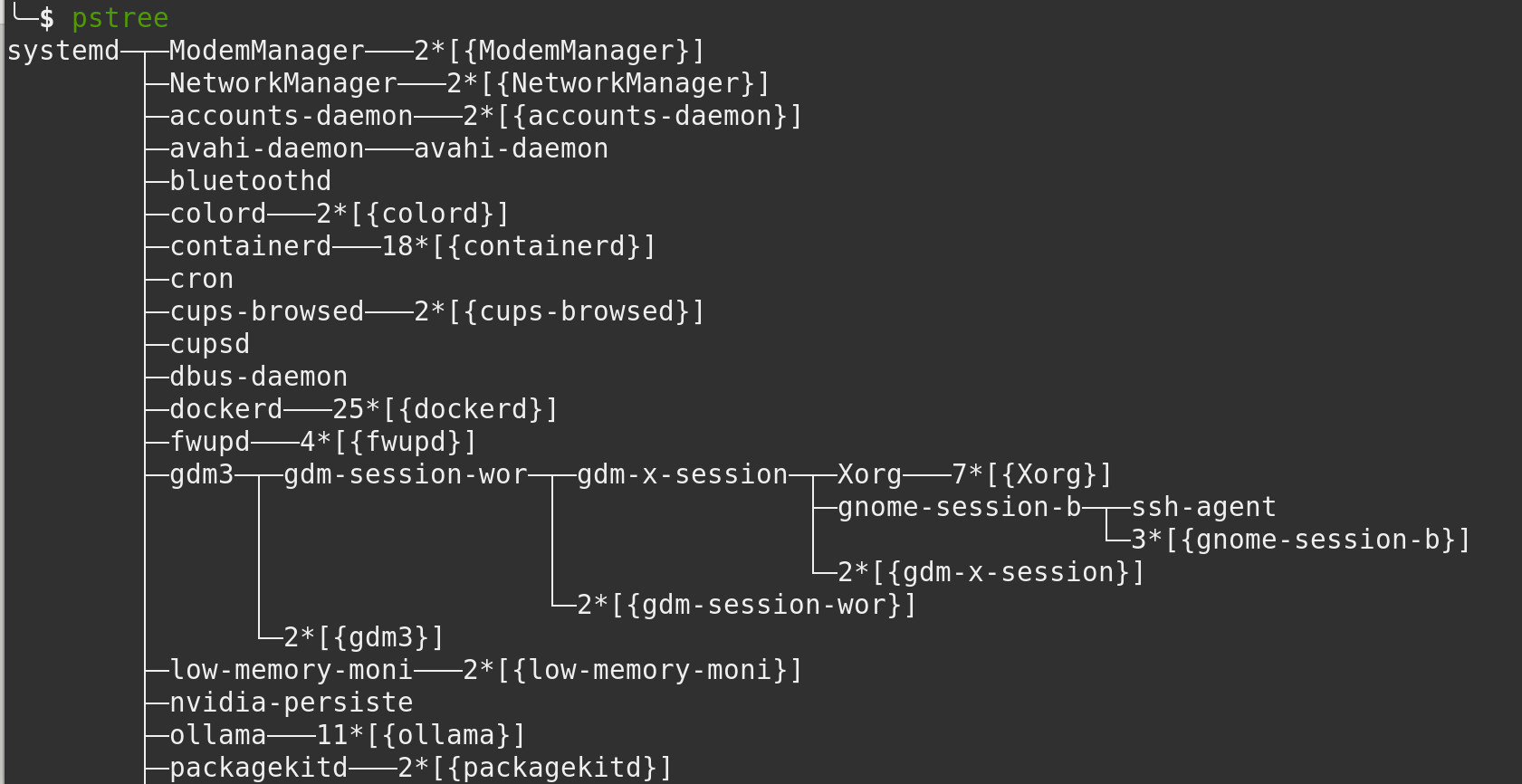
As such all processes in the system can be represented in a process tree.
The process tree illustrating the parent/child relationships of all processes in the system can be obtained with the pstree command:
Process Creation with fork()
The only way to create a process in a POSIX-like operating system such as Linux is through the fork() primitive.
It dates back to the 1960s and is now part of the POSIX operating system interface standard.
When a parent process calls fork, it creates a child process.
The child is not created empty: it is actually a duplicate of the parent: it inherits a copy of the parent address space (including all the program’s code and data), system resources such as file descriptors, and even a copy of the parent’s CPU registers’ content at the time fork was called.
With Linux, under the hood fork is implemented by the C standard library that calls the clone system call, which in turn performs the child creation and duplicates the parent’s resources.
After fork is called by a parent process, both the parent and the child return from that call (recall that the child inherits the same code as the parent).
At that stage both processes run concurrently.
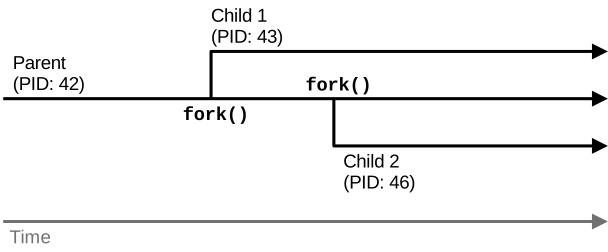
This is illustrated in the diagram below, showing a parent with PID 42 that calls fork a first time and creates a child with PID 43.
The original parent then calls fork a second time and creates another child, PID 46:
An example of usage of fork is shown below:
int global = 42;

int main() {
  int local = 10;
  printf("[%d] parent before update local = %d, global = %d\n", getpid(),
      local, global);

  int pid = fork();
  switch(pid) {
    case -1:
      printf("fork error!\n");
      return -1;

    case 0: // Child run
      printf("[%d] child, before update local = %d, global = %d\n", getpid(),
          local, global);
      local = 100; global = 100;
      printf("[%d] child after update local = %d, global = %d\n", getpid(),
          local, global);
      break;

    default: // Parent run
      local = 0;  global = 0;
      printf("[%d] parent after update local = %d, global = %d\n", getpid(),
          local, global);
  }

  return 0; // executed by both
}
Our program starts by printing the values of a local variable and a global one, then calls fork and switches on its return value:
- If
forkreturns -1, there was a problem with the call and no child was created: we simply exit the program. - If
forkreturns 0, this means we are in the return path of the child. We print the values of the variables, then set both to 100 and print them again. - If
forkreturns something other than -1 or 0, this means we are in the return path of the parent. Here the parent sets both variables to 0 and prints them.
Then both processes leave the switch body and exit by returning 0 from their main function.
An example of execution of this program is as follows:
$ gcc fork.c -o fork
$ ./fork
[14434] I'm the parent, before I modify them local = 10, global = 42
[14434] I'm the parent, after I modify them local = 0, global = 0
[14434] bye!
[14435] I'm the child, before I modify them local = 10, global = 42
[14435] I'm the child, after I modify them local = 100, global = 100
[14435] bye!
We can see that the child sees the same values for the variable before it updates them.
Once the variables are updated, each process has its own copy of their values: this demonstrates that the address space of the child that starts right after fork is a copy of that of the parent, but also that each process has its own private address space, and it is free to read and write to it independently of other processes.
fork Implementation by the OS.
How does the OS duplicate the address space?
It is not a synchronous copy performed at fork time: the parent’s address space contains megabytes, possibly gigabytes, of mapped memory, so copying it all would take too much time and memory space.
The copy is actually realised later, on-demand, when the memory is accessed.
The key idea here is that as long as neither the parent nor the child modify the content of a particular memory page, they can share it: the virtual memory page in the address space of both processes can be mapped in a read-only manner to the same physical page.
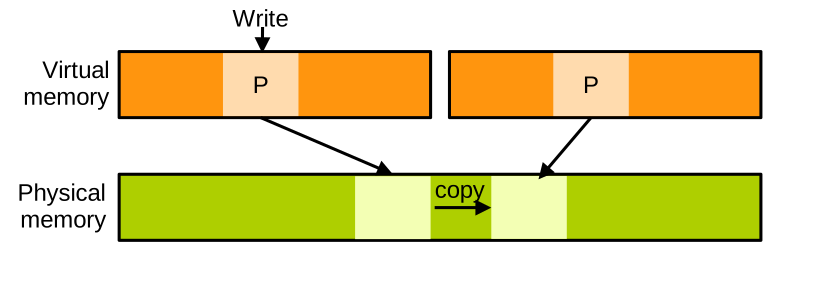
Only when the parent or the child actually write to the memory in question will the page be duplicated: that process is called copy-on-write (CoW).
On-demand CoW address space duplication after fork can be illustrated as follows:
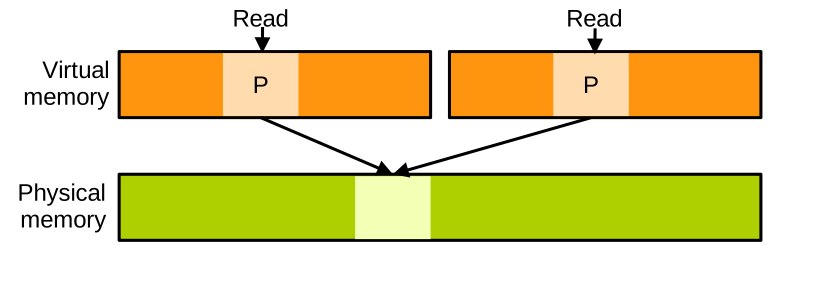
When fork returns, the child receives a copy of the parent’s page table: the address spaces are identical, and the mapped virtual pages point to the same physical pages.
Read accesses are performed normally: as long as neither the parent nor the child modifies the memory, neither needs to see different content:
Only when the parent or the child writes to the address space are the corresponding physical memory copied and the page table updated. This is achieved at the granularity of a page, which in the vast majority of systems is 4 KB:
Executing a Different Program with execve
Now what if we want to create a new process to execute a different program, rather than a copy of the parent.
For that we need to combine fork with another primitive: fork + execve.
An example is shown below:
int main() {
    char *args[] = {"/bin/ls", "-l", NULL};
    char *envp[] = {NULL};
    printf("[%d] Parent, forking\n", getpid());

    switch(fork()) {
        case -1:
            printf("fork error!\n");
            return -1;

        case 0:
            printf("[%d] child, calling execve()\n", getpid());
            execve("/bin/ls", args, envp);
            printf("execve error!\n"); // should not reach here
            break;

        default:
            break;
    }
    return 0;
}
In this program the parent calls fork, and the child, in its return path, calls execve.
execve takes as first parameter the path to the binary of the new program we want to execute (here "/bin/ls"), followed by an array of strings, one for each argument (the first being the name of the binary).
The third parameter is the set of environment variables, here just NULL.
If we run this program, we can see that the child executes ls -l successfully:
$ gcc forkexec.c -o forkexec
$ ./forkexec
[19605] Parent, forking
[19606] child, calling execve()
total 60
-rw-r--r-- 1 pierre pierre   931 Jun 19 15:42 fork.c
-rwxr-xr-x 1 pierre pierre 16232 Jun 19 16:32 forkexec
-rw-r--r-- 1 pierre pierre   581 Jun 19 15:42 forkexec.c
-rw-r--r-- 1 pierre pierre  1977 Jun 19 15:42 lock.c
# ...
execve Implementation by the OS.
Under the hood, when a process calls execve, the OS sets up a new blank address space for it.
Whatever was present in the old address space is completely lost.
The kernel has a loader that extracts from the ELF binary to execute the segments that should be loaded, the program entry point, and further metadata indicating whether a user space loader or interpreter is needed:
- If the program to load is a statically-linked binary, it is then loaded directly into the address space.
- Instead, if it is a dynamically-linked binary, or an interpreted script, the kernel will rather load a user space loader or interpreter, with the program/script to execute passed as parameter.
Next, the OS allocates a stack and populates it with what the program needs to initialise: the command line parameters and the environment variables, among other things. Then the OS returns to user space at the program/user space loader/interpreter entry point and starts to execute it. A statically-linked binary will start running directly, a dynamically-linked binary will be loaded and executed by the user space loader, and an interpreted script will be handled by the interpreter.
Inter-Process Communication
Many applications, like web browsers or GUI software, are made of multiple processes working together. This is achieved to leverage parallelism, run background tasks, isolate untrusted code, etc. These processes need to communicate and synchronise:
- Communication between processes is done through Inter-Process Communication (IPC) mechanisms such as pipes, signals, sockets, shared memory, etc.
- Synchronisation lets processes coordinate, so the program does not break when they access memory or other shared resources concurrently. We do not want two processes updating a shared data structure without agreeing on an order of operations, otherwise the data structure may be left in an inconsistent state. Synchronisation is needed, and it is done with mechanisms such as barriers, locks, or processes waiting for each other.
All of these communication and synchronisation mechanisms are provided by the operating system, and most of them are accessed through system calls. Here we cover a few examples of IPC mechanisms first, and then we will discuss synchronisation.
Signals
A signal is a notification sent by the kernel to a process upon certain events, e.g., when the program encounters a page fault or tries to divide by zero, or when the user presses certain combinations of keys (ctrl+c), etc.
A process can also instruct the kernel to send a signal to another process with the kill system call.
In essence, a signal is just a notification: apart from its type (an integer ID), a signal does not carry any data.
A process installs handlers for the signals it wishes to receive and act upon. A process receiving a signal for which it has no handler installed will be terminated by the OS. That is what happens by default upon a segmentation fault or a division by zero.
We can study an example of a process installing a signal handler:
// Signal handler for SIGUSR1
void handle_sigusr1(int signum) {
    printf("[%d] signal received!\n", getpid());
    fflush(stdout); // Ensure immediate output
}

int main() {
    // Install custom handler for SIGUSR1
    struct sigaction sa;
    sa.sa_handler = handle_sigusr1;
    sigemptyset(&sa.sa_mask);   // No additional signals blocked in handler
    sa.sa_flags = SA_RESTART;   // Restart interrupted syscalls automatically

    if (sigaction(SIGUSR1, &sa, NULL) == -1) {
        perror("sigaction");
        exit(EXIT_FAILURE);
    }

    while (1) {
        printf("[%d] Doing useful work\n", getpid());
        sleep(1);  // Simulate work
    }

    return 0;
}
This program first prepares a struct sigaction object, which is a data structure describing a signal handler.
Notice how the sa_handler field specifies the function that will be executed when the signal is received: handle_sigusr1.
The struct sigaction object is then installed with the sigaction system call, in order to handle the signal of type SIGUSR1.
From that point onwards, if the program receives the signal SIGUSR1, the handler handle_sigusr1 will run:
$ gcc signal.c -o signal
$ ./signal
[23800] Doing useful work
[23800] Doing useful work
[23800] Doing useful work
The signal can be sent from another terminal while the main program is running:
$ kill -SIGUSR1 23800
To terminate the program, you can press ctrl+c, which sends a SIGINT signal: our program does not have a handler for it, so it will be terminated by the OS.
Signals: Implementation by the OS.
Under the hood, the kernel delivers signals lazily: upon returning to user space in a process from an interrupt or a system call, the kernel checks if that process has any pending signals.
If so it determines the action: either invoke the handler or terminate the process if there is no handler.
If a handler needs to run, the kernel modifies the execution of the process as follows.
It sets the instruction pointer to return to be the handler’s code, and puts on the stack information about the signal received and what to do when the handler finishes running.
Execution then returns to user space and the handler executes.
When the handler is done, the program invokes the sigreturn system call that will clean things up and resume the normal process execution.
You will notice that the handler in our previous example does not invoke sigreturn directly: this is actually called under the hood by the C standard library when the code of our handler returns.
All these steps are illustrated here:
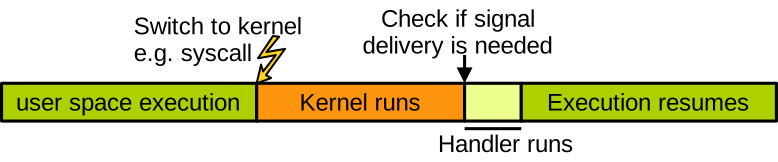
We have a process running in user space. At some point it traps to the kernel, following a system call or an interrupt. After the kernel is done processing this trap, it checks, before returning to user space, if a signal needs to be delivered. If so, it returns to user space at the level of the handler, which runs, and when the handler is done the process resumes its execution normally.
Pipes and Sockets
Contrary to signals, which do not carry much information, pipes and sockets are data communication channels. Pipes are unidirectional: there is one writer process and one reader process, while sockets are bidirectional. Both mechanisms are visible to processes as pseudo files on the filesystem. This is because the filesystem is visible from all processes, so it is easy to share a pipe or a socket between different processes in this way. The kernel uses internal buffers to hold the data in transit on pipes and sockets. The kernel also puts reading and writing processes to sleep when the communication channels are empty or full.
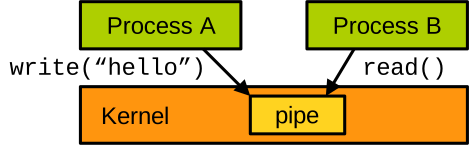
Here is an example of usage of a pipe, also named FIFO:
#define FIFO_PATH "/tmp/myfifo"

int main() {
    mkfifo(FIFO_PATH, 0666); // Create a named pipe (FIFO)

    pid_t pid = fork();
    if (pid == 0) { // --- Child Process: Writer ---
        int fd = open(FIFO_PATH, O_WRONLY);

        const char *msg = "Hello from child!\n";
        write(fd, msg, strlen(msg));
        close(fd);

    } else { // --- Parent Process: Reader ---
        int fd = open(FIFO_PATH, O_RDONLY);

        char buffer[128];

        int n = read(fd, buffer, sizeof(buffer)-1);
        if (n > 0) {
            buffer[n] = '\0';  // Null-terminate
            printf("Parent received: %s", buffer);
        }

        close(fd);
        unlink(FIFO_PATH);  // Clean up FIFO file
    }
}
We have a parent process that creates the pipe with the mkfifo system call.
It then forks to create a child.
The child opens the pipe in write mode and writes a message into it.
Concurrently, the parent opens the pipe in read mode, reads from it, and displays what it read.
Both processes close the pipe’s file descriptor when they are done, and the parent deletes the pipe at the end with the unlink system call.
Shared Memory
The IPC examples we saw all involve quite a lot of system calls, both to be set up and to achieve communication. This is not ideal in terms of performance, as system calls are costly because each user/kernel switch takes many CPU cycles. Further, because the kernel needs to be involved in each data transfer, the data in question needs to be copied as part of the transfer. This is done for security reasons: as we will see very soon, the kernel should not operate directly on user space memory. Obviously, the need to copy data further impacts the performance of IPC mechanisms such as pipes and sockets.
A more basic but also faster communication mechanism is shared memory. Two processes can instruct the OS to let them share one or more physical memory pages. Once it is set up, that memory can be accessed by several processes and used for communication, which in some situations prevents the need to copy data and also minimises the number of system calls required.
In essence, shared memory works as follows:
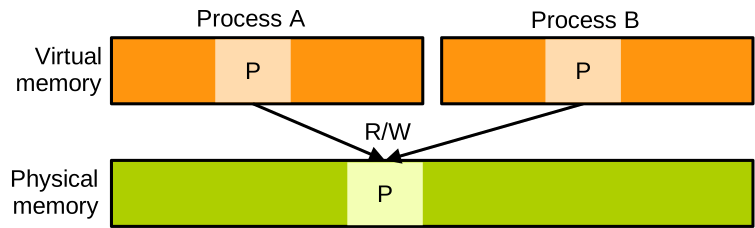
The kernel maps the same physical page within the address space of two (or more) processes. They can then read and write to that page and hit the same locations in memory.
Shared Memory: the Need for Synchronisation. When using shared memory, the fact that several processes can read and write concurrently to the same areas of memory creates the need for synchronisation. If these processes do not agree on a protocol to access this shared memory, the program may break. Imagine a scenario in which process 1 is interrupted in the middle of updating a large data structure, and then process 2 starts to run and reads that data structure while it is only half updated. This is called a race condition, and it is obviously a bug.
The issue can be illustrated as follows. We have a data structure with three fields. Initially, process 1 is running and wants to update the data structure. For it to be in a state that makes sense, all three fields should be updated. Process 1 updates the first field:
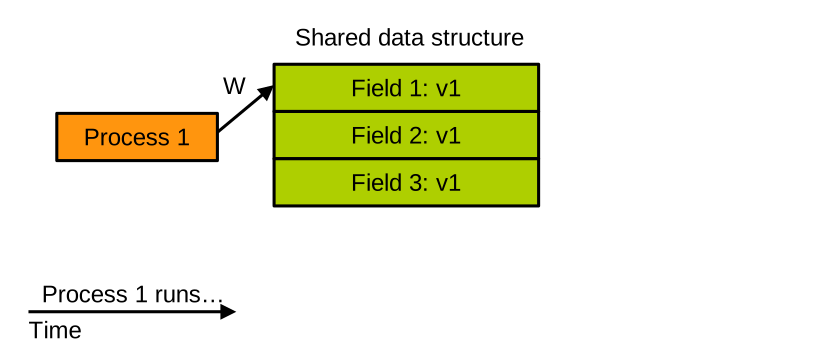
Then the second field:
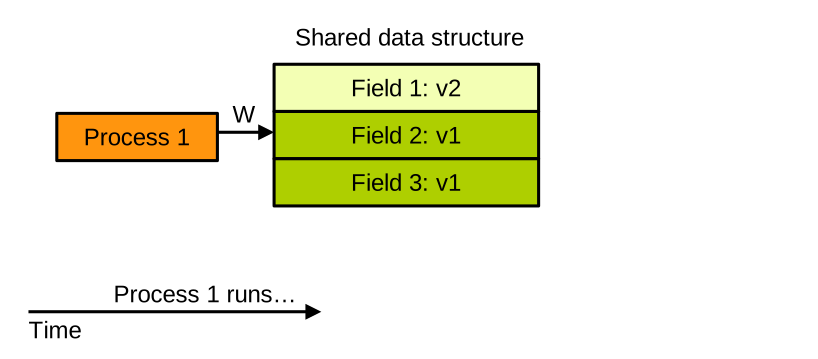
Before process 1 can update the third field, it is preempted and the scheduler decides to run process 2 on the CPU instead:
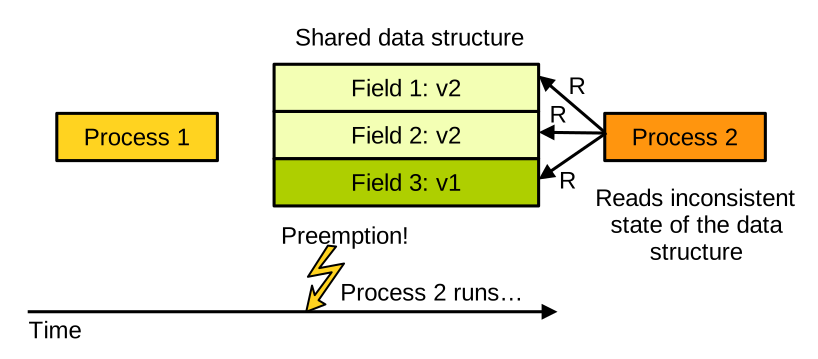
Process 2 reads the entire data structure, which is in an inconsistent state. That is our race condition.
Synchronisation
The bits of code in your program where processes access shared data are called critical sections. To avoid race conditions, the critical sections of all processes accessing a piece of shared data need to execute in a very particular fashion: they need to execute atomically. Atomicity means that these two rules must be enforced:
- A critical section can only be executed by one process at a time; and
- If a process starts to execute a critical section, it must finish it before another process can start to execute another critical section accessing the same piece of shared data.
These rules are enforced by a particular mechanism: locks.
Locks
A lock protects a piece of shared data, and works as follows. Say we have two processes that want to access some shared data, protected by one lock:

When the execution of both processes reaches the point where they need to access the shared data, each process attempts to take the lock. In its initial state the lock is free to be taken by a process, and it is implemented in such a way that only one process can succeed in taking and holding it. Let’s assume it is process 1. Because that process has obtained the lock, it can go ahead and execute its critical section, i.e. read or write the shared data: in the meantime, the second process fails to take the lock and needs to wait for it to become free again, so it is put to sleep by the OS:

When process 1 is done accessing the shared data structure, it exits its critical section and releases the lock. Process 2 then tries to take the lock again and succeeds, as the lock is now free:

Process 2 can then execute its critical section and release the lock when it is done:

This way we have ensured atomicity in the execution of the critical sections: each was executed by one process at a time, and there were no race conditions.
Locks: Example
Let’s illustrate with an example program both how to establish shared memory between two processes, and how to use a lock to protect access to data living in shared memory:
typedef struct {
    int field1;
    int field2;
    int counter;
    pthread_mutex_t lock;
} shared_data_t;

int main() {
    shared_data_t *shared;

    // Create anonymous shared memory
    shared = mmap(NULL, sizeof(shared_data_t), PROT_READ | PROT_WRITE, MAP_SHARED |
        MAP_ANONYMOUS, -1, 0);

    // Initialise process-shared mutex
    pthread_mutexattr_t attr;
    pthread_mutexattr_init(&attr);
    pthread_mutexattr_setpshared(&attr, PTHREAD_PROCESS_SHARED);
    pthread_mutexattr_destroy(&attr);

    shared->counter = 0;

    pid_t pid = fork();
    // the code below will be executed by both the parent and child processes

    for (int i = 0; i < 5; i++) {
        pthread_mutex_lock(&shared->lock); // critical section starts: take the lock

        int old = shared->counter;
        shared->field1 = rand();
        shared->field2 = rand();
        shared->counter++;
        printf("[%d] counter %d -> %d\n", getpid(), old, shared->counter);

        pthread_mutex_unlock(&shared->lock); // critical section ends: release lock

        usleep(100000); // small delay
    }

    // Wait for child in parent
    if (pid > 0) {
        wait(NULL);
        pthread_mutex_destroy(&shared->lock);
        munmap(shared, sizeof(shared_data_t));
    }

    return 0;
}
Here we first declare our shared data structure to be of type shared_data_t.
It has two integer fields field1 and field2, as well as a counter we use to keep track of the number of times the shared object is updated.
Finally, it has a lock to protect it against concurrent accesses, and the type of the lock is pthread_mutex_t.
In main, we use mmap to ask the OS for an area of memory large enough to hold our data structure.
We want it to be readable and writable (PROT_READ | PROT_WRITE), and with MAP_SHARED we indicate that it will be shared with the child process we are going to create next.
The type of lock we use here is called a mutex, which stands for mutual exclusion lock.
We indicate that it will be shared with the child process using pthread_mutexattr_setpshared.
We also set the counter of the shared object to zero.
Once this initialisation phase is done, the parent forks.
The code below the call to fork will be executed by both the parent and the child.
In a loop, they both repeat the following steps:
- First they take the lock to indicate the start of their critical section.
- Then they update the shared data structure, writing some random values in its two fields and incrementing the counter.
- And when the critical section is over, they release the lock.
When the loop is over, the parent uses the wait system call to wait for the child to exit, then cleans things up.
The lock is destroyed with pthread_mutex_destroy, and the shared memory is released to the OS with munmap.
As you can see, this program works correctly:
$ gcc lock.c -o lock
$ ./lock
[161503] counter 0 -> 1
[161504] counter 1 -> 2
[161503] counter 2 -> 3
[161504] counter 3 -> 4
[161503] counter 4 -> 5
[161504] counter 5 -> 6
[161503] counter 6 -> 7
[161504] counter 7 -> 8
[161503] counter 8 -> 9
[161504] counter 9 -> 10
[161503] final counter: 10
If you are curious about how things would run without synchronisation, you can try commenting out the pthread_mutex_lock and pthread_mutex_unlock statements to get rid of the lock.
Try running this program a few times: you will likely observe some race conditions and see the counter’s value evolve unexpectedly:
$ ./lock-with-race
[162203] counter 0 -> 1
[162204] counter 1 -> 2
[162203] counter 2 -> 3
[162204] counter 3 -> 4
[162203] counter 4 -> 5
[162204] counter 4 -> 5
[162204] counter 5 -> 6
[162203] counter 5 -> 7
[162203] counter 7 -> 8
[162204] counter 7 -> 9
[162203] final counter: 9
Locks: Implementation by the OS
The OS needs to be involved in lock taking and release operations because only the kernel can put processes to sleep or wake them up. So in the old days every lock take and release operation required a system call, which is a slow operation. This was very costly from a performance point of view.
The old way of dealing with locks, with one system call for each lock operation, is illustrated on the left here:
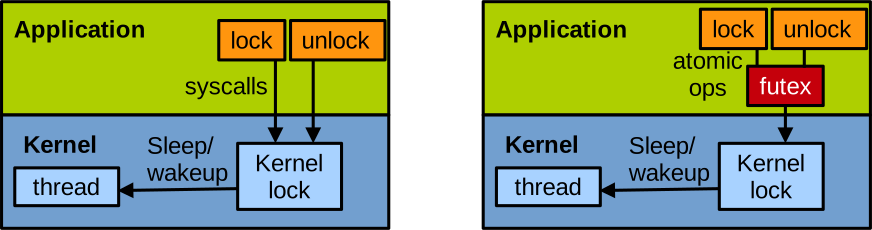
Linux and many other operating systems implement an optimisation to avoid involving the kernel as much as possible during lock operations. That optimisation is called futex, for fast user space mutex. It is illustrated on the right of the diagram above.
With futex, part of the lock is implemented in user space: we have a futex data structure that is accessed atomically by processes using atomic instructions. System calls are made only when the kernel needs to be involved, i.e. when a process needs to sleep or to be awakened. So when there is no contention, the lock is accessed swiftly without any system call.
Threads
Definition
A thread is an execution flow within a process.
Each process has at least one thread, corresponding to the execution flow that starts at main after the program is loaded.
A process can also create additional threads.
In C, thread creation and management are achieved with the POSIX thread library, pthread.
Threads are available in many other languages too, e.g. Python, Rust, Java, etc.
The key idea with threads is that all threads belonging to the same process share that process’ address space. This means that threads see the same global variables, and more generally they see the same value when looking at a particular slot in memory (for example through pointers). That makes it very easy for threads to communicate using global variables or pointers to anywhere in memory. Threads run concurrently, which means they also need to synchronise to avoid race conditions when accessing shared data.
Example
Here is an example of a multithreaded program:
typedef struct {
    pthread_mutex_t lock;
    int field1;
    int field2;
    int counter;
} shared_data_t;

void* thread_func(void* arg) {
    shared_data_t *shared = (shared_data_t*)arg;

    for (int i = 0; i < 5; i++) {
        pthread_mutex_lock(&shared->lock);

        int old = shared->counter;
        shared->field1 = rand();
        shared->field2 = rand();
        shared->counter++;
        printf("[%d] counter %d -> %d\n", gettid(), old, shared->counter);

        pthread_mutex_unlock(&shared->lock);

        usleep(100000);
    }

    pthread_exit(NULL);
}

int main() {
    pthread_t t1, t2;
    shared_data_t shared;
    shared.counter = 0;

    pthread_mutex_init(&shared.lock, NULL);

    // Create two threads:
    pthread_create(&t1, NULL, thread_func, &shared);
    pthread_create(&t2, NULL, thread_func, &shared);

    // Wait for both threads to finish:
    pthread_join(t1, NULL);
    pthread_join(t2, NULL);

    // Cleanup:
    pthread_mutex_destroy(&shared.lock);
    return 0;
}
That program performs the same thing as the multiprocess application we saw previously, this time with threads.
We have the same data structure with two fields, a counter, and a lock.
This time, the shared object shared is a local variable and will live on the stack of the main thread.
We also declare two pthread_t objects, t1 and t2, representing the threads we want to create.
We initialise the lock with pthread_mutex_init, then create and start the two threads with pthread_create.
The calls to pthread_create take as third parameter the name of the function the threads should run: here it is thread_func, and as fourth parameter the argument to pass to that function, here it is the address of the shared data structure.
After calling pthread_create, the main thread waits for both threads to finish with two calls to pthread_join, each taking as parameter the thread to wait for.
When they run, both threads execute the thread_func function.
It executes the same loop as our multiprocess application: take the lock, update the shared data structure, then release the lock.
See how each thread prints its own thread identifier (TID, an OS-level identifier different from the PID) with gettid().
Once they are done, each thread calls pthread_exit.
You can compile and run that example as follows:
$ gcc thread.c -o thread -lpthread
$ ./thread
[167299] counter 0 -> 1
[167298] counter 1 -> 2
[167299] counter 2 -> 3
[167298] counter 3 -> 4
[167299] counter 4 -> 5
[167298] counter 5 -> 6
[167299] counter 6 -> 7
[167298] counter 7 -> 8
[167298] counter 8 -> 9
[167299] counter 9 -> 10
The -lpthread switch instructs the linker to link our program against the pthread library.
It is unnecessary with modern versions of the GCC toolchain, but may be required when using older ones.
Implementation by the OS
Threads are created with the same system call used underneath fork: clone.
From the OS’s point of view, a thread is a task, i.e. the smallest schedulable entity.
Linux does not schedule processes, it schedules threads.
All threads of a process will report the same PID, but they also have a thread-level identifier, the TID.
Most of the scheduler-related system calls, such as the one to update priorities, actually take a TID as parameter and not a PID.
This is because threads, and not processes, are the schedulable entities.
The sharing of a single address space between all threads belonging to the same process is simple: they all use the exact same page table.