Lightweight Virtualisation
You can access the slides 🖼️ for this lecture.
Motivation
Imagine a company wishes to run a website and does not want to leave a local machine up and running 24/7, so they decide to rent a virtual machine in the cloud. They choose a cloud provider, say AWS, and select a Linux distribution to install on their VM, for example Ubuntu. So inside their VM the web server, such as Apache, is installed, along with its library dependencies, such as Perl and libssl. When Apache runs, all this software makes use of a subset of the services offered by this massive guest kernel, namely Linux. The setup we just described can be illustrated as follows:
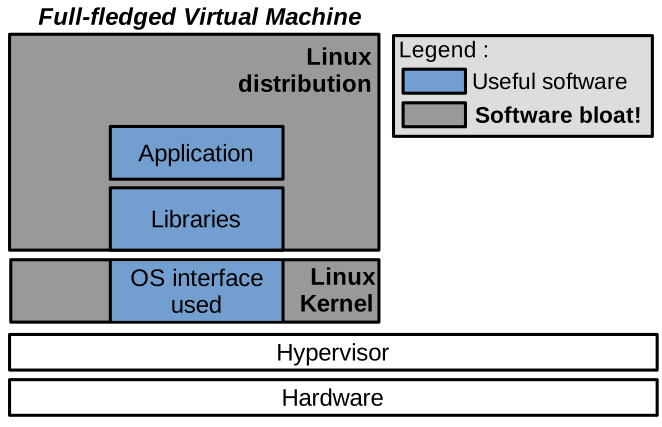
In this illustration, what really needs to run is in the blue boxes: the web server, its dependencies, and the subset of kernel features it requires, that’s it. All the grey areas are installed and maybe even running but are not needed. We call this software bloat, and it is a genuine concern.
Indeed, software bloat first leads to an increased attack surface: all the software installed in the Linux distribution, and the background programs running—much of which you do not really need—represent potential targets for an attacker to take over as a first step toward attacking your environment. Probabilistically, the more software you run, the higher the chance that a vulnerability is present somewhere. Second, software bloat represents additional costs. The tenant of the VM is paying the cloud provider for the disk, memory, and CPU cycles used to store and run software they do not even need. Third, for a fixed budget, software bloat also causes performance loss, because all these memory and CPU cycles are not used to run what really needs to run, which is your web server.
Definition
Lightweight virtualisation tackles this issue by providing the following properties, compared to traditional virtual machines:
- Lower memory footprint, in the order of kilobytes to a few megabytes of system software overhead for each virtualised instance, compared to hundreds of megabytes or gigabytes of memory consumption for traditional VMs.
- Fast boot times in microseconds or milliseconds, compared to seconds or minutes for traditional VMs.
- Lower disk footprint, once again we are talking about a few kilobytes or megabytes.
Obviously, these metrics concern the per-VM systems software, in particular the operating system. The part of the initialisation time and memory/disk footprint that relates to an application will stay the same whether it runs in a lightweight or in a traditional VM.
Today there are three modern technologies that enable achieving these lightweightness objectives. First, stripped-down Linux VMs, called micro-VMs. These can be quite minimalist, but there are two technologies that take things one step further in terms of lightweightness: containers and unikernels. We will focus on containers and unikernels here; if you want to explore micro-VMs on your own, you can check out, for example, Firecracker.
Containers
Presentation
Containers are a process-based sandboxing technology, enforced by the operating system. A container management stack differs significantly from a system-level VM-based one:
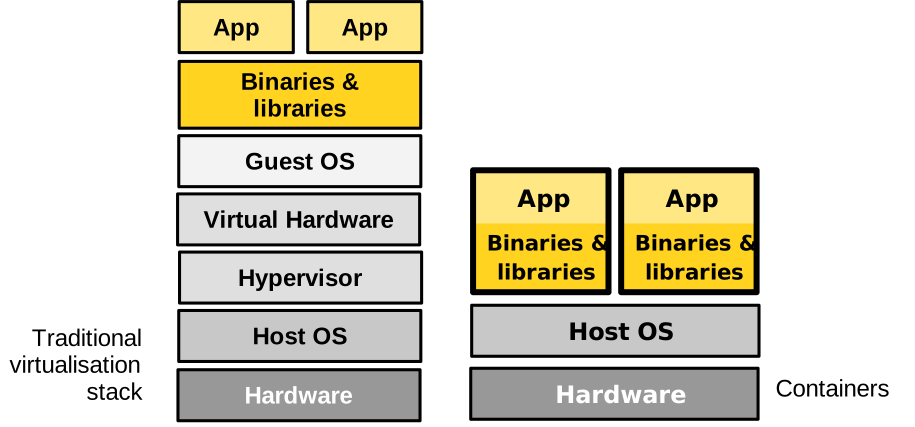
Unlike a traditional virtual machine, a container is a process or a group of processes for which the OS restricts the visibility of system resources. This way the software running in the container is sandboxed, and it also feels as though it is running alone in the system, like in a virtual machine.
The resources whose visibility can be reduced and changed for the container are the filesystem, the system’s users, visible PIDs, IPCs, system clocks, among others. The OS can also control the allocation of certain resources to the container, including CPU scheduling cycles, available memory, and usable disk and network bandwidth, among others.
Conceptually, by reducing or changing the visibility of resources, and limiting their allocation to a process or a group of processes, containers achieve the same isolation goals as a virtual machine, without the need for a hypervisor and a system-level VM. This is much lighter than using a traditional virtual machine. The boot time is that of spawning a process, a few microseconds, and the memory footprint is close to zero. Still, containers are not perfect, and as we will see they suffer from significant security concerns.
Use Cases
Containers are useful in most scenarios where virtualisation is beneficial. They are extensively used in software development, where they allow setting up a homogeneous environment in which to develop, build, and test an application, shared by the entire development and testing team. Containers can also be used for deployment, as they represent a lightweight way to package an application together with all of its dependencies. Docker is a prime example of a container engine used extensively in software development:
Because they are so lightweight, containers can replace traditional VMs for many aspects of the cloud that require very quick initialisation and execution of a particular task. Services such as Gmail or Facebook make extensive use of containers for such tasks. You may also have heard of AWS Lambda, which provides serverless computing services. With the serverless paradigm, the developer programs cloud machines with small stateless functions executed on demand when certain events happen, for example when a user visits a web page. These functions generally run within containers.

Namespaces and Control Groups
Containers are enabled by two key technologies in Linux, which restrict the view and usage of resources for processes: namespaces and control groups.
Namespaces restrict the view of the following system resources from the container:
- Filesystems and mount points: a container is generally given its own root filesystem from a base image, and it cannot access the host’s filesystem.
- Network stack: a container also has its own state of the network stack, including its own IP, with a virtual bridged and routed network.
- Processes: PIDs and IPCs: a container also has its own isolated set of PIDs, one for each process it runs. It cannot see or communicate with external processes.
- Host and domain name: a container can set the host name, which is the machine’s name, to something different from what the host sees. The same applies to the domain name.
- User IDs: usernames and IDs can also be different within the container, compared to those on the host. In most scenarios a user will simply take on the identity of root within the container.
Control groups restrict a container’s usage and allocation of the following system resources:
- Memory: one can set the maximum amount of memory and swap a container can use.
- CPU: the CPU usage of a container can be rate-limited, for example the container can be allocated 1.5 CPUs. Which CPU (core) a container can run on can also be restricted, and so can the scheduler’s quotas for the container.
- Devices: a container can also be restricted to seeing only certain devices.
- Block and network I/O: a container’s disk and network throughput can be rate-limited.
Containers vs. VMs
If we list the respective benefits of containers versus traditional virtual machines, we get the following:
| Containers | VMs |
|---|---|
| Low memory/disk usage | OS diversity |
| Fast boot times | Kernel version |
| High density per host | Performance isolation |
| Nesting | Security |
Containers are very lightweight, meaning they have low memory and disk usage and very fast boot times. Their lightweightness allows creating a very high number of containers on a single machine; it is not uncommon to run hundreds or even thousands of containers on a host. Nested virtualisation is also easy with containers; in other words, it is simple to create a container within a container. Regarding virtual machines, they are still useful when one wants to run an operating system other than Linux—something that is difficult to do efficiently with containers because they rely on the namespaces and control groups technologies available only on Linux. Several studies have also shown that performance isolation is stronger with VMs than with containers, meaning it is more difficult for a malicious VM to steal resources by abusing them. Finally, the degree of isolation of the sandboxing enforced by virtual machines is considered much stronger than that of containers.
Containers and Security
To understand why the isolation of VM environments is considered stronger than that of containers, let us consider both setups:
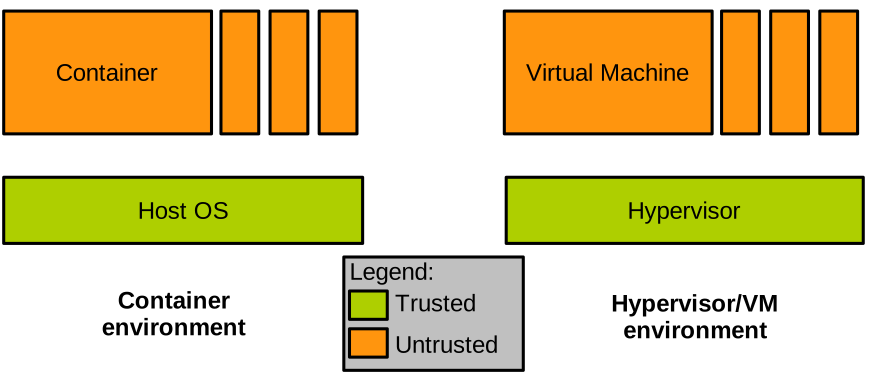
We have a container environment on the left, with several containers running on top of the OS kernel. And on the right a VM environment, with several VMs running on top of a hypervisor. If we place ourselves in the shoes of the cloud provider, and reason about what we trust and what we do not trust in such a setup, we shall conclude that the virtualisation layer is trusted, that is the OS for the container environment, and the hypervisor for the VM one. The instances of either containers or virtual machines are obviously untrusted; who knows who the tenants are and what they run in their VMs/containers.
As the provider of virtualised environments, the kind of attack we are most concerned about is often the following:
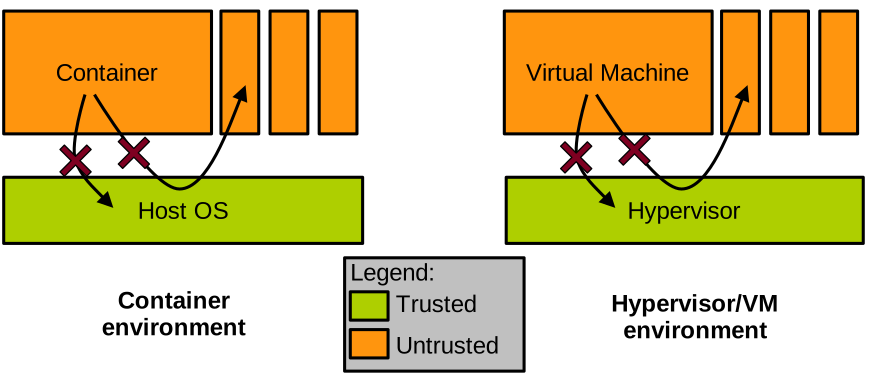
One of the containers or VMs is malicious, and tries to perform an escape attack, that is, to gain access to the virtualisation layer’s memory, or to the memory allocated to other containers or VMs. As we have seen in the past, hardware-enforced isolation mechanisms such as the page tables or extended page tables will prevent direct access from the malicious entity to other VMs or containers. The real threat lies in the virtualisation layer, which can be invoked by the malicious VM or container. If such an invocation manages to trigger a bug in the virtualisation layer, the isolation may be broken and the attacker could access the virtualisation layer’s, or another container’s or VM’s, memory.
It is quite important to determine how complex this interface between what we trust and what we do not trust is in both cases. The reason is that how complex the interface is translates directly into how hard it is to secure this interface and make sure there are no bugs.
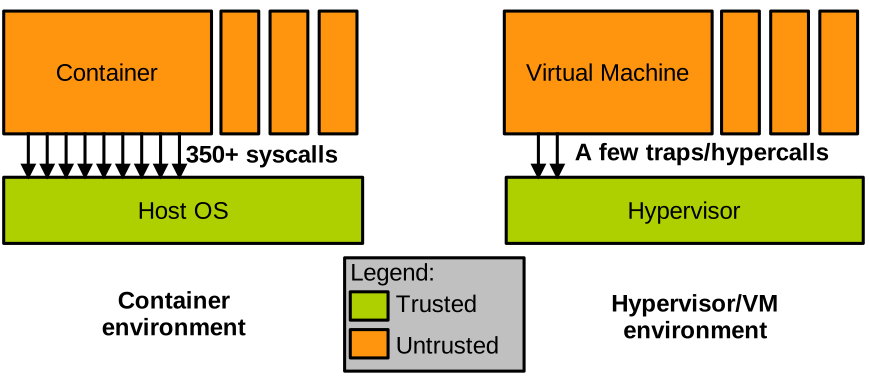
In the case of containers, that interface is unfortunately very complex: it is the system call interface, which comprises hundreds of system calls, some of them like ioctl presenting thousands of sub-functions.
There is no way we can guarantee that the implementation of all these system calls is bug-free.
In fact, automated vulnerability detection systems regularly find bugs in that interface.
Conversely, the interface between a VM and the hypervisor managing it is much simpler: it is just a few traps.
In that context, the isolation between containers is not considered as strong as that between VMs, because of the complexity of the interface between containers and the privileged layer, the OS kernel. To illustrate this point, note that many actors running containers in production actually run containers within virtual machines, to benefit from their strong isolation. These approaches try to reduce the memory footprint and boot times of Linux VMs as much as possible, creating what they call micro-VMs; however, this still negates most of the lightweightness benefits of containers. An example of such technology is Firecracker.
Unikernels
Presentation
We have seen that traditional VMs are heavyweight but secure, and that containers are lightweight but insecure. Can we get both the lightweightness benefits of containers, combined with the security benefits of virtual machines, into a single virtualised solution? Unikernels are a relatively new operating system model that aims to answer that question.
Recall our motivational example from earlier, presenting the software bloat that occurs in many situations when using traditional VMs. Using unikernels we would address the problem as follows:
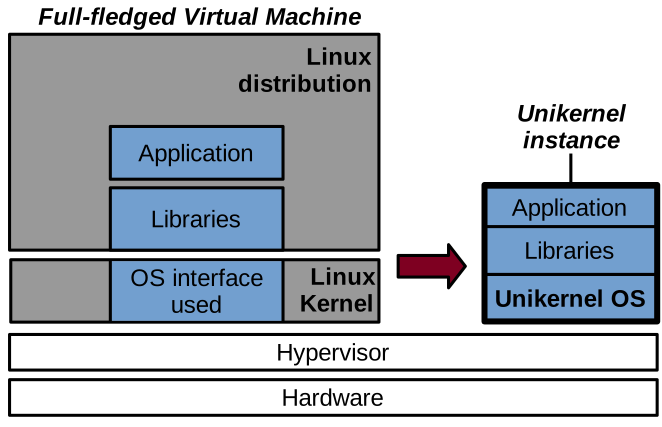
With a unikernel we compile an application’s code, as well as all of its dependencies, together with a very small operating system layer into a static binary that merges the application and the operating system. This binary can be run as a kernel, in a virtual machine, on top of a hypervisor.
A unikernel instance is single-purpose and it runs a single application. To run multiple applications, one needs to run multiple unikernel instances. A unikernel instance is also a single-process virtual machine, and once again, to run a multi-process application, several unikernel instances must generally be run. Still, several unikernel models can run on multicore CPUs and leverage parallelism/concurrency with threads. Finally, as already mentioned, a unikernel instance runs a single binary, containing the application, its dependencies, and the kernel. All of this code runs within a single address space, and there is no user/kernel protection. This is because there is only one application running in a unikernel instance, and the isolation between applications is already enforced by running them as separate unikernel instances.
The unikernel model was originally proposed in this seminal paper in 2013:
Madhavapeddy et al., Unikernels: Library Operating Systems for the Cloud, ASPLOS’13
Benefits & Application Domains
With that model, unikernels present a series of benefits. First, it is a form of lightweight virtualisation. Because a unikernel instance only runs the code absolutely necessary for the application in question, and because the OS layer is so small, we get similar benefits to those of containers in terms of low memory/disk footprint and fast boot times. Second, because they run as virtual machines, unikernels are well isolated and considered a secure alternative to containers in many scenarios. Third, the OS layer within a unikernel instance can be specialised towards the application it runs: specialised kernel subsystems can bring higher performance, or lower memory footprint and power consumption, for a particular application scenario. Finally, because a unikernel operating system is so small and simple, it does not get in the way of the application’s performance as much as larger operating systems such as Linux. This translates into increased performance for certain applications. Another noteworthy point regarding performance is the system call latency: with unikernels, because there is no user/kernel isolation, system calls are simple function calls, which makes them much faster.
Just to illustrate the unikernel performance benefits that come from their low-latency system calls, consider these results:
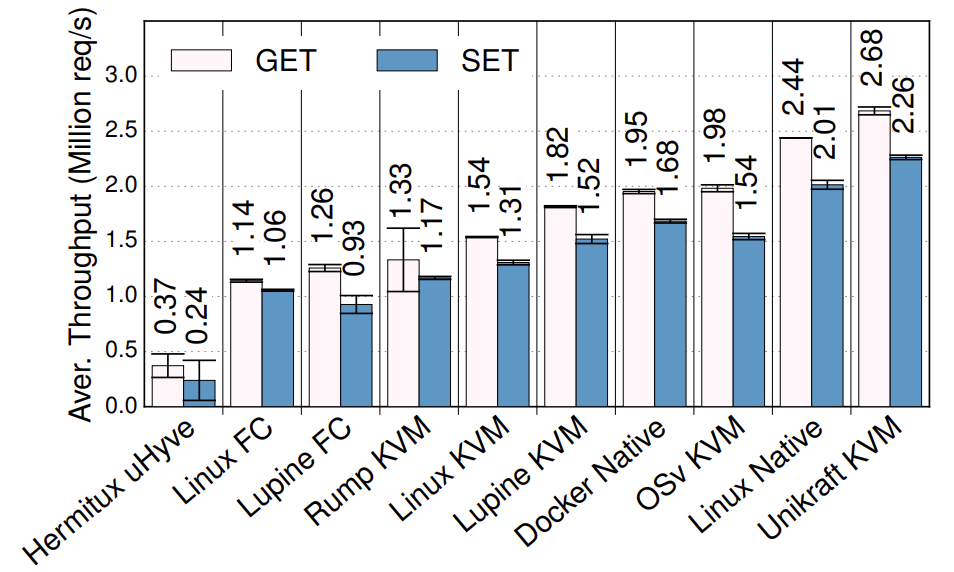
Redis throughput under various setups (higher is better)
This graph is taken from the Unikraft paper:
S. Kuenzer et al., Unikraft: Fast, Specialized Unikernels the Easy Way, EuroSys’21
The graph shows the throughput of Redis, which is a very popular key-value store, in millions of requests per second. There are various setups on the x-axis, including different unikernels, as well as vanilla Linux. As you can see, Unikraft is the fastest solution: even though it runs virtualised on top of QEMU/KVM, it is still a bit faster than non-virtualised Linux, and also much faster than Linux in a VM. Feel free to check out the paper for a more detailed performance evaluation.
Given these benefits, unikernels have plenty of application domains. We motivated them with cloud environments such as server or microservice software. But they have also been explored in the domains of embedded virtualisation, edge computing and IoT, network function virtualisation, high-performance computing, and various security-critical domains such as VM introspection, malware analysis, and secure desktop environments. Still, an important point to note is that most unikernels are still at the stage of research prototypes. This is different from containers, which, as you may know, are a production-ready technology.
Unikernel Projects

A few examples of unikernel projects are listed below. Some of these are relatively unstable and poorly maintained academic research artefacts. The most mature project, and the one closest to production-ready status, is Unikraft.
Unikernels can be classified based on the target languages for the supported applications:
- Pure memory-safe languages (OCaml, Erlang, Haskell): MirageOS, LING, HalVM
- C/C++, semi-POSIX API: Unikraft, HermiTux, HermitCore, OSv, Rumprun, Lupine
- Rust/Go: Hermit, Clive
- More: https://unikernelalliance.org/projects/
Compatibility Aspects
Although they present desirable security and lightweightness benefits, unikernels also suffer from an important drawback that stems from their custom OS nature: a lack of compatibility with existing software and, to a lesser extent, hardware. On the hardware side, it is not possible for unikernel projects to integrate the large number of drivers supported by popular operating systems such as Windows or Linux. Still, using the split driver model (frontend/backend) that we saw is common in virtualised environments, a unikernel supporting popular paravirtualised (e.g., Virtio) I/O frontend drivers and running alongside a host operating system such as Linux will be compatible with numerous I/O devices. The real compatibility problem of unikernels rather lies on the software side.
One of the reasons unikernels are not particularly popular today, despite being around for more than a decade, is that it is hard to run existing applications on top of them. Most unikernels require access to an application’s source in order to compile it with the unikernel OS, so in scenarios where the source is not available for a given application (e.g., proprietary software), a unikernel cannot be created. Even when the source is available, as we have seen previously, most unikernel models support only one or a few programming languages, which limits compatibility.
Many applications will also require specific OS features available under Linux or Windows, but unsupported by most unikernel models. Porting is thus required: one can try to adapt an application to work on top of a unikernel model, or to enhance the unikernel model so that it provides the features required by the application. Often, porting involves doing a bit of both: it is a time-consuming task that requires expertise in both the application to be ported and the unikernel model to use, which discourages many prospective users.
Since this problem was identified, several research efforts have attempted to address the compatibility issues of unikernels. The main idea is to require as few modifications, and as little effort, as possible to execute, as a unikernel, an application that already builds for and runs on top of a popular operating system such as Linux. Compatibility can be achieved at various levels, from the weakest to the strongest:
- Source-level compatible unikernels (e.g., HermitCore, Rumprun): these require recompiling an application’s code with a custom C standard library and the unikernel kernel. This is a relatively weak form of compatibility, as the C standard library is not the only interface to the kernel in many applications. This approach also still requires recompilation and access to the source.
- C standard library-level binary-compatible unikernels (e.g., OSv, Lupine): these interface with an application at runtime through a custom C standard library, similarly to how shared libraries are loaded at runtime. These approaches may sometimes avoid recompilation, but are still limited to programs that request OS services only through the C standard library.
- System call-level binary-compatible unikernels (e.g., HermiTux, Unikraft): this is the strongest form of compatibility, targeting the standard application/OS interface: the unikernel OS hooks into the system calls made by an application compiled for a popular operating system (e.g., Linux) and emulates that OS behaviour. Such compatibility at the system call level allows running unmodified Linux applications as unikernels without access to the source or recompiling.
For more information on the topic of unikernels and application compatibility, check out this paper:
Olivier et al., A Binary-Compatible Unikernel, VEE’19