I/O Virtualisation
You can access the slides 🖼️ for this lecture.
After we covered how CPU and memory are virtualised on modern ISAs, let’s now talk about I/O virtualisation.
I/O Interposition
Similar to CPU and memory virtualisation, the first attempts at virtualising I/O were achieved in software without hardware support. This is called I/O interposition. The hypervisor creates a software model of a virtual I/O device, which the guest OS will access using a driver, as if the device were a real, physical one. The hypervisor is also in charge of connecting the virtual device to the real devices on the host to actually perform I/O such as accessing the filesystem or the network.
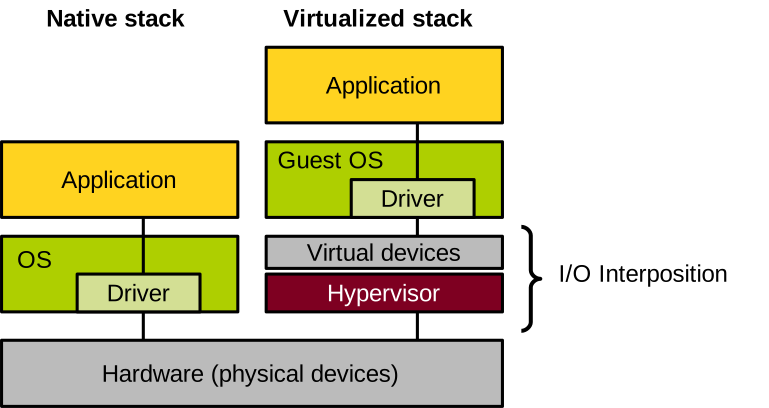
Virtualising devices this way has many benefits. One is device consolidation: we can create many virtual devices on top of a smaller number of physical devices. For example, you can have a host with a single hard disk running several virtual machines, each with its own virtual disk. This helps reduce cost and increases device utilisation. Conversely, several physical devices can also be aggregated into a single virtual one, in order to achieve higher throughput or better reliability (e.g. through data redundancy). Because the virtual device is implemented in software, it is easy for the hypervisor to capture its state at a given point in time: this is quite useful to enable features such as virtual machine suspend/resume or migration, including between hosts equipped with different models of physical devices. Finally, device virtualisation can also enable features that are not normally supported by physical devices, for example taking disk snapshots, compressing or encrypting I/O, etc.
Physical I/O
Before diving into virtual I/O, let’s briefly talk about how I/O works on a non-virtualised machine. Overall, there are three ways for the system and devices to interact:
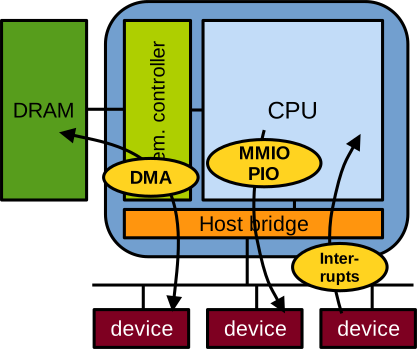
First, port-based or memory-mapped I/O (MMIO). With this method, device registers are mapped somewhere in the address space, and when these addresses are read or written, the CPU actually communicates with the device, reading from or writing to the device’s registers. This method of communication is unidirectional, from the CPU to the device, and can only transmit very small register-sized messages. For example, when the CPU configures the network card to enable networking, this is done through memory-mapped I/O.
Second, interrupts: these are unidirectional signals sent from the device to the CPU. Interrupts are a form of notification; they do not carry data. For example, when the network card wants to notify the CPU that a packet has been received and should be fetched, it uses an interrupt.
Third, direct memory access (DMA): it is bidirectional, and is used to transfer large quantities of data between memory and the device. For example, when the CPU needs to send data to the network or receive data from the network through the network card, it uses DMA.
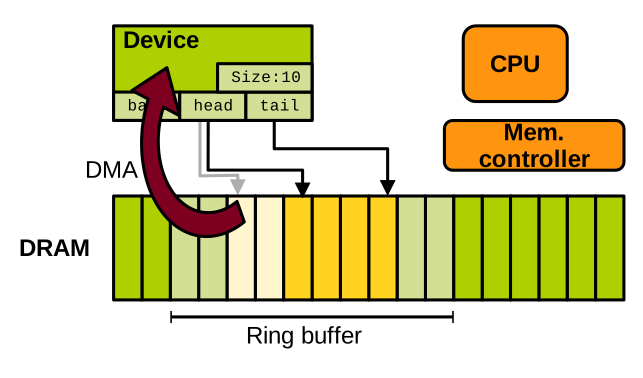
Large DMA data transfers between memory and I/O devices are realised with the use of ring buffers in memory. A ring buffer is a producer-consumer system, generally enabling unidirectional communication. To establish such communication, the CPU configures the device using memory-mapped I/O and specifies, in some of the device’s control registers, information about the ring buffer: what its base address and length are, and where the head and tail pointers are located.
For CPU-to-device transfers, the device consumes data from the head pointer and updates it:
The CPU produces data at the tail pointer, updating it too:
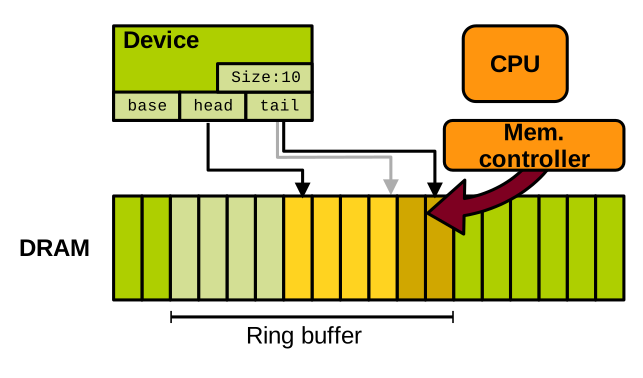
Because memory is shared between the device and the CPU, they need to synchronise. Memory-mapped I/O is used for CPU-to-device synchronisation, for example to signal the start of a DMA transfer. Interrupts are used for device-to-CPU synchronisation, for example to notify the end of a DMA transfer.
I/O Virtualisation without Hardware Support
Let’s now see how this can be virtualised, first entirely in software without hardware support.
Device Emulation
A first technique is I/O emulation. We have seen that the interface between the OS and devices is quite simple. The OS discovers and controls devices with memory-mapped I/O, and devices respond with interrupts and DMA. The hypervisor can create a virtual device that entirely emulates the behaviour of a device behind the same interface exposed to the guest OS. Of course, every I/O-related action performed by the guest OS must trap. Memory-mapped I/O involves sensitive instructions, so it will indeed trap. The hypervisor also needs to map DMA memory as inaccessible so that any access will trap. Concerning device-to-CPU notification, the hypervisor can also emulate it by injecting interrupts into the guest. This is done by calling the handlers registered by the guest in the virtual interrupt controller, which is also handled by the hypervisor. Finally, to emulate DMA, the hypervisor can simply read from and write to the relevant guest memory areas.
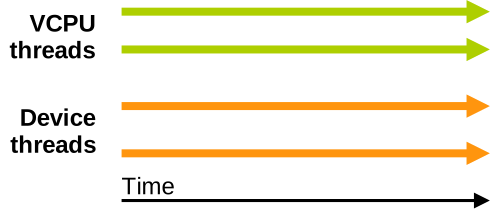
With KVM and Qemu, the hypervisor uses one thread for each virtual core of the VM; we call these virtual CPUs, or vCPUs. It also creates one thread for each virtual device. Here is an illustration of a VM with two virtual cores and two virtual devices:
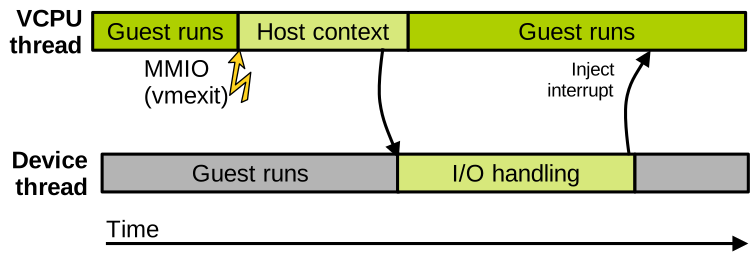
Assume the VM is running and one of the cores wants to perform I/O. As illustrated below, it initiates memory-mapped I/O communication with the virtual device. This will trap to the hypervisor, which will defer the handling of that I/O to the thread managing the virtual device. Assuming this is a long operation, such as a DMA transfer, the guest will resume after the transfer starts, and the hypervisor will inject an interrupt later when the transfer is done. This mimics exactly what happens with a real device.
The following is an example of the lspci output on a standard Linux Qemu/KVM machine:
00:00.0 Host bridge: Intel Corporation 440FX - 82441FX PMC [Natoma] (rev 02)
00:01.0 ISA bridge: Intel Corporation 82371SB PIIX3 ISA [Natoma/Triton II]
00:01.1 IDE interface: Intel Corporation 82371SB PIIX3 IDE [Natoma/Triton II]
00:01.3 Bridge: Intel Corporation 82371AB/EB/MB PIIX4 ACPI (rev 03)
00:02.0 VGA compatible controller: Device 1234:1111 (rev 02)
*00:03.0 Ethernet controller: Intel Corporation 82540EM Gigabit Ethernet Controller (rev 03)
*00:04.0 Ethernet controller: Red Hat, Inc Virtio network device
00:05.0 Communication controller: Red Hat, Inc Virtio console
You can see two network cards in this list: the first, the Intel one, is a fully emulated device, working as we just described. The second, the Virtio one, is called a paravirtualised device. We will discuss this type of device virtualisation in more detail shortly.
Looking more closely at the Intel (fully emulated) network card, we can see the memory address where the memory-mapped I/O registers are located: 0xfebc0000.
00:03.0 Ethernet controller: Intel Corporation 82540EM Gigabit Ethernet Controller (rev 03)
    Subsystem: Red Hat, Inc QEMU Virtual Machine
    Physical Slot: 3
    Flags: bus master, fast devsel, latency 0, IRQ 11
    Memory at febc0000 (32-bit, non-prefetchable) [size=128K]
    I/O ports at c000 [size=64]
    Expansion ROM at feb40000 [disabled] [size=256K]
    Kernel driver in use: e1000
    Kernel modules: e1000
We can also see the name of the driver used for that virtual device: e1000. This model of network card is quite old but also widespread, so most OSes already have a driver for it, ensuring good compatibility. The data sheet for the physical version of this Intel network card lists the memory-mapped I/O registers exposed to the OS for communication:
| Category | Name | Full name | Offset | Description |
|---|---|---|---|---|
| Receive | RDBAH | Receive descriptor base address | 0x02800 | Base address of Rx ring |
| Receive | RDLEN | Receive descriptor length | 0x02808 | Rx ring size |
| Receive | RDH | Receive descriptor head | 0x02810 | Pointer to head of Rx ring |
| Receive | RDT | Receive descriptor tail | 0x02818 | Pointer to tail of Rx ring |
| Transmit | TDBAH | Transmit descriptor base address | 0x03800 | Base address of Tx ring |
| … | … | … | … | … |
| Other | STATUS | Status | 0x00008 | Current device status |
| Other | ICR | Interrupt cause read | 0x000C0 | Cause of the last interrupt |
| … | … | … | … | … |
Each register is accessible by reading from or writing to a particular location in memory, at a given offset from the base address where these registers are mapped.
Each register also serves a particular purpose: setting up ring buffers for DMA, indicating the status of the device, the cause of the last interrupt, etc.
For example, to read the cause of the last interrupt (the ICR register), the driver running on the CPU reads at the physical address base + offset: 0xfebc0000 + 0xc0 = 0xfebc00c0.
What the device does upon receiving this command is documented in the device’s data sheet.
The emulated model for this device, as implemented in Qemu, mimics exactly the behaviour of the real network card when each of these registers is read or written by the virtual machine.
With Qemu/KVM, each interaction with the emulated e1000 NIC’s memory-mapped registers traps to KVM first, which redirects I/O management to Qemu. The code implemented by Qemu for emulating the Intel network card can be found here. It is not very large, at less than two thousand lines of code. The following excerpt shows the code executed when the VM reads the memory-mapped register that holds the cause of the last interrupt:
static uint32_t mac_icr_read(E1000State *s, int index)
{
    uint32_t ret = s->mac_reg[ICR];

    set_interrupt_cause(s, 0, 0);
    return ret;
}
As you can see, that information is held in a data structure and is returned to the VM by the emulation code, in effect mimicking in software the behaviour of a hardware NIC.
I/O Paravirtualisation
Full emulation is great for compatibility, because we are emulating real devices for which we know existing guest OSes will have the drivers. However, these real devices have never been designed with virtualisation in mind. For that reason, communication between the VM and the emulated device involves a lot of VM exits, which are quite costly and hurt performance. I/O paravirtualisation is an alternative approach, in which the relevant virtual devices are designed entirely with virtualisation in mind. They do not correspond to any existing physical device, and are built with the goal of minimising the overhead. Of course, the downside is that new drivers for these paravirtualised devices must be integrated within the guest operating systems.
Virtio is the most popular paravirtualised device framework for Qemu/KVM. It offers virtual PCIe devices optimised for high performance. Here are a few examples of virtio devices, for network, disk, or console:
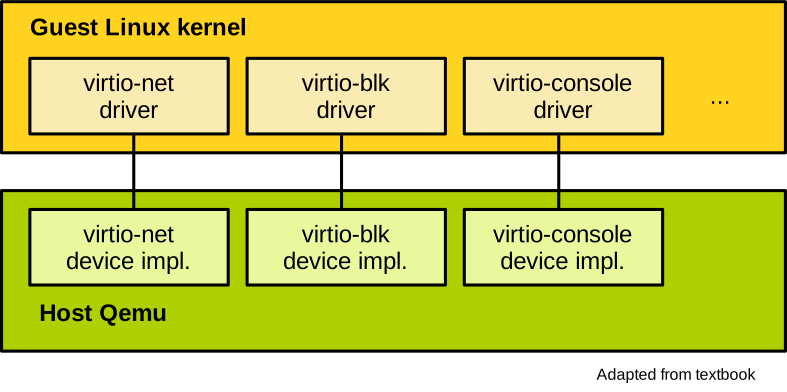
There are also virtio virtual devices that do not necessarily correspond to real physical hardware, enabling things such as memory hotplug and sharing part of the host filesystem with the VM. Because virtio is so popular, OSes such as Linux already integrate drivers for all these paravirtualised devices in the mainline kernel.
Hardware Support for I/O Virtualisation
Because full device emulation is slow, and device paravirtualisation sacrifices equivalence, there are also hardware technologies that were developed to support I/O virtualisation. A first and rather simple solution was to give a VM direct access to a device, bypassing the hypervisor. This is called direct device assignment, and it gives a VM full and exclusive access to a device:
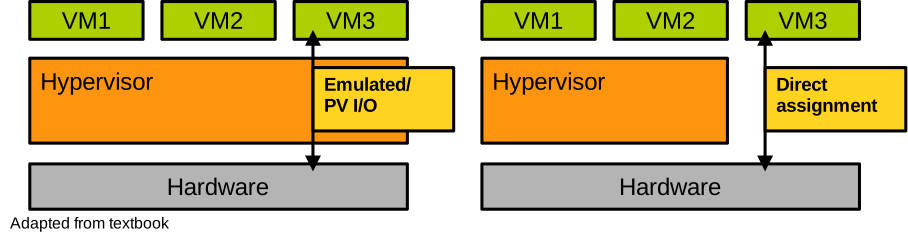
This is great from the performance and equivalence point of view, but it creates two obvious issues. First, regarding security: because the hypervisor is no longer involved, the VM can freely control the device, and in particular it can configure it to DMA anywhere in physical memory. This is a clear breach of the safety criteria. Second, in terms of scalability, each device can only be used by a single VM, so it is not very practical.
The IOMMU
The aforementioned security problem with direct device assignment is due to the fact that DMA bypasses the MMU and operates directly on physical memory. The VM controlling the device can then read from or write to anywhere in physical memory, including the areas allocated to other VMs or to the hypervisor. The VM can also force the device to trigger arbitrary interrupt vectors and can possibly inject interrupts into the host or other VMs.
The solution to these problems is the IOMMU. It is a piece of hardware on the CPU that contains mainly two technologies. First, the ability to enforce the permissions set by page tables and extended page tables on DMA requests. This way we can make sure that a VM with direct device assignment can only access the memory it is allocated. Second, the interrupt remapping engine routes all interrupts from a given device to the VM which has direct access to that device. This prevents interrupt injection attacks.
SR-IOV
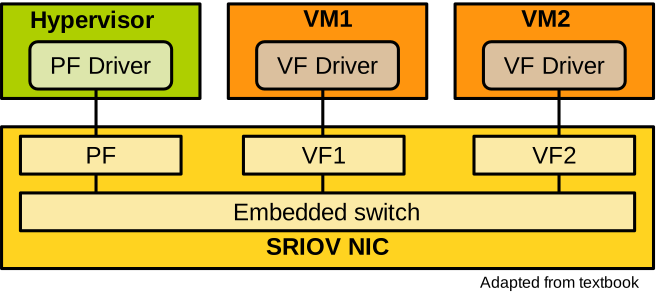
A second technology is SR-IOV, which stands for single-root I/O virtualisation. It tackles the scalability issue. A device supporting SR-IOV can present several instances of itself, and each instance can be directly assigned to a VM. Doing so, the hardware virtualises and multiplexes itself. A device has one physical function which is controlled by the hypervisor, and that allows it to create several virtual functions, each representing a virtualised instance of the device directly assigned to a VM. An example of an SR-IOV-enabled network card is illustrated here, with a physical function controlled by the hypervisor, and two virtual functions, each assigned directly to a different virtual machine:
Today’s modern SR-IOV devices can create thousands of virtual functions. M