Logistics
You can access the slides 🖼️ for this lecture.
Unit Organisation
COMP60261 is divided into two main parts:
Part 1: Systems Software Security. This part runs for the first 6 weeks of the semester. The instructor is Dr. Pierre Olivier.
Part 2: Hardware Security. This part runs for 5 weeks after Part 1. The instructor is Prof. John Goodacre.
The last week of the semester (the last week of Part 2) will also include an exam preparation session.
The learning content for each part of the course unit is delivered slightly differently. Part 1 (first 6 weeks, with Pierre) follows a blended learning approach: there is a 1-hour live session (lecture) slot per week, and after that session you’ll need to work on a series of asynchronous materials: lecture videos, and quizzes. The videos represent additional lecture materials not covered during the live sessions, and watching them is mandatory to succeed in the course unit. Please watch the videos for a particular week after the corresponding live session, and furthermore make sure to watch them before the live session of the subsequent week. Part 1’s per-week organisation can be illustrated as follows:
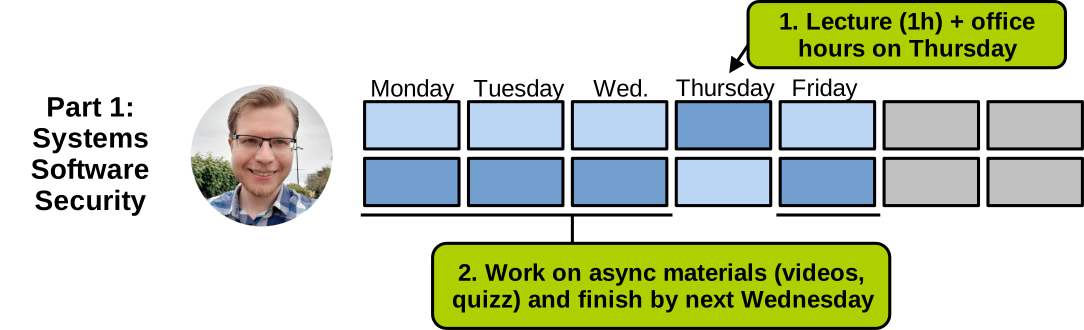
Part 2 follows a more traditional organisation, with a 2-hour live session (lecture) and a quiz to complete after that session each week:
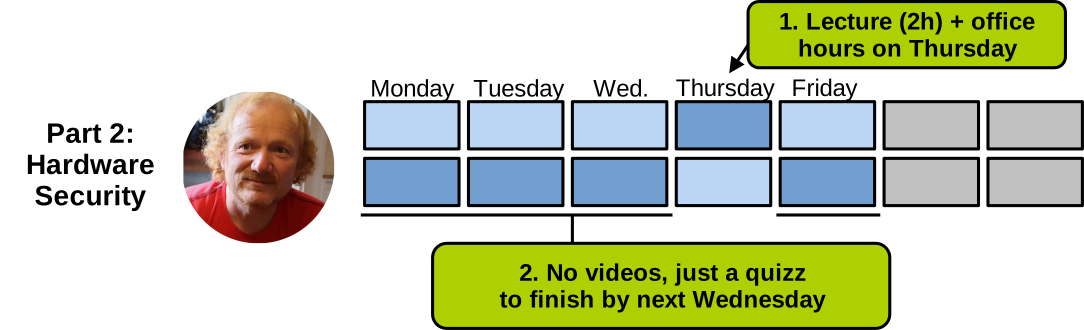
For both parts, the instructor will also hold 1 hour of office hours per week.
Assessment
The summative (i.e., marked) assessment for the unit is divided into:
- Coursework: lab exercises (30% of the final mark): there are a total of 4 lab exercises to be done throughout the semester.
- Final exam (70% of the final mark): taken at the end of the semester.
Each lab exercise counts for 25% of the coursework mark. You should start working on each exercise at least 2 weeks before the deadline.
The weekly quizzes are formative (i.e., not marked). Although they are not marked, it is important to complete them each week, as they allow you to confirm that you understand the content learnt through the lecture materials. These quizzes are also an excellent way to practise for the final exam.
COMP60261 Canvas Page
The unit has a page on Canvas.
Everything regarding the course can be accessed from that Canvas page:
- Schedule (what to do each week)
- Lecture recordings, videos, slides
- Quizzes
- Lab exercise briefs
- Discussion boards
- Reading list
Required Software Setup
All programming exercises should be done in a Linux x86-64 (Intel/AMD CPU) environment. To bring up such an environment, there are several solutions, listed on the “required setup” page of the first lab exercise here. Please make sure you have your setup up and running (e.g., a VM installed and up and running) by the end of the first week of teaching, because lab exercises start in the second week.
Code Snippets in Lecture Materials
The slides used in the live lectures and videos (Part 1) are available on Canvas. They are interactive: when watching the videos or attending the lectures, you are encouraged to access them for clickable links and to try out the code discussed on many slides. Here is an example of a code snippet embedded in the slides (a ‘hello world’ in C):
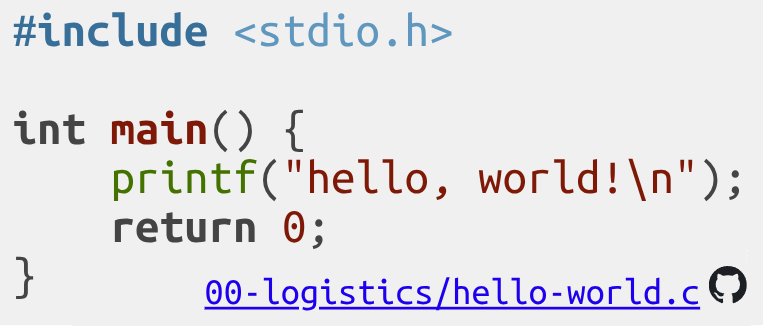
You can click on the blue link at the bottom right of the snippet to download the corresponding source code, so you can build and run the resulting program on your computer if you have a native or virtualised Linux x86-64 setup. If you do not have such a setup (e.g., MacBooks with ARM CPUs), you can also click on the GitHub icon at the bottom right to access a GitHub repository holding all the code snippets presented in the lectures. That repository can be loaded into a GitHub Codespace, allowing you to build and run the program in your browser, independently of your computer/CPU architecture. To find a particular snippet, follow the path in the repository indicated by the blue link at the bottom right of that snippet. Instructions on how to build and run C programs will be given during the first week of teaching.
Contact Information: How to Get Help?
If you have any questions regarding the unit, in increasing order of urgency:
- Step 1: come to the next support session;
- Step 2: use the discussion boards on Canvas, the instructors are generally quite responsive;
- Do not post answers there, or your post will be deleted.
- Step 3, only if urgent: contact the instructor by email (contact information is available on Canvas).